

Do you want a great mobile app?
Based on your app development strategy, the app might perform well, but that’s only half of the battle. If you really want your app to shine, it needs a killer design.
Whether you’re designing the app yourself or hiring a designer, I’ll give you some advice to make your app look like it’s an award winner.
This guide is also a great reference for designers who are working on multiple apps for various clients.
Apps that aren’t designed well simply won’t succeed. You might be able to skate by for a while, but ultimately users will get frustrated and stop using it.
Follow the advice that I’ve outlined below to make sure that this doesn’t happen to you.
Here are the top 21 design tips that everyone absolutely needs to know. Let’s dive right in.
#1: Stick with what works
There’s no reason for you to try and reinvent the wheel when it comes to designing an app.
Don’t get me wrong. I’m not saying that you can’t be creative. However, you have to stick with what has worked historically and what users are familiar with as well.
The majority of successful apps all have similar designs. Don’t design an app that’s going to have a difficult learning curve for users.
Take a look at some of the top mobile apps and see how their design is laid out.
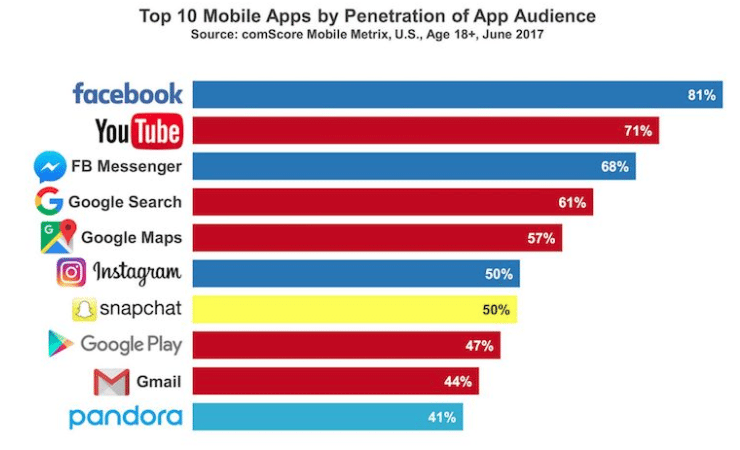
Use these as a reference to come up with common design elements. Lots of these will have similar features.
For example, most mobile users are familiar with common touch gestures.
If they click on a button, they expect to get brought to another page. If they spread two fingers apart on the screen, they expect to be able to zoom in. If they swipe their finger, they expect the page to move.
Furthermore, people associate certain images and icons with what they’ve seen from other apps. One of the most common ones is an envelope icon, which is associated with email.
Don’t start re-assigning different touch gestures and common image icons for other functions.
This will confuse the user and cause problems.
#2: Keep your design on a grid
Use a grid to help you design your app. While it may be invisible, it’s a great guide.
That’s because grids can provide you with an excellent resource to define your spacing.
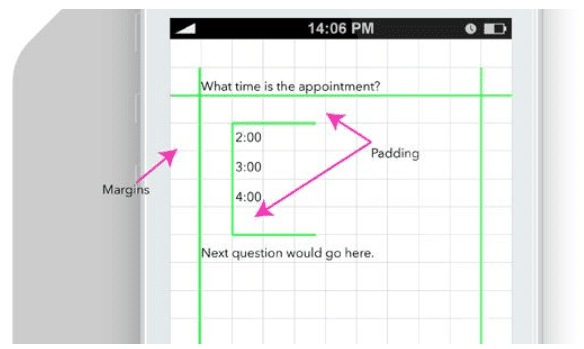
This will keep the layout of your app neat and organized. Grids help you visualize what your app will look like when the design components are complete.
You can make sure that text and pictures don’t overlap with each other. Set and define your margins on the grid as well.
Nobody wants to use an app that has crooked pictures or misaligned text.
#3: Don’t make random color choices
All of the design elements of your app need to have a clear purpose, including the color aspects.
Don’t make the colors too bright, contrasting, or difficult to read. You don’t want to hurt someone’s eyes if the colors are too bright.
Similar to what we previously discussed in terms of sticking with what works, use common color associations for your buttons.
For example, anything that is yes or continues should be green, while buttons for no or exit should be red.
If you reverse common color associations, it’s just going to confuse the user. As a result, your conversion rates will suffer.
#4: Keep it simple
I’m not saying that your design needs to be super basic. Just don’t go over the top in terms of complexity with the user interface.
Remember that real users are going to be viewing and using your app on a small device. Don’t try to jam everything into a small space and expect it to work. UI elements must be taken into consideration for usability.
Here’s something else to consider. If your design is complicated, it could take longer for your app to load. I’ll discuss this concept in greater detail shortly.
Simple designs keep the app users focused. If there are too many bells and whistles to distract them, it’s going to have a negative impact on their experience and your conversion rates.
#5: Understand the differences between screen sizes
Mobile app designers need to recognize different screen sizes and screen resolutions.
Smartphones, even from the same brand and manufacturer come in all different shapes, sizes, and resolutions. Just take a look at some of the latest iPhone models as an example of what I’m talking about.
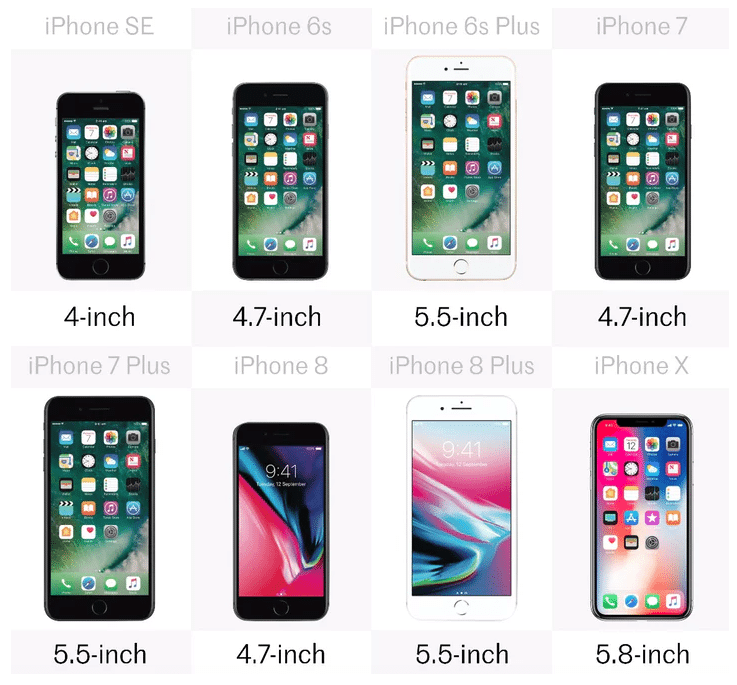
You need to account for other devices as well. Think about how many people will be using your app on their tablet.
Depending on where your app will be available, you’ve also got to take other screens into consideration, such as Smart TVs.
The design needs to be optimized for as many screens as possible.
#6: Repeat elements after they’ve been defined
Let’s say you’re working on the home screen of your mobile app. If the subscribe button is a certain style and color, that same button should be the same style and color on every other page.
This creates reinforcement and gives users an association with that button. It’s all about being consistent with iterations.
If certain button sizes, colors, and designs keep changing from one page to another, it will just confuse the user.
As a result, they may even click on the wrong button and end up on a different page than they originally intended. This can cause frustration and cause people to abandon your app.
It could even give them a negative association with your brand. So don’t confuse your app users and stay consistent be repeating all previously defined design elements.
#7: Clearly separate text
You don’t want different text to run into each other.
In an effort to be efficient in the design of your app, it’s not always reasonable to have huge spaces between every line of text. So you’ll need to come up with other ways to separate the content.
Sure, you can use pictures or page breaks, but you can’t go that route for every single line of text. So you can use some other easy tricks to distinguish one line from another.
For example, the heading of a certain section could be all capital letters. Then right below it, switch back to regular capitalization rules.
You can also underline text to create a separation barrier. Use bold text, contrasting colors, and change the background or font of different lines of text.
This allows you to fit more on each screen without changing the size of your text.
#8: Don’t forget about loading speed
As I briefly stated earlier, if the design of your app idea is too complex, it will affect how long it takes for your app to load.
Take a look at how your bounce rate increases with every second that passes when a page is loading.
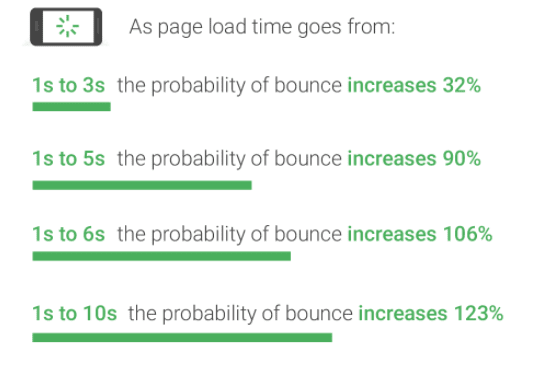
This will hurt you and cause users to abandon your app. Obviously, this will be a big problem. Don’t make a design that’s so over the top and crazy that it causes abandonment.
Simplifying your design helps eliminate this issue.
Fast page loading speeds will improve the user experience and increase their engagement. When they enjoy their experience using your app, they’ll continue to use it, which gives you a better opportunity to make more money.
#9: Make sure actions are recognized
When a button gets clicked, something needs to happen.
Even if a page is loading, there should be a moving symbol or something to show that it’s being refreshed.
If a user makes an action without it being acknowledged, they may think the app is frozen. This relates back to what we just discussed about page loading speed.
Making sure that their actions are recognized will also help create the illusion that a page is loading faster than it actually is.
A button should have some kind of visual push effect when it’s clicked.
#10: Don’t pick a fancy font
Your font needs to be legible.
Don’t get too fancy.
For the most part, your font should be pretty consistent throughout the app. You could use different fonts for headings or different sections but tread carefully.
Implementing lots of different fonts will confuse the users. Crazy fonts also just look tacky. There’s no reason to use ones that aren’t clearly legible.
#11: Use resources to help you with the layout
You don’t need to create your layout from scratch. There are plenty of online resources that can help you layout the design of your mobile app.
Try using a platform like Mobile Patterns as an aid.
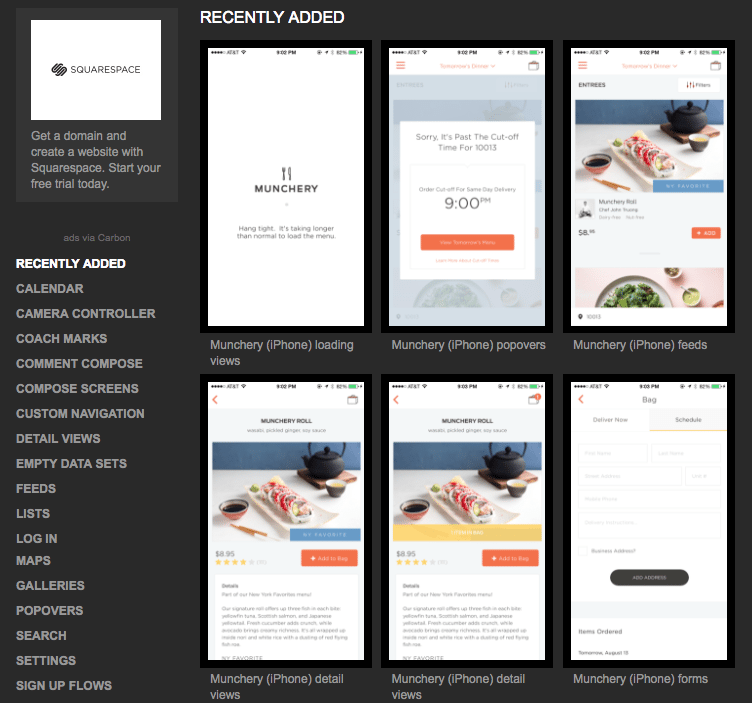
There are tons of different layout resources on this platform.
You can also check out similar websites like:
These are some of my favorite online resources for designers to use for layouts.
#12: Navigation should be easy
Part of having a simple design means that your navigation should be easy as well.
Most apps are just different ways to navigate through lists. The lists could be in blocks of pictures that get clicked or bullet formats with text.
You can add different types of menus all over the screen or even expandable accordion menus to help save some space.
No matter what you do, you’ve got to make the navigation as easy as possible for the users. A user-friendly design means people won’t have to do too much scrolling, zooming, or be forced to side scroll to see content on each page. The best app builders are optimized for UX design.
#13: Don’t forget about accessibility
App accessibility is absolutely necessary for your team to take into consideration when they’re designing your app.
Think about certain elements like the size of your buttons. They need to be appropriately sized and placed so users can accurately hit the right part of the screen.
Not everyone holds their phone the same way. Some people use two hands while others use one. The design needs to be friendly for people who are left-handed as well as right-handed.
Keep hand and finger placement in mind when you’re designing your app.
You’ve also got to focus on other accessibility elements for people with disabilities. Allow users to change the size of the text on the screen if they have a vision impairment.
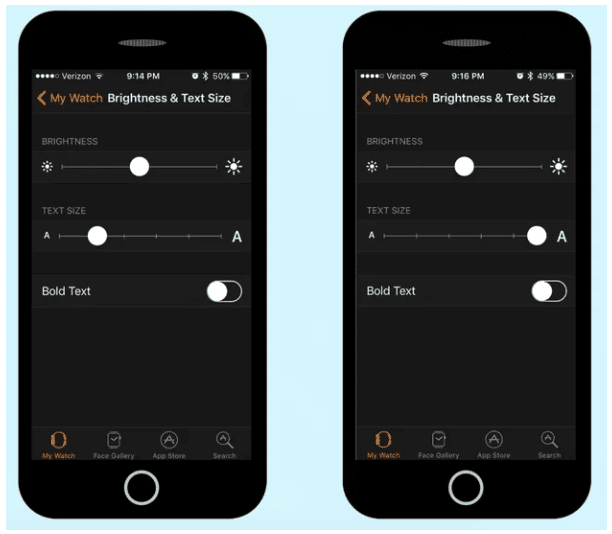
Just make sure that all of the other elements within your app adjust accordingly. Otherwise, you can run into problems where text and images overlap, making matters even worse for people.
#14: Test your design
To make sure that your app and design are running smoothly, you’ve got to constantly test your app.
You might think that it’s great, but recognize that as the person who designed it, you have a biased opinion.
You’ve got to get feedback from other people. In my experience, it’s best to outsource testing outside of anyone associated with the app design, development, or brand. That way the feedback is from a completely neutral perspective.
Use beta testers or focus groups to test the design. See what kind of feedback you get.
Focus on any bugs or glitches due to the design. Make adjustments where problems occur.
#15: Use visual elements
I know lots of the tips that we’ve covered so far discuss text. But let’s be honest, as a designer, you want to let your creativity shine.
While your app will obviously need text, you’re going to need lots of visual elements to make the design work well. Don’t go too text-heavy with the design.
Use pictures as a way to enhance any words on the screen. Build animations.
You can use Auto Layout to create advanced animations for iOS apps.
Visuals will ultimately make your app easier on the eyes.
#16: The design has to be responsive
As we said earlier, there are so many different devices available on the market. You’ve got to consider both Apple and Android users.
You should always be designing for both platforms in mind unless your company is specifically designing for one of the two and only launching on one app store.
Android dominates the global market share.
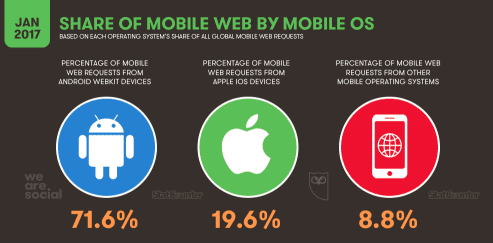
But even so, you should still design your app so that it’s responsive for both iOS and Android devices. For this purpose, just pretend it’s a 50/50 split.
Think about any problems that could arise with specific devices.
#17: Test out iterative mobile app design
An iterative design uses the UI to help you create apps that are responsive and engaging.
You can track behavioral analytics for how users react when they’re using the app.
Then you can make any modifications based on how they use it.
Consider using software like Inapptics to help you get more information about how people use your app and how the design impacts their actions.
#18: Update your design
You don’t want your app to get stale or boring. Developers will come up with ways to improve the performance of an app for updates.
Well, UX designers should do the same thing. Often times, development and design updates can go hand-in-hand. This ensures core functionalities remain intact.
Just keep in mind that users may not be receptive to huge changes, especially if there is a learning curve.
For example, Snapchat just completely redesigned their app. These changes weren’t welcomed with open arms by their users.
There is a petition on Change.org with more than 1.2 million signatures urging Snapchat to remove the newest update.
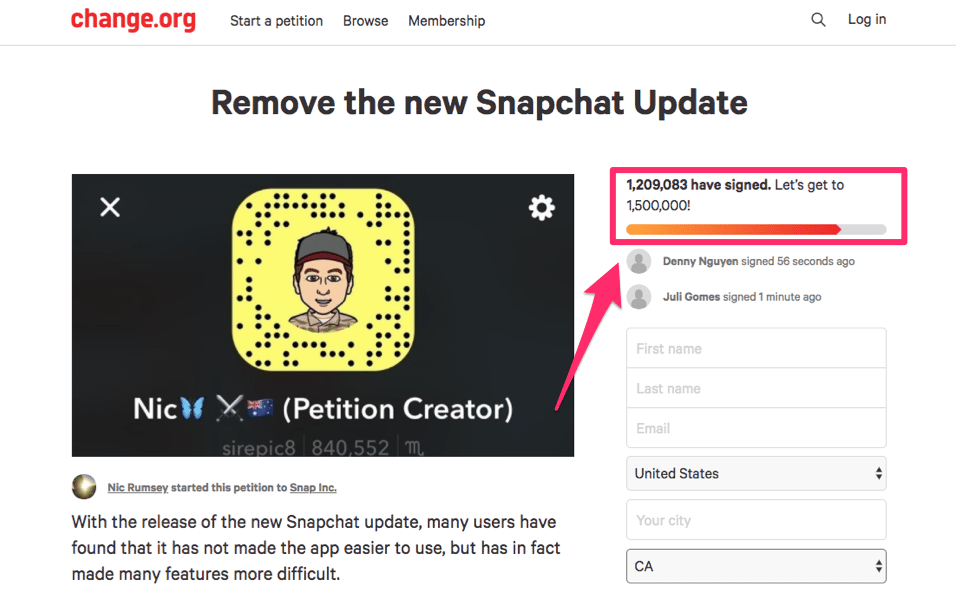
I’m sure people will eventually come around to the changes. Snapchat is a major company, so they can get away with this.
But if your app isn’t as popular, people may just find an alternative solution if your design makes their experience less enjoyable.
While it’s important to update your design, major changes shouldn’t happen too often.
#19: Start with simple prototypes
Prototyping, mockups, and wireframes are all part of the app development process and design process. Before you dive into something complex, you should start with a prototype.
This will help you save time, effort, and money in the long run.
You can even start by hand drawing some of those components. Use a mood board to get your color schemes and ideas in order to keep your entire team on the same page.
That way you can make sure everyone is happy before you waste time designing something that’s wrong or won’t be used.
#20: You’re allowed to use negative space
Not everything you design needs to be 100% saturated.
You can use negative space behind the text, pictures, and other elements of your design.
Leave some space between the columns. Have negative space in the margins.
Letting your design breathe will make it look visually appealing.
#21: User experience needs to be the focus of every design choice
No matter what you’re doing, always ask yourself how this will impact the user experience.
Spend time conducting research to fully understand how the design will affect UX.
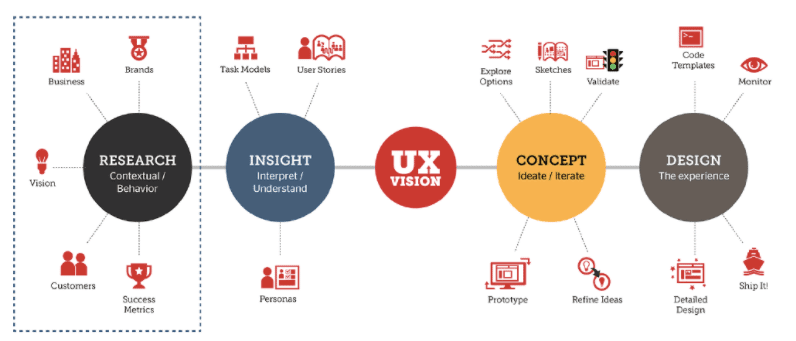
If choices you’re making aren’t positive, make another decision that benefits the user.
Conclusion
Designing a great app isn’t easy.
Whether you’re designing your own app, hiring a designer, or you’re a designer for hire, it’s important to keep all of the design best practices in mind.
Let your creativity shine, but don’t let it compromise the app.
Stick to the basics. If you want to design an award winner, use these tools and tips that I’ve outlined to help you get the job done right.
Does your mobile application design meet the criteria for an award looking app?