

Do you want more app downloads?
Facebook could help you out.
With its humongous reach at 1.4 billion monthly users globally, Facebook is one of the go-to places for business owners and marketers when promoting anything. Whoever your targets may be, chances are, they are on Facebook.
Have you been tapping this opportunity? The opportunity to reach thousands to millions of your ideal customers?
Key Takeaways
- Massive Reach: Facebook has 1.4 billion monthly users, making it a prime platform for app promotion.
- Successful Campaigns: Brands like Westwing and mySupermarket have seen significant returns from Facebook app install ads.
- Targeted Advertising: Facebook allows precise targeting based on user demographics and interests.
- Cost-Effective: You can start advertising with a minimal budget.
- Step-by-Step Guide: This post provides a detailed guide to setting up your app install ads.
Don’t take my word for it, though. Here are some examples of successful app install campaigns on Facebook.
- Facebook app install ads helped Westwing get their app some traction with ~5000 installs at 270% return on their ad spend.
- mySupermarket didn’t only increase their app installs, they also expanded their community by getting a 2000% jump on their page likes.
Undeniably, Facebook knows how big of an asset they are to businesses and they constantly make measures to give app publishers and business owners opportunities to succeed.
So why not get on the program and take advantage of promoting your app on Facebook? Arguably the best reason to advertise on Facebook (aside from the 1.4 billion monthly users thing) is that they allow you to target customers as narrow as possible, given you know the profiles of your ideal customers—what they like, where they are, how old they are and other information that are unique to the subset you are targeting.
Imagine if you can promote your app directly to the people who are sure to benefit from and be interested in your app. When you cast a wide net when marketing—throwing ideas to the way and seeing what sticks—you lose money.
All you need to start advertising your app on Facebook is a good handle on which types of people would be interested in your app and some money. And it doesn’t even have to be a lot of money.
Assuming you already have a Facebook account and just want to know how to start advertising, I put together a no-nonsense guide on how to get started with app promotion on Facebook.
Ready? Follow along.
Create a page
Log in to Facebook.
Click on the downward arrowhead on the upper right corner of the page. It will reveal a dropdown menu.
Click on Create Page.

Choose a category. If you’re going to promote an app for your business, choose the category that matches the closest to the nature of your business. If you’re a local business, choose precisely that.
If you want to create a page that’s just dedicated to your app, click on Brand or Product. It provides the choice of building an “App Page”. For this tutorial, let’s choose that and use BusinessApp as the app name.
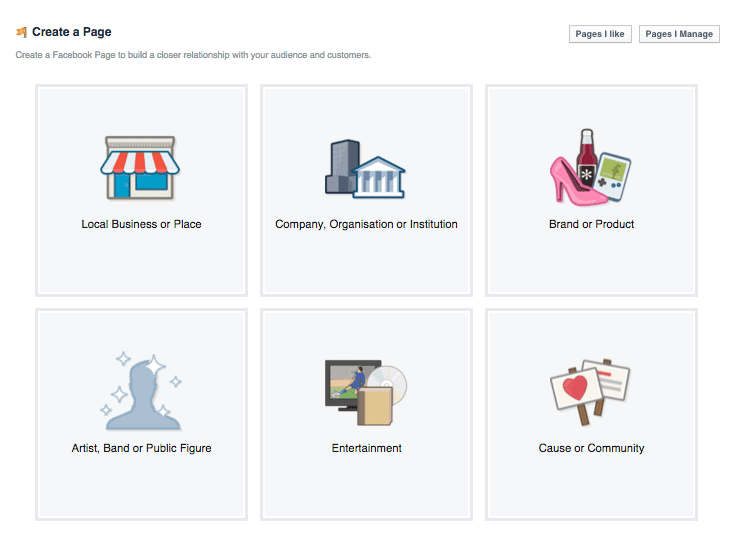
Depending on the category you choose, Facebook will ask for more information like a more particular category, the name of your business/app/product, etc. Then, it will ask you more information to build up your profile and your business identity on Facebook. It will ask you information about your customers and a photo.
After you fill everything up, you’re done. Your new page will appear next.
You can start creating the ad for your app now that you have a page.
Create an Advert Account
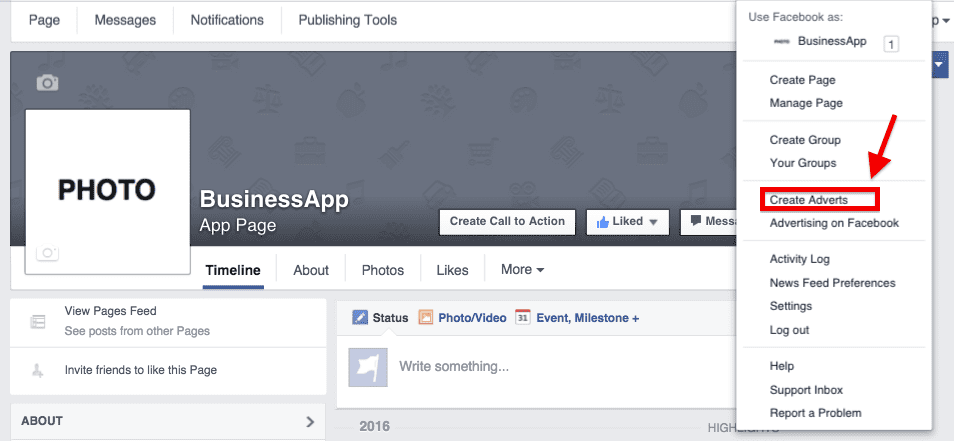
From your new page, click on the same downward arrow on the upper right corner of your screen. Click on Create Adverts.
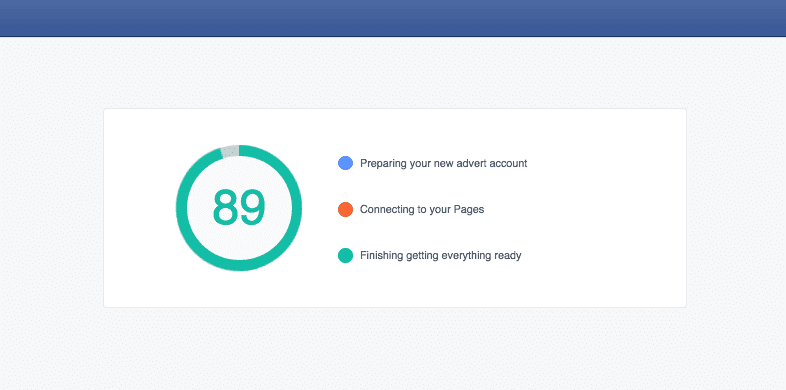
You will see this loading page:
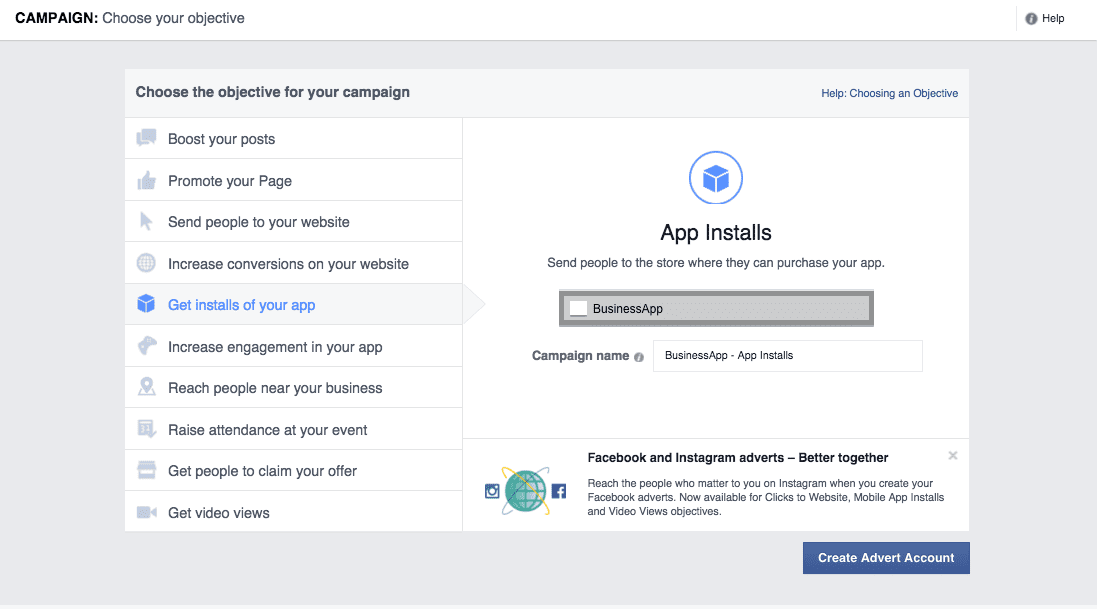
The next page will ask you to choose your objective for advertising. Choose Get installs of your app then paste your app’s App Store or Play Store URL. Name your advert campaign.
Click Create Advert Account.
The next page will ask you to choose your country and the time zone you’re in.
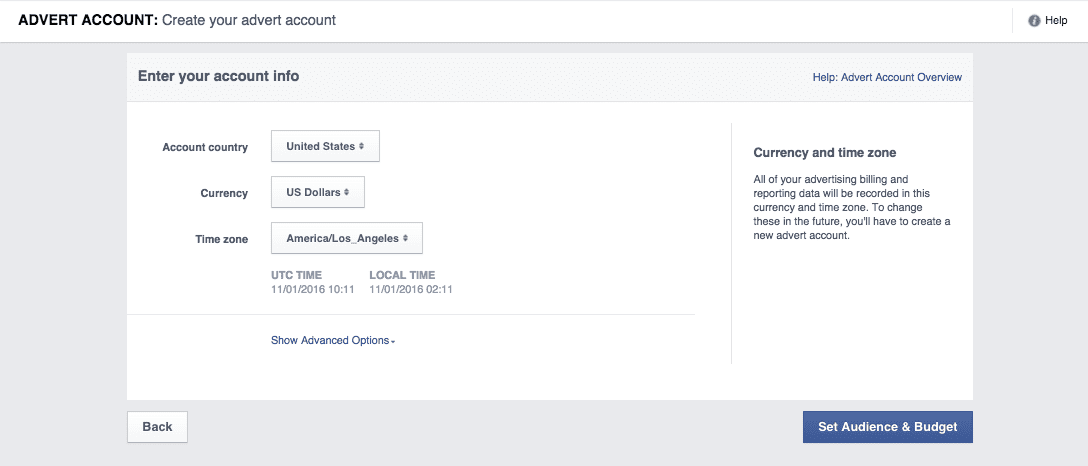
Click Set Audience & Budget next.
Define your target audience
Before you we go into modifying the settings for your ads, I just want to emphasize that the next step is for your first advert set and not the ads yet.
For this particular example, the campaign is to Get installs for your app. Now we will create an advert set which is the umbrella under which you can create multiple ads.
The first step in creating an advert set is defining your target audience. Here is the page: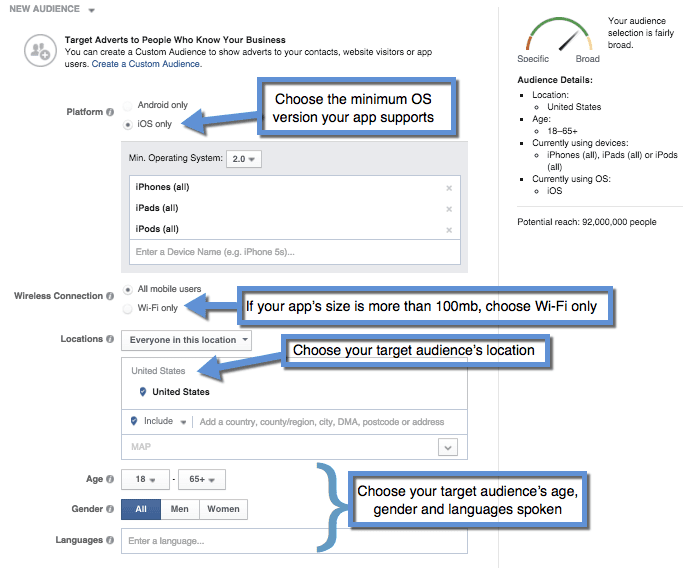
| Configuration | Details |
|---|---|
| Platform | Choose the platform of your app, e.g., iOS. |
| OS Version | Select the minimum OS version your app supports, e.g., iOS 8. |
| Connection Type | Decide between cellular data and Wi-Fi, or Wi-Fi only for larger apps. |
| Demographics | Set age range, gender, and languages for your target audience. |
The first thing you’d be asked to configure is the platform of your app. In this example, I chose iOS.
The next configuration is for the OS version. For example, if your app only works for iPhones with iOS 8 and above, choose 8 as the minimum operating system. You don’t want to be wasting your budget showing ads to people who can’t use your app.
Configure whether you want to show ads to people who are connected through cellular data and Wi-Fi, or exclusively Wi-Fi. Apple does not allow users to download apps that are more than 100mb over cellular data.
Also, consider that those who are on data will probably have a slower connection and limited bandwidth. For this reason, choose Wi-Fi only if your app size is close to or more than 100mb.
Then choose the age range, gender, and languages spoken of people you want to serve your ads to. It’s up to you to determine where and who your target audience is.
Generally, the more targeted your ads are, the better. If you know that certain cities will fare better than others, go ahead and target those cities.
be tempted to limit the age range setting based on your assumptions and even your initial validation. I suggest that you leave the age range broad for now. When the ads are run and the campaign starts collecting data, you will have a better idea which age groups deliver a lower cost-per-install (CPI). Then, you can set a narrower target age range.
Setting your budget and goals
Facebook ads cost money—but they work, that’s why publishers continue to run them. The success of your ad campaign relies on many factors but budget and goal-setting are arguably two of the most important next to how well you target your audience.
Budget
Choose between Daily budget or Lifetime budget.
If you choose daily, Facebook will only run ads within your daily cap. Don’t worry about Facebook running your well dry in the first few hours of the day. They make it a point to spread your spend throughout each day. Once the cap is hit, your ads will cease running and will resume the next day. If you choose lifetime, you only have to set the start and end of your campaign. Facebook will spread the ads evenly throughout the period you se
What to optimize for
| Optimization Option | Description | Considerations |
|---|---|---|
| App Installs | Facebook shows ads to people likely to install the app. | More expensive per conversion; helps test effectiveness. |
| Link Clicks | Facebook shows ads to people likely to click the link. | Higher conversion rate if targeting and landing page are optimized. |
If a lot of people are clicking your ad but just a few are installing your app, you will have the chance to make some changes to your app landing page or listing without having to pay for the clicks that didn’t convert. Once you find the sweet spot, you can optimize for link clicks.