

Essential Features for a Successful M-Commerce App
If you’ve got a business that offers the sale of goods through a mobile app, that’s great. You’re already on the right path to success.
You’ve recognized the latest technology trends and you understand that your current and prospective customers have gone mobile.
But just because you have a mobile app, you can’t automatically assume that it’s efficient.
There are certain features and elements that you need to include if you want to be successful.
Key Takeaways
- Mobile App Necessity: A mobile app alone doesn’t guarantee success; it must be efficient and feature-rich.
- Importance of Features: Including the right features can significantly enhance app performance and user satisfaction.
- Visual Appeal: High-quality product images are crucial for mimicking in-store experiences.
- Personalization: Tailoring the shopping experience to individual users can boost engagement and sales.
- Navigation and Deals: Easy navigation and exclusive app discounts can drive conversions.
For those of you that just built a mobile commerce app or you’re in the process of building one, you’ve come to the right place if you need some guidance. Even if you’ve had a mobile commerce app for a while, you can still use this guide as a reference to make improvements.
Sometimes just a few new or updated features can make a massive difference. As an industry expert, I’ve identified which features are the most important.
Here are the top 13 most common features that all successful mobile commerce apps have. Learn from these examples and apply them to your own app if you want to have the same success.
1. Lots of product images
Don’t just tell your customers what you’re selling. Show them.
In addition to having lots of pictures, you need to make sure that all of them are high in quality. Take the time and make sure all photos are taken by a professional, or at least taken by someone with basic photography skills and decent equipment.
If the images are poor quality, it can cause people to be turned off and not want to buy whatever you’re selling. Don’t forget the little things, like good lighting and things of that nature.
In fact, being able to see pictures of products is the most important factor for shoppers on smartphones and tablets.
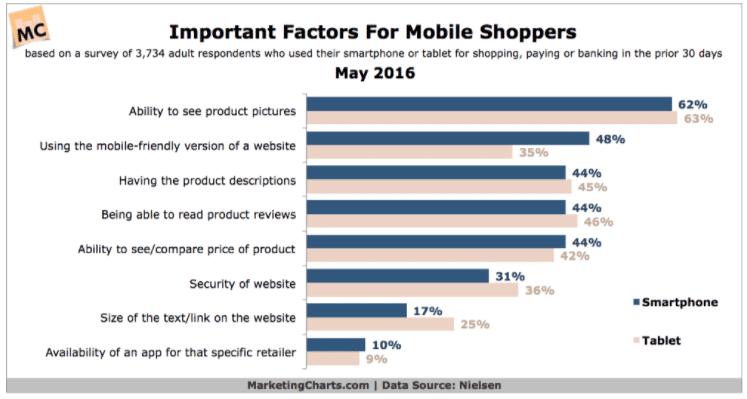
For every product that you’re selling, you need to have multiple images from every angle. Highlight and zoom in on the key features.
This makes things easier for the customer. Now they won’t have as many questions that could prevent them from completing the purchase.
Think about how consumers shop in a physical store. They get to pick up the product, try it on, test it out, feel it, and examine it. Obviously, this can’t happen when they’re shopping from a mobile app.
So they rely on these pictures to mimic this experience as much as possible.
2. A personalized shopping experience
One of the first things that should happen when a user downloads your mobile commerce app is that they create a profile.
This is your chance to get as much information as possible about the customer. Ask them questions to learn information about their:
- location
- age
- gender
Ask anything that can help you personalize what they see on their app. Even if you don’t get this information from their profile, you can track their browsing behavior and shopping history.
Based on these analytics, you can offer discounts on their favorite items or departments. Upsell and cross-sell your customers as well.
Send out coupons for items that they browsed for but didn’t actually purchase. You can send seasonal discounts based on their location. For example, send customers who live in New England discounts on warm clothing during the winter months.
Consumers want a personalized shopping experience. It’s your job to give it to them.
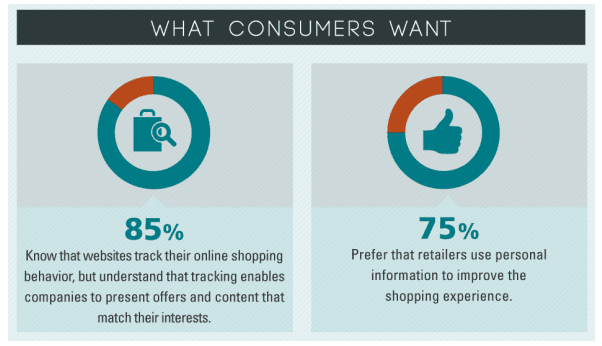
Let customers bookmark, save, or favorite items while they are shopping on your mobile app. Keeping track of their order history can also make it easy for them to finalize repeat orders.
All of these personalization tips will help your mobile commerce app make more money.
3. Easy navigation
Don’t make it too difficult for customers to find what they want on your app. Everything should be well organized by keywords and categories.
You should also have a search bar.
Realize that customers may not be searching for the exact titles of the products that you’re selling. So you’ve got to make sure that your search function is organized by tags and other keywords to ensure that the right products show up.
If people have problems finding what they’re looking for or they’re getting empty search results, it’s not going to lead to conversions.
Customers will get frustrated and turn to your competitors for a better experience.
| Aspect | Mobile Website | Mobile App |
|---|---|---|
| Product Views | Fewer | More |
| Shopping Cart Additions | Less frequent | More frequent |
| Conversion Rates | Lower | Higher |
Take a look at this graphic that outlines the conversion funnel for mobile users between your mobile website and mobile app.
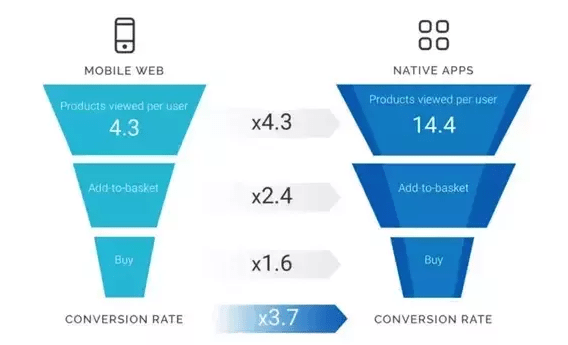
As you can see from the data, customers shopping from mobile apps view more products, add more items to their shopping carts, and have higher conversion rates than shoppers on a mobile website.
But your app needs to have a simple navigation if you want to get the same benefits.
4. Discounts and promotions
Everyone wants to get a deal, so give the people what they want.
Implement one of the oldest businesses strategies out there. Jack up your prices and offer lots of discounts. Just make sure you’re not giving things away without turning a profit.
Have a section of your app that always has items on sale. Make sure this section is easy to identify and navigate to as soon as a user opens up the app.
Promote anything else that benefits your customers. I’m referring to things like free shipping or free returns with no questions asked.
Run seasonal and holiday promotions. Take advantage of any excuse to tell your customers that they can save money by purchasing something from your mobile app.
Here’s something else you can try. Offer discounts off of mobile app purchases that the customers can’t get in your stores or on your website. This will encourage more people to use your app to complete purchases.
5. Integration with retail locations
Retail isn’t dead. So you can’t ignore the fact that your customers will want to visit stores.
For those of you that have retail locations in addition to a mobile app, you’ve got to take full advantage of this situation.
Consumers are using their phones while they’re shopping in physical store locations. Take a look at how they are using these devices.
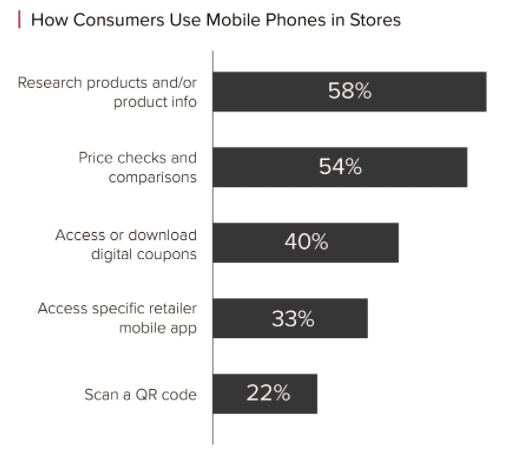
Tailor your mobile commerce app to meet the needs of your customers while they are in your store. Your app should be a guide for them.
You could even include a store map so they can find everything they need with ease.
Set up a feature on your app so that customers can scan a barcode and get more information about the product that they scanned. Allow them to save or favorite an item on their app so they can buy it later once they have time to think about it.
Another reason why this is feature is great is because it will help you get more people to download your app. Customers who don’t have it yet will be encouraged to do so when they visit your store.
6. Social media integration
There are lots of ways that you can leverage social media to i
Improve your mobile commerce app. For starters, you have new users create an account on your app by logging into one of their social media profiles, such as Facebook.
This speeds up the onboarding process and makes it easier for your customers. Now they don’t have to take the time to create a new profile. All they need to do is log into an existing one.
But this is also great for you too. Now you have lots of information about each user based on their social media profile. This relates back to what we talked about earlier regarding personalization.
You know their likes and interests, so use that information to your advantage.
Let customers share products on their social media pages directly from your app’s platform. This is an effective way for you to create brand exposure as well.
Give your customers a reason to do this, such as a discount off of their purchase if they share the product on one of their social profiles.
7. Valuable analytics
You’ve got to use tools to see how your app is performing. What is converting the most? What is having problems?
Analyze things like errors, crashes, bugs and things of that nature.
Furthermore, make sure you continue with everything that’s doing well. Fix anything that’s broken. This will make your app run smoother.
More than 80% of app users say
13. Multiple payment options
I understand that some credit cards may be easier for your company to take than others. You’re basing this logic off of things like transaction fees or other taxes.
But you need to accept all major credit cards.
Furthermore, you’ve got to take alternative payment options too.
Here is a list of the most popular types of alternative payment methods from mobile devices.
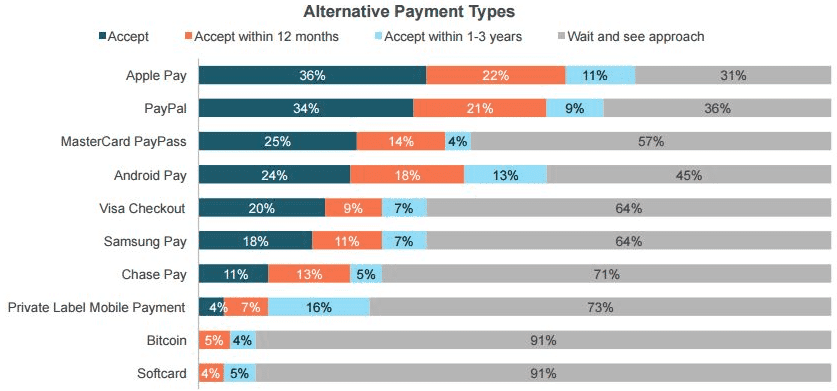
| Payment Method | Reason for Preference |
|---|---|
| Visa Card | Widely accepted, but users may prefer other cards for better benefits. |
| PayPal | Users may feel safer, especially if the brand is new or unknown. |
| Apple Pay | Offers convenience and security for mobile transactions. |
How many of these payment forms does your mobile commerce app accept?
Don’t get me wrong. I’m not saying you need to start accepting cryptocurrency like Bitcoin, but you should be trying to integrate all of the payment methods on the half of this list to your app.
Even if every user has a Visa card, it doesn’t mean that they want to use it.
They may get better benefits with another one of their credit cards. Your customers may feel safer using something like PayPal or Apple Pay, especially if your brand is new or unknown.
Frequently Asked Questions
What are the essential features for a successful m-commerce app?
Successful m-commerce apps often include features like high-quality product images, personalized shopping experiences, easy navigation, and integration with retail locations.
How can I personalize the shopping experience on my app?
Personalization can be achieved by collecting user data such as location, age, and shopping history.
Why is easy navigation important in a mobile commerce app?
Easy navigation ensures that customers can find what they are looking for quickly, reducing frustration and increasing conversion rates.
How can I integrate my mobile app with physical retail locations?
Integration can be achieved by offering features like in-store maps and barcode scanning. This enhances the shopping experience and encourages app downloads.
What role do discounts and promotions play in m-commerce apps?
Discounts and promotions can drive sales by offering customers incentives to purchase through the app. Exclusive app-only deals can also increase app usage.