

Security always needs to be a top-of-mind concern for businesses. This is especially true for companies with mobile apps.
A data breach or hack can cause significant damage to your organization. Security breaches are not only expensive, but they can also crush your reputation.
To ensure security for your business and customers, you must take app security seriously.
That’s why I created this guide. First, I’ll explain some common mobile security flaws and vulnerabilities for mobile devices. Then I’ll show you how to build secure mobile apps.
Mobile App Security Threats
Most businesses understand the importance of securing websites, databases, and cloud storage systems. But mobile app security is just as important, if not more important than these other categories.
Think about the scale of your mobile deployment. It might be installed on tens of thousands of mobile devices—maybe more.
Mobile app security issues are more prominent than you might realize. In fact, 70% of all internet fraud can be traced to mobile devices. One in five hacks come from rogue mobile apps, and there’s a high-risk mobile app installed on one in 36 mobile devices.
Let’s talk about some common application security threats and mobile app security vulnerabilities you need to be aware of.
Data Leakage
According to a recent study, 85% of mobile apps have little to no security protection. Hackers and cybercriminals have realized this and have increased the frequency in which they target mobile infrastructures.
When a user downloads an app, they generally grant the app certain permissions to other data on the device. So if a hacker can penetrate the app, they’ll gain access to sensitive data beyond the primary use-case of the app.
This could include digital wallets and passwords. If it’s an internal app for employees, the hackers can get their hands on sensitive corporate data as well.
Malware and Spyware
Like computers, mobile apps are also susceptible to malware.
Some devices are more susceptible to malware threats than others. In fact, a new study found that Android devices are 47 times more likely to carry malware than Apple devices.
That’s because Androids support third-party app stores more than iOS. It’s easier for an Android user to download apps from somewhere other than the Google Play Store.
Nearly one in four people think it’s safe to download third-party mobile apps as long as those apps aren’t accessing corporate data.
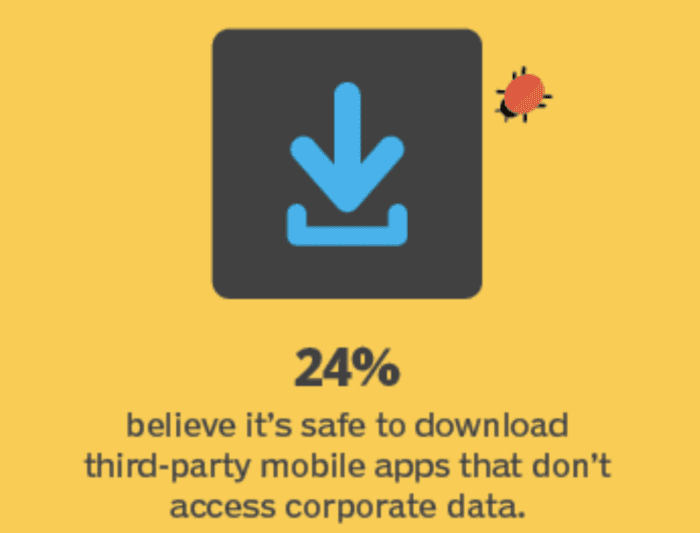
This is something that Android developers really need to be aware of. Once a malicious app has been installed on a user’s device, it could compromise the other apps on their device as well—even the ones downloaded from legitimate sources.
Compromised Passwords
Our society has a huge problem with passwords right now. Since so many different tools, accounts, and subscriptions require a password, people just reuse the same passwords across multiple accounts.
So if one account is compromised, hackers can run wild across other accounts as well.
What would happen if one of your developers or someone on your software development team had a compromised password? Could a hacker use that password to gain app access on the backend of your software?
If yes, that poses a huge risk to your organizational data and app users. Cybercriminals could use that access to deploy malicious links or hacks directly to all users who have your app installed.
Outdated Operating Systems and Software
Failing to keep all of your devices, software, and OS up to date is a mobile security vulnerability.
As malware, ransomware, and other cyber attacks become more advanced, outdated software can’t detect and prevent newer attacks. But many software updates contain security patches. This holds true for mobile apps, mobile devices, and mobile security as well.
Check out these graphs Verizon’s Mobile Security Index Report:
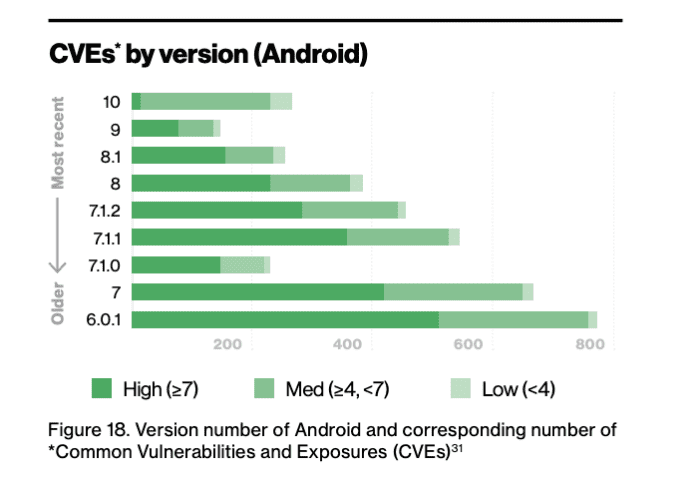
As you can see, newer Android versions contain fewer CVEs (common vulnerabilities and exposures).Just a fraction of the newest Android releases contain high security vulnerabilities.
Now let’s look at Apple’s CVE’s by iOS version:
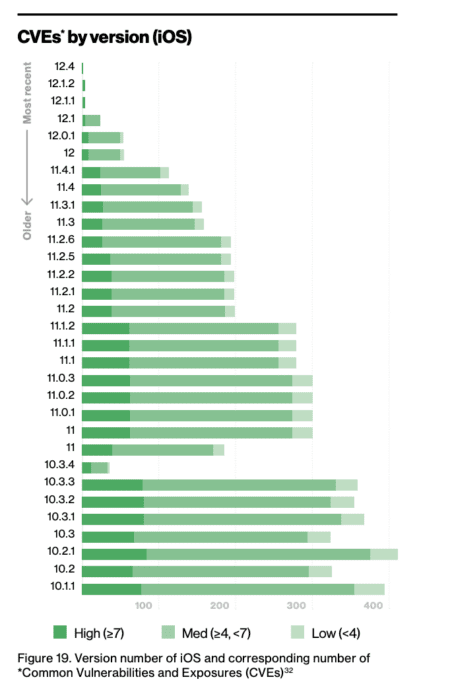
It’s safe to say that this graph speaks for itself.
If people are using mobile devices that haven’t been updated to the latest OS, they’re significantly more susceptible to mobile security threats.
Social Engineering and Phishing
Social engineering is on the rise for mobile. Also known as phishing, this occurs when hackers send fake emails, text messages, or malicious ads in an effort to access passwords or private information.
We’ve all seen these before. You get an email from someone claiming to be Apple or another reputable business, telling you to reset your password or update an expired credit card.
Shockingly, nearly 60% of people say they can’t confidently identify social engineering attacks. Roughly 40% think it’s smart to reply to these attacks.
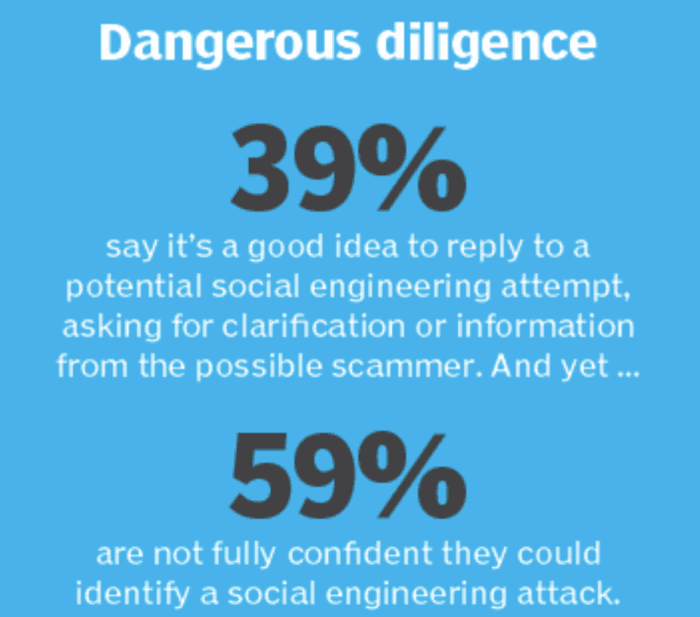
These numbers are alarming and pose a threat to mobile applications and developers.
Encryption Gaps
End-to-end encryption is a crucial yet often overlooked aspect of mobile application security.
Any data being transmitted from one point to another should be encrypted. Whether it’s going from your users’ mobile devices to your system, from your system to cloud storage, or from you to a third-party service, encryption is a must.
If these security measures aren’t taken seriously, hackers and cybercriminals can exploit holes in data transfer and steal data while it’s in motion.
For example, let’s say you have an internal employee messaging app. If those messages aren’t encrypted, someone could potentially access everything your staff is saying when they’re chatting via mobile. This could put sensitive data and private company information into the wrong hands.
11 App Security Best Practices
Now that you’ve seen some common mobile app security threats, it’s time to talk about properly securing your app. The following security measures must be taken into consideration before, during, and after the software development process.
Here’s how you build secure mobile apps:
1. Choose the Right Development Platform
90% of your security vulnerabilities are eliminated if you build an app on the right platform.
The best app builders have security features built into the system. You can rest easy knowing that your app is safe on the platform’s security architecture.
If you’re planning to code the app yourself with an in-house development team or a third-party development agency, your app’s security could be a bit more vulnerable. The app code and sensitive data are at the mercy of your development team. If they have poor app security best practices, then your app could be in trouble.
With Buildfire, not only is your app secure on the backend, but it also comes with features to enhance user security.
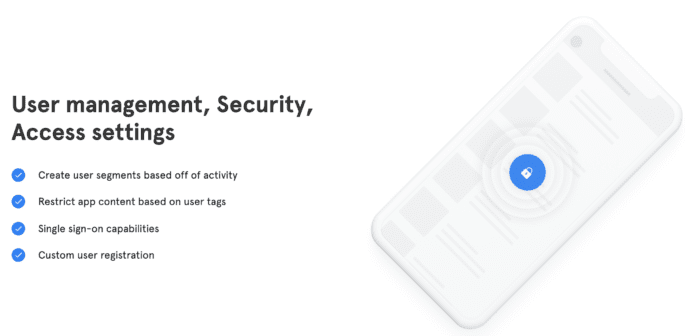
You can take advantage of features like SSO and custom registration to add an extra layer of protection to your app when people are using it. This helps prevent unauthorized users from accessing the app from a compromised account.
We have cutting-edge firewalls, robust encryptions, and data policies that are constantly being monitored and updated. Developers can rest easy knowing that our platform is built on AWS, and we have redundancies across multiple servers and geographic locations to reduce the risk of data loss.
Not only is Buildfire the most powerful no-code app builder for iOS and Android, but it’s also one of the most secure ways to build an app.
So when you’re shopping around and comparing different development options, make sure you prioritize app security.
2. Application Security Testing
If you’re developing an app on your own or with a team of developers, application security testing needs to happen on a regular basis.
You should test apps during the development process and after the app has launched as well.
Shockingly, 40% of businesses don’t scan app code for security vulnerabilities.
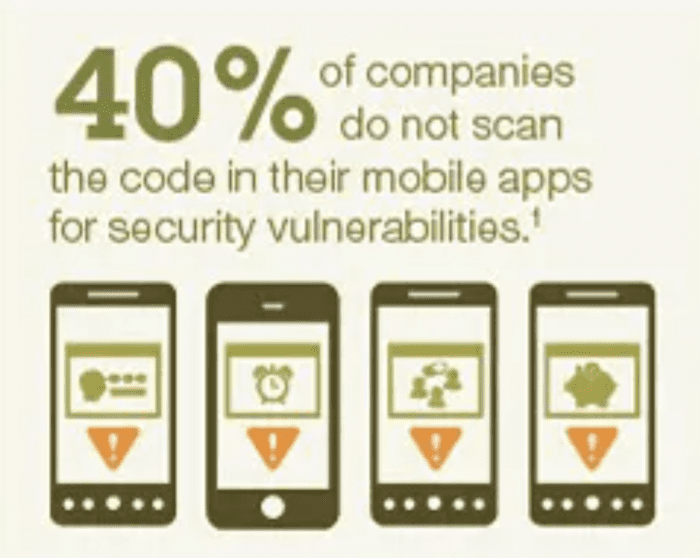
The same study discovered that organizations test less than half of the apps they build. 33% of those companies never test apps to make sure they’re secure.
Not every security flaw is glaringly obvious. Mobile testing is one of the best ways to find potential vulnerabilities.
So why aren’t businesses testing their apps?
One of the main reasons has to do with lack of planning and poor budgeting. In fact, half of companies don’t have any budget for mobile app security.
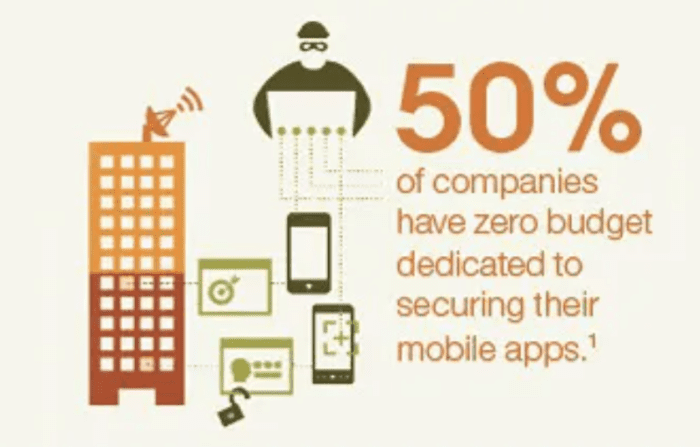
Security needs to be part of your app maintenance process. So make sure you plan accordingly for this.
Not only is this important for preventing hacks and malware. But you need to ensure your application security evolves to support regulatory changes. I’m referring to things like GDPR, CCPA, ADA, HIPAA, PCI, and other data security standards.
Check out our guide on the five hidden costs of software you need to anticipate after you launch to learn more. App security and testing is definitely an important aspect of this.
3. Put Yourself in the Shoes of an Attacker
To build secure mobile apps, you need to think like a person with malicious intent. Ask yourself questions that a hacker or cybercriminal would ask when looking at your app.
- How can your app get hacked?
- What vulnerabilities are easily exploitable?
- Do you have weak points or gaps in your app security?
Ask these questions on a regular basis. You can do it during the building process but continue after the app has launched as well.
Penetration testing (also known as pen testing) is a great way to implement this strategy. This involves ethical hacks against your own software. You essentially have a team member try to penetrate your app’s security as if they’re an outsider. If that person is able to break through your security barriers, it’s a problem that needs to be resolved quickly.
4. Keep Software Up to Date
As previously mentioned, failing to update software means you won’t be able to fight off the latest mobile threats, malware, and malicious code.
Make sure you keep your operating system up to date and make it mandatory for your team to do the same. This is one of the easiest mobile application security policies that you can implement in-house.
Updating your software can help protect sensitive data and close outdated security gaps.
This is another reason why it’s so important to use the right app builder or choose the right development partner. If you’re creating an app with Buildfire, you won’t have to worry about any software updates on the backend.
We’ll automatically update your app to support the latest versions of Android and iOS.
5. Include User Authentication
Adding login credentials to your app is an excellent way to provide an extra layer of security to users.
User credentials help prevent unauthorized account access, which is crucial if your app contains sensitive information. Let’s say you have in-app purchases enabled. You wouldn’t want an unauthorized party to access user payment information, billing address, or other data.
You can take this one step further with multi-factor authentication, 2FA, single sign-on, and more.
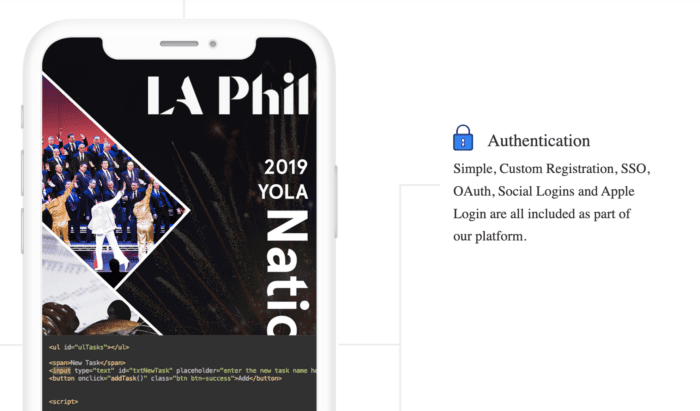
Buildfire makes it easy to implement user authentication for your app.
Everything from custom registrations to OAuth, SSO, and social logins are supported on the platform. Rather than forcing app users to create a new username and password for your app, they can simply log in using their existing social credentials. This is an easy way to authenticate users.
This eliminates friction and improves the user experience without compromising app security. It also prevents unauthorized users from getting into the app if they get their hands on lost and stolen devices.
6. Prioritize Data Encryption
We talked about data encryption earlier when discussing common mobile app security threats. So it should come as no surprise to see it again here in our mobile app security best practices.
You must have security tools in place to protect data. But when that data is encrypted, it takes your app security a step further.
Let’s say someone is able to get their hands on sensitive user data or app data. If it’s encrypted, that data is useless to them without an encryption key.
7. Apply Strict In-House Security Standards
You also need to consider the security controls for your app development team. Your app is only as secure as the weakest link.
You could implement mobile device management policies and or use MDM software to enforce internal security policies.
For example, you don’t want your developers, designers, or anyone on your app team to be working on the app from an unsecured device. Something simple like working remotely or writing code on unsecured public WiFi could threaten your app’s security.
Even if you’re using a secure app builder, you want to make sure that anyone who has access to the app on the backend is taking steps to prevent a breach.
If someone on your team is using weak passwords like qwerty or password to access your app, anyone could potentially hack their account and make changes to your app without your knowledge.
Apply the principle of least privilege to your app team. This means that everyone on your team should only have access to parts of your app that are strictly necessary for their job or task.
I found an excellent graphic from Heimdal Security that showcases the POLP in practice:
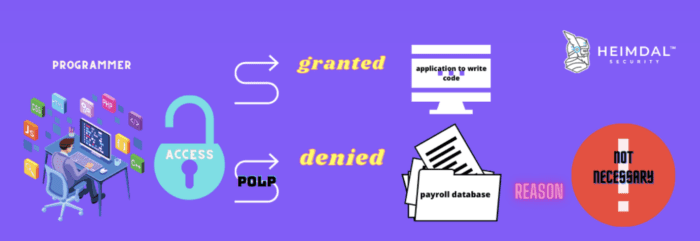
In this example, a programmer would have access to write application code—as it directly relates to their job. But they wouldn’t have a reason to access a payroll database.
Not every team member who works on your app needs to have admin privileges or access to make live changes.
8. Educate Your Team on Mobile Security
Creating and enforcing internal policies is just one aspect of in-house security. You also need to educate your team on application security best practices and the importance of mobile security.
Explain the dangers of using the same passwords on multiple accounts. Tell them why they need to update the software on their personal devices.
Show them statistics, studies, infographics, and useful resources on mobile security. You can send them this blog that you’re reading right now!
If you make it clear to your team that you’re taking this seriously, they’ll follow your lead. But if you have a haphazard approach and you’re not reinforcing these app security best practices, you can’t expect your team to care. You can even consult with your in-house security team on a plan for employee education.
9. Eliminate Unnecessary Permissions
What kind of permissions are you trying to access from mobile users?
Try not to collect confidential data or anything that’s not necessary for the direct purpose of your app. Does your app really need to access someone’s camera, pictures, or contacts? If not, then don’t ask for it.
The more permissions you collect, the more risk you’re putting on your company.
Every additional permission or connection poses extra vulnerabilities. So use a zero-trust approach when you’re building secure mobile apps.
If a permission isn’t related to the app’s key features, don’t bother with it.
10. Be Careful With Third-Party Code
Many Android apps, iPhone apps, and apps available from the official app stores have similar code. So it’s not uncommon for developers to take shortcuts and take code from third-party sources.
Sometimes you can find pre-written code available for free. Other times they’re on paid platforms.
But you can’t assume the code you’re taking from a third-party source is safe. Hackers leverage these code-sharing platforms as a way to inject malicious code into software. If you’re simply copying and pasting someone else’s open-source code into your app, you could be unknowingly opening the door to new security vulnerabilities.
That’s another reason why it’s so much better to create an app with Buildfire. You won’t have to worry about writing a single line of code, so you know everything is secure.
11. Stay Informed on the Latest Mobile Trends
Your mobile app doesn’t exist in a vacuum. You need to keep your finger on the pulse and see what’s happening in the mobile apps industry.
Are there new emerging threats? Have there been any high-profile data leaks? How are hackers exploiting mobile data breaches?
I’m not saying you need to do this every day. But find a trusted source of mobile trends and information, and check on it at least once a month.
Mobile App Security Checklist
Here’s a quick cheat sheet for you to reference as you’re building a secure mobile app:
- Find a secure platform for app development
- Encrypt your data
- Keep all software up to date
- Run app security tests
- Create an internal policy for mobile security
- Educate your team on app security best practices
- Don’t request permission to data you don’t need
- Limit your data exposure
- Avoid unsafe code from untrusted sources or third party libraries
- Follow mobile security trends
- Implement a strong password policy
- Authenticate users
All of these tips and app security best practices will help you create an app that’s safe and secure.
Final Thoughts on App Security
If you’re coding an app from scratch with a traditional development team, your security vulnerabilities are significantly higher. There is just so much that needs to be protected and taken into consideration.
Using a no-code app builder like Buildfire to create an app is a safer alternative. Not only is this faster, easier, and cheaper than traditional development, but it also alleviates nearly all of your application security concerns.
You don’t have to worry about applying advanced mobile security policies to the app. Buildfire handles everything on the backend. All you need to do is apply basic password protection to your account and be careful who you grant admin privileges to on your team.
Buildfire comes with built-in security, user authentication, automatic updates, and more. It’s everything you could possibly need to create a secure mobile app from scratch. For DIY apps, enterprise apps, business apps, internal employee apps, and more, Buildfire has app security covered.
If you decide to code an app on your own, that’s fine too. Handling the security aspects will be a bit more of a daunting task. But your life will be easier if you follow the tips and best practices explained in this guide.
Frequently Asked Questions
How can I protect my mobile app from data leakage?
To protect your mobile app from data leakage, ensure that you implement strong encryption protocols and limit app permissions.
What are the best practices for preventing malware in mobile apps?
Preventing malware involves regularly updating your app and using secure coding practices.
How do I secure my app against compromised passwords?
Implementing multi-factor authentication and educating users about strong password practices can help secure your app.
Why is it important to keep mobile operating systems updated?
Keeping mobile operating systems updated is crucial because updates often contain security patches that protect against new threats. Outdated systems are more vulnerable to attacks.
What steps can I take to prevent social engineering attacks on my app?
Educating users about recognizing phishing attempts and implementing security features like two-factor authentication can help prevent social engineering attacks.