
Developing an Android app isn’t the easiest thing that you’ll ever do. It can be an overwhelming task, especially if you’ve never done it before.
But with that said, using Android development tools can make your life much easier.
Even experienced developers take advantage of tools and resources to help them through the development process. The problem is there is so much information online; it’s tough to know which guide to follow.
That was my inspiration for creating this guide.
Here you’ll be able to find all of the tools and resources you need for Android development in one place. I’ve broken the tools down into four categories:
- Android language resources
- Editors and IDEs for Android development
- Android libraries
- Android plugins
So feel free to navigate to the section you need assistance with. Regardless of your Android development project, there are plenty of tools on this list that will help you out.
Language Resources for Android Development
When you’re developing an app or coding anything for that matter, you need to use a programming language.
I’ll show you the top resources for learning how to code using Java, as well as some other languages like C and C++. I’ve got language resources for Lua and Cordova in here as well.
Java Resources
Java is King when it comes to Android development. Even if you want to use other programming languages, you need to learn how to use Java first.
Java

One of the best ways to learn Java is by going straight to the source. Java has its own development kit that you can download. For those of you who have never used Java before, you’ll want to check out the new to Java programming center.
They have guides and tutorials that will give you an overview on the Java basics and how to get started. You can get Java certifications after completing courses and even have access to resources connecting you with other Java professionals.
Team Treehouse
Team Treehouse is an online learning website. They have tons of different coding resources and courses, but they’re well known for teaching Java.
I like Team Treehouse because all of the courses are on-demand, so you don’t have to be pinned down to a specific class schedule. It’s flexible, so you can learn at your own speed and on your own time.
This resource also has a great network of students who are very supportive of each other. So you can communicate with your peers through the Team Treehouse online community if you need any assistance.
New Boston

The New Boston is a YouTube channel filled with Android development tutorials. There are more than 200 videos on this channel, including some great beginner resources for Java.
Over 2.2 million people have subscribed to The New Boston, so you know that it’s legitimate.
Codecademy

When you navigate to the Codecademy homepage, the first thing you’ll see is two words—Learn Java. That’s about as self-explanatory as it gets.
Nearly two million people have already taken this online course. It takes ten hours to complete, and you don’t need any prerequisites to get started. I like this course because it’s actionable. You’ll end up building seven Java projects yourself before you finish.
Udemy

I can’t talk about online learning resources without bringing up Udemy. They have tons of different categories ranging from marketing to photography and music. But their Java development tools are exceptional as well.
Oracle Java Tutorials

The Oracle Java Tutorials are specifically designed for people who want to use Java to create applications. So it’s definitely more specific than some of the other Java tools.
Oracle has examples and lessons organized into three categories.
- Covering the basics
- Graphical user interfaces
- Specialized lessons
These tutorials are made for both beginners and experts alike. So they will be helpful for any Android developer, regardless of your skill level.
Java Design Patterns (GitHub)

These Java Design Patterns are hosted on GitHub. The patterns are formatted to show programmers the best practices to solve the most common problems when designing an application. The patterns focus on simplicity and only add complexity when absolutely necessary.
Programming by Doing

I think it’s safe to say that the name says it all. Programming by Doing has assignments that teach you Java hands-on. They have been around for more than 15 years.
This resource has been used to train children in public school systems, so I’m sure you won’t have any trouble keeping up with the pace.
Ryan Park Apps Resource List
Ryan Parks is a self-taught Java coder. He created a Google Docs spreadsheet with all of the resources he used to train himself.
Ryan has the spreadsheet organized by category and skill level. He also has a brief description of what you can expect from each resource.
Mkyong

Mkyong has tutorials that are very specific. His guides are geared more toward skilled coders who are looking for more complicated tutorials. I wouldn’t recommend this resource to a Java beginner.
Cave of Programming

The Cave of Programming covers Java and C++. This resource contains tons of different tests and exercises. Although some of them require payment, the Cave of Programming has some free Java resources as well.
C++ and C Language Resources
Truth be told, in my opinion, C and C++ only increases the complexity of mobile app development. You can use them with your Android Native Development Kit to build an Android app.
Although the programming will be more complex with these languages, it doesn’t always translate to optimal app performance. So don’t assume that this route will make your app better.
But with that said, there are still plenty of people who prefer C++ and C. So if you want to learn them or need some help with a project, these are the two best resources for you to use.
SoloLearn

SoloLearn has 80 lessons and more than 300 quizzes in C++. The lessons cover things like basic concepts, loops, classes, functions, objects, data types, and more. It’s an app that teaches you a new programming language, but you can learn online as well.
More than 5 million people have used SoloLearn for C++, so it’s definitely a reputable resource.
Learn CPP

Learn CPP is a free resource. You can use it to learn C++ but it’s definitely going to take a while if you plan to use it for Android development. But with that said, it will still get you there.
With Learn CPP, you’ll get some language skills that go beyond mobile apps as well.
Lua with Corona Language Resources
Lua is a cross-platform programming language. Corona is software that’s layered on C++ with Lua. It’s basically made for building graphic apps. So if that’s the type of Android app you want to create, it’s worth looking at these language resources.
Tyler Neylon
Tyler Neylon says you can “learn Lua in 15 minutes.” If you’re a beginner, I can’t promise that it will be that easy. But with that said, this resource is definitely one of the simplest explanations of Lua that you’ll find on the web.
Programming in Lua

Programming in Lua is probably the most extensive online resource for learning the Lua programming language. This first edition guide was written back in 2003, but its application still works today. It’s a 29 chapter book that covers everything you need to know about Lua.
Corona Learning Center

The Corona Learning Center is a 100% free resource. It has a Corona SDK builder that lets you build an Android app using the Lua language. It’s an extremely popular resource for building lightweight gaming apps for cross-platform usage.
Other Programming Language Resources
There are a few other languages that don’t really fall into the categories we saw so far. But they are definitely worth mentioning.
Kotlin

Kotlin is a newer programing language, so there aren’t a ton of online resources to help you with it. It’s made for Android and JVM. It’s supposedly interoperable with Java as well, but I can’t speak on that from any personal experience.
If you’re up for learning something different, this resource has plenty of tutorials to teach you a new language.
Apache Cordova Tutorial
The Apache Cordova Tutorial is a GitHub project. You’ll build an Apache Cordova using a single page architecture, touch events, and HTML templates to teach you this language.
You’ll also learn how to use Cordova APIs, data storage strategies, and mobile-specific elements like page transitions, scrolling, styling, and touch events.
To use this resource, you’ll need a code editor and some working knowledge of HTML and JavaScript.
TutorialsPoint on PhoneGap

This technically isn’t a programming language, but it’s still very relevant. With TutorialsPoint on PhoneGap, you’ll use HTML, CSS, and JavaScript for Cordova and Adobe. It’s a good resource for those of you who want to further your knowledge on these subjects. This is not a tool for beginners.
Editors and IDEs for Android Development
The IDE acronym stands for integrated development environment. Basically, an IDE is software that lets you create other software. In this instance, the software we’re creating is a mobile app.
IDEs translate your coding language using a compiler. You’ll spend most of your time building in the IDE. These are made for creation, testing, designing, and editing.
To help you out with editing and IDEs for Android development, these are the best tools and resources for you to consider.
Android Studio

Android Studio is the official IDE for Android development. It’s arguably the fastest way to build an app on any type of Android device. Some of the top features of Android Studio include:
- Visual layout editor
- APK analyzer
- Fast emulator
- Flexible build system
- Intelligent code editor
- Real-time profilers
If you’re new to Android development, this should be the first place you start before you move on to other IDEs and editors.
IntelliJ IDEA

IntelliJ IDEA is powered by JetBrains. It analyzes your code and automatically looks for connections between your languages and project files. Then it takes this information to provide you with coding assistance and other analysis.
There are tons of plugins created by the community here, so it’s extremely customizable for your specific needs.
DroidEdit

DroidEdit is a source code and text editor for Android development. It can be applied to all Android platforms, including mobile applications. The best part about DroidEdit is that you can change code directly from your mobile device, which is ideal if something is urgent and you’re away from your computer.
The tool is extremely powerful and has highly customizable themes for editing to accommodate your visual preferences as well.
Eclipse

Eclipse was the official Android IDE before Android Studio. It’s best for coding with Java, but if you’re an experienced developer, you can also use it for other programming languages. If you’re going to use anything other than Java on Eclipse, you’ll need to install some plugins to make it possible.
Android IDE
Android IDE has more than two million downloads. It’s an interactive way for you to learn the programming for coding your own mobile app. It supports CSS, HTML, and JavaScript.
It’s great for anyone who wants to learn Java skills and Android development. Aside from mobile apps, you can use this tool to build your own website as well. Android IDE is compatible with Android Studio and Eclipse. It also has Git and Dropbox integration.
Corona
We talked about Corona earlier when we covered Lua programming language resources. But this two-dimensional cross-platform development tool can be used to create your mobile app. It’s recommended for gaming apps, but versatile enough for other types of apps as well.
As I said before, one of the best parts about Corona is that it’s 100% free.
Cordova

Cordova is a free and open source editor. You can build mobile apps with JavaScript, CSS, and HTML. It’s a great option for creating hybrid apps with just one base code.
All you need to do is install Cordova, create a new project, add your platform, and run the app. The resource takes you through what you need do at each phase.
CppDroid
CppDroid has over 1.5 million installations. This resource lets you edit, compile, execute, and code using C and C++. It has tons of features like syntax highlighting and practice courses. CppDroid is helpful, but it’s not updated that frequently, which is definitely worth noting.
Xamarin

Xamarin is a product from Microsoft’s visual studio. With this tool, you can create native apps for Android, iOS, and Windows using a shared .net code base. It uses the C programming language.
Part of this resource is free and open source, but there are some other pricing options if you want to upgrade.
Appcelerator
Appcelerator lets you write in JavaScript to run a native app. It’s made for cross-platform development without going hybrid. The top features include:
- IDE and Titanium SDK
- App designer
- Hyperloop
- API builder
- API runtime
- Mobile backend services
You can start off using a free trial, so it’s worth giving a try.
Android Library Resources
In the context of software development, libraries are collections of data that can handle graphic effects, manage rules for app behavior, communication protocols, prewritten code, text, templates, and more.
Usually, libraries are organized by a topic of specific activity. For the most part, developers are pretty open with their work to help others in the development community. So there is a good chance that someone has already built a library that you can use.
Alternatively, you can always build your own library by taking pieces of code from other resources. These are the best libraries for you to consider for whatever your goal might be.
Awesome Java
Awesome Java is hosted on GitHub. It’s a curated list of Java frameworks, software, and libraries. The list is extremely extensive, so I won’t even attempt to pick out some of the highlights.
Everything here is well-organized and easy to find, making it one of the best libraries for Android development.
Retrofit

Retrofit is a type-safe HTTP tool for Java and Android development. Basically, it can turn your HTTP API into a Java interface.
Gson
The Gson Java library is used for converting Java objects into JSON. It works with pre-existing objects that don’t have source code. This is extremely helpful, since the majority of open-source JSON conversion tools require Java annotations in classes, which can’t be done without the source code.
It’s also worth noting that Gson supports Java Generics as well.
Universal Image Loader
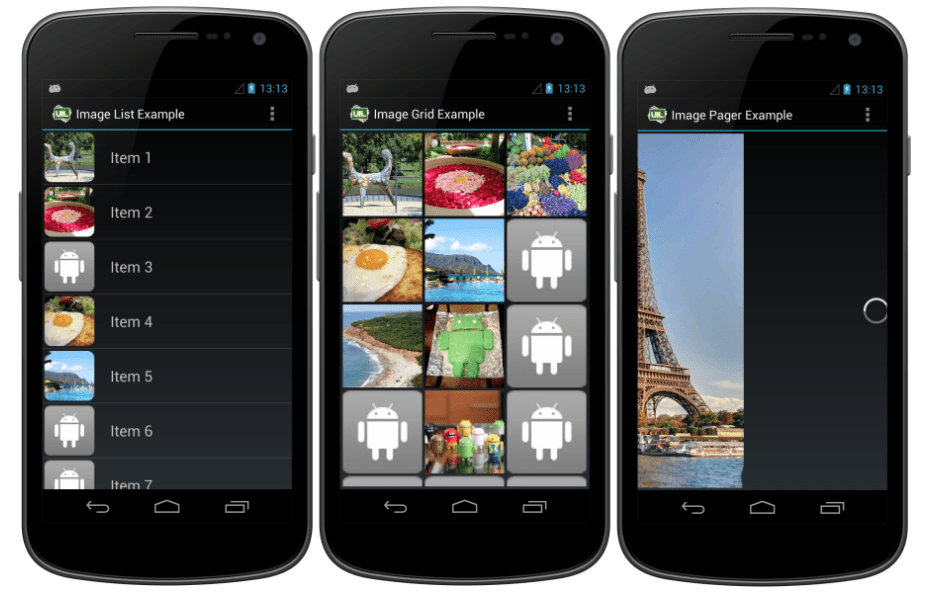
The Universal Image Loader is one of the top-rated Android libraries on GitHub. This resource is highly customizable, flexible, and powerful, to say the least. It’s a great tool for caching, displaying, and loading images.
You’ll have tons of configuration options and controls throughout the entire loading and caching process. Some of the top features include:
- Asynchronous or synchronous multi-thread image loading
- Thread executors
- Decoder
- Memory and disk cache
- Caching switch
- Stub images
- Listening loading processes
It’s easy to set up and configure the Universal Image Loader as well.
EventBus

The purpose of EventBus is to make the communication between different areas of your app as smooth and seamless as possible. Basically, it decouples event senders and receivers. This process simplifies the communication between different components of your app.
All of this requires less coding and delivers higher quality results. It’s one of the best options for gluing fragments, activities, and background threads together for Android app development.
Picasso
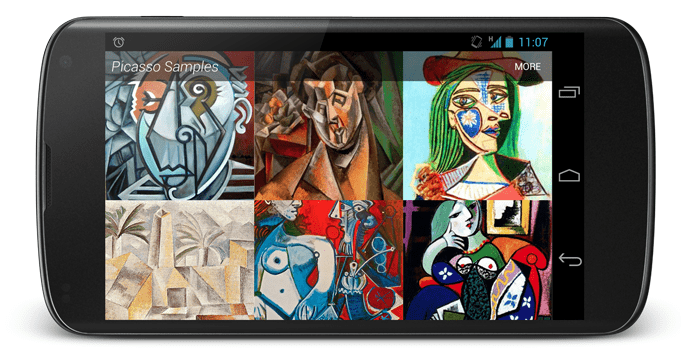
In short, Picasso is an image downloading and caching library made specifically for Android development. All you need to do is input the URL of an image to download it. Then you can store the file as a bitmap before caching it. It’s very straightforward.
ButterKnife

ButterKnife is a lightweight library. It’s capable of streamlining complex Android syntax problems. It creates a boilerplate template code using annotations.
You’re able to group multiple views in an array or list with ButterKnife. You also have the capability to operate on everything at the same time using setters, actions, or properties.
AndroidView Animations

The AndroidView Animations library uses an easy to understand syntax. It will help you get your animations running more smoothly. This library was actually inspired by an iOS library that has similar features. The creator used that inspiration to create something similar for Android development.
Android Arsenal Libraries

The Android Arsenal Library has more than 6,500 resources to choose from. You’ll find both free and paid options on here while you’re looking around. Everything is organized alphabetically, and by category, so it’s easy to find what you’re looking for. This is definitely considered an all-in-one Android development library.
Awesome Android Libraries
The Awesome Androids Library is another all-in-one resource. The libraries are sorted by name, license, and functionality. The majority of these Android development libraries are actively maintained, which is definitely important for developers.
Android Plugins for Development
Plugins are essential for customizing your coding environment. I can speak from personal experiences when I say that these add-ons will make your life much easier, especially down the road.
But there are so many options to choose from when it comes to plugins. It’s extremely overwhelming. I’d recommend starting with these resources to get your feet wet with Android development plugins.
Genymotion

Genymotion is a testing an emulation tool designed specifically for Android apps. You can run automated tests with unlimited scaling capabilities, such as parallel testing.
It’s compatible with testing frameworks like Robotium, Appium, and Espresso. The Genymotion cloud works with a CI infrastructure as well.
Another top feature of this plugin is the ability to showcase your app on your website. Its “kiosk mode” lets visitors test your app online without being forced to download it first.
Plugin Collection for IntelliJ
JetBrains has a huge collection of plugins for IntelliJ. There are nearly 10,000 plugins that can be used for IntelliJ IDEA. These are organized into three categories:
- Ultimate
- Community
- Educational
You’ll definitely be able to find something to help you customize your IntelliJ IDE here.
Import Drawables
This plugin is also used for IntelliJ. It lets you import drawables of different resolutions and other functionalities based on the images. Here’s an example what the Import Drawables plugin looks like in-use.
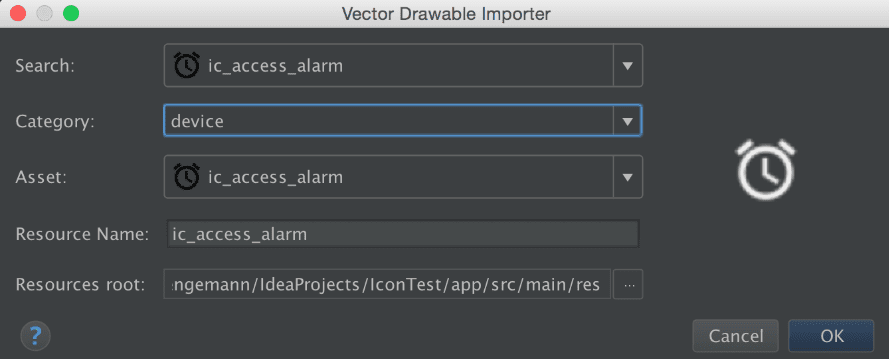
The installation instructions are outlined step by step in the link above, so it’s very easy to for you to get started.
A Curated List of IntelliJ Plugins
This curated list of IntelliJ Plugins was posted on the IntelliJ blog back in April 2015. The author, Andrey Cheptsov, takes you through some different scenarios and use cases for the plugins on this list. Even though the blog was published four years ago, it’s still very relevant when it comes to assisting you with your plugins needs today.
HAXM
HAXM is short for hardware accelerated execution manager. The plugin was developed by Intel and is made for executing Android apps faster for developers who are using SDK emulators.
It’s most commonly used for Android Emulator and QEMU. This plugin runs on the host operating system using a kernel-mode driver.
IDEA Vim
DEA Vim was created by JetBrains. The plugin is based on building your app with IDEs for the IntelliJ platform. Some of the top supported features include:
- Motion keys
- Marks
- Registers
- Visual mode commands
- Macros
- Digraphs
- Command line and search history
- Ex commands
It’s worth noting that jump lists aren’t supported on this plugin just yet, but according to JetBrains, it’s in the works.
Boilerplate Code Generation
This plugin has a very specific feature. As the name implies, Boilerplate Code Generation is used for generating parcelable boilerplate code for IntelliJ.
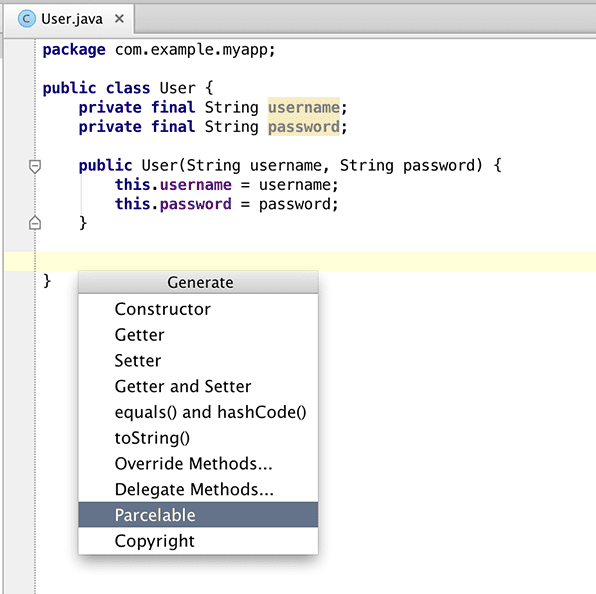
This screenshot gives you an indication of what it will look like once you start using this plugin.
Folding Plugin
The Folding Plugin is made for grouping files. It’s very helpful throughout the Android development process. All of your files can be displayed as groups in different folders, which makes it easier for you to stay organized.
However, the Folding plugin does not move files or create folders; it simply groups them.
Android Holo Colors

The Android Holo Colors plugin generates different Android components. It provides you with the XML you need for edittext and color spinners in your app.
The plugin makes it easy for you to copy drawables and styles directly into your Android development project.
ButterKnife Injections
If you’re using the ButterKnife library, which we talked about earlier, you’ll definitely want to get the ButterKnife Injections plugin. It’s designed for Android Studio and IDEA. The plugin is made for allowing one-click creations of ButterKnife view injections.
ADB IDEA
The ADB IDEA plugin helps you develop Android apps faster. It has functionalities that will make your life easier. Some of the commands featured in this plugin include:
- Uninstall
- Kill
- Start
- Restart
- Clear data
- Clear data and restart
You can do all of these using the quick operations popup, filtering through actions, or navigating to the menu.
Key Promoter
Key Promoter is an older plugin that’s compatible with Android Studio and IntelliJ IDEA. Powered by JetBrains, the plugin shows you how you can speed up your actions with keyboard shortcuts.
It’s very helpful, although some users complain that the notifications can be a bit obstructive and intrusive when they’re working. So I figured you should know that before you go ahead and install it.
CodeGlance
CodeGlance embeds codemaps into your editor pane. It’s a minimap, which works for light themes and dark themes alike. You can use it for customized colors with syntax highlighting as well.
This plugin is not made for opaque backgrounds.
Android Material Design Icon
Android Material Design Icon comes pre-built into new versions of Android Studio, making it the official icon set for Google. If you’re using an older version of Android Studio and don’t want to update it, you can just install this plugin separately.
It’s one of the best was for you to create an icon that meets the size and resolution specifications that you need.
Conclusion
There you have it. This guide has more than 50 Android development tools all in one place.
I’m confident that there is something for everyone on this list. There are resources for beginners, as well as advanced developers, and everything in between.
Some of the tools on this list are compatible with each other. For example, certain libraries and plugins are designed for specific coding languages and editors. So you’ll want to make sure whatever you’re choosing is compatible with your other tools.
Make sure you save this guide so you can use it as a resource for all of your development needs today, as well as in the future.
What tools are you using to streamline your Android app development process?