

Key Takeaways
- Importance of Aesthetics: Modern app icons prioritize aesthetics over mere functionality.
- First Impressions Matter: A compelling app icon is crucial for attracting downloads and defining your brand.
- Visual Influence: 92.6% of people prioritize visual factors in purchasing decisions.
- App Store Discovery: Icons play a significant role in app store visibility, influencing 70% of downloads.
- Color and Simplicity: Successful icons often use limited colors and simple designs for better recognition.
App Icon Creation Best Practices
Pick a bold, unique shape.
Simplicity is key to creating an app icon that’s memorable and recognizable. If you don’t pick a shape that’s unique and bold, your app will end up blending in to the rest, meaning that fewer people will be enticed to download it. It’s also important to note that you should try to incorporate what your app does into the design of the app icon somehow. The icon is one piece of custom branded apps.| App Icon | Design Elements | Effectiveness |
|---|---|---|
 |
Bold, unique shape with two colors; represents app’s purpose. | Highly effective due to simplicity and clear representation. |
 |
Too many elements; difficult to understand in smaller size. | Ineffective due to complexity and lack of clarity. |
Avoid using a photo.
This applies even if you think the photo includes a bold, unique shape. If you have a photo you really like that’s simple, bold, and represents your brand, create a vector image version of it. Or use some of the elements from the photo to inspire your vector image design, like this design by the Sipp app: Image source: The Next Web
The Sipp app icon creators knew that the purpose of the app was to help users share information with their friends about the wines they tried. So their starting point was, of course, a picture of a glass of wine.
But they didn’t stop with the picture. Instead, they had the image illustrated and added a letter to it, improving the overall appearance of the icon and making it more memorable.
Image source: The Next Web
The Sipp app icon creators knew that the purpose of the app was to help users share information with their friends about the wines they tried. So their starting point was, of course, a picture of a glass of wine.
But they didn’t stop with the picture. Instead, they had the image illustrated and added a letter to it, improving the overall appearance of the icon and making it more memorable.
Don’t overload the icon with color and detail.
When designing your app, you have to keep in mind that the app will appear tiny on the user’s screen. That means that including too many colors or too much detail could hinder your app from standing out. So limit yourself to two or three colors if possible, and resist the urge overload the design with detail. The simpler your app icon design is, the more it’ll stand out from the rest. The Snapchat app icon is a great example of an app icon with a simple color palette and design. It’s a simple design with rounded corners. You can see that the two main colors are white and yellow, and the designer used a black border around the white ghost to make it stand out even more. It’s instantly recognizable from other icons on the home screen. So not only will it get the user’s attention in the app store, but it will also increase opens. And there’s not a lot going on in the design – it’s just a ghost on a plain background. That’s about as simple as it gets!
If you look through the app store, you might also notice that many app icons tend to have similar appearances. A recent study by Appbot revealed that many of the most popular apps have icons that share similar colorways.
It’s a simple design with rounded corners. You can see that the two main colors are white and yellow, and the designer used a black border around the white ghost to make it stand out even more. It’s instantly recognizable from other icons on the home screen. So not only will it get the user’s attention in the app store, but it will also increase opens. And there’s not a lot going on in the design – it’s just a ghost on a plain background. That’s about as simple as it gets!
If you look through the app store, you might also notice that many app icons tend to have similar appearances. A recent study by Appbot revealed that many of the most popular apps have icons that share similar colorways.
 Red and blue dominate the landscape, while green is also pretty popular. But you’ll notice that the most prominent app icons tend to commit to just one or two colors.
Keep that in mind when you’re choosing the colors for your app.
And make sure the colors align with your brand. The color palette for the icon should be the same one you use in the design of the actual app, and it should attract your audience. Since 84.7% of people in a Secretariat of the Seoul International Color Expo survey reported that color accounts for more than half among the various factors important for choosing a product, its critical for you to choose the right color scheme.
Tip: Use contrast the right way in your design to draw potential customers’ eyes to your app icon. If you’re not sure which colors are best to use together or want to learn more about color theory in design, check out this blog post.
Red and blue dominate the landscape, while green is also pretty popular. But you’ll notice that the most prominent app icons tend to commit to just one or two colors.
Keep that in mind when you’re choosing the colors for your app.
And make sure the colors align with your brand. The color palette for the icon should be the same one you use in the design of the actual app, and it should attract your audience. Since 84.7% of people in a Secretariat of the Seoul International Color Expo survey reported that color accounts for more than half among the various factors important for choosing a product, its critical for you to choose the right color scheme.
Tip: Use contrast the right way in your design to draw potential customers’ eyes to your app icon. If you’re not sure which colors are best to use together or want to learn more about color theory in design, check out this blog post.
Don’t include words.
Think about it. Your app icon is going to look tiny on a smartphone screen, meaning that users will pretty much need a microscope to read any text you place on the icon.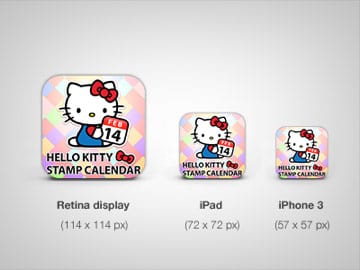 That’s why it’s best to leave text out of your icon design. If you create an effective app icon and name your app something appropriate, that will be enough to draw people in. Then, they’ll be able look at the app
description to learn about what it is and what it does.
Now, you might be thinking:
Wait a second. Facebook technically uses text in their icon by putting the letter “F” there, and they have one of the most successful apps ever!
And you’re right. They do.
That’s why it’s best to leave text out of your icon design. If you create an effective app icon and name your app something appropriate, that will be enough to draw people in. Then, they’ll be able look at the app
description to learn about what it is and what it does.
Now, you might be thinking:
Wait a second. Facebook technically uses text in their icon by putting the letter “F” there, and they have one of the most successful apps ever!
And you’re right. They do.
 This design works for them because it includes a bold, unique shape that represents their already well-known brand. So, if your brand is already well-known and you feel like a specific letter represents it, you may be able to create an iconic app icon with just that letter.
Otherwise, I strongly advise you to come up with something different that represents your app’s functionality. Just because Facebook can get away with using a single letter doesn’t mean that’s the best tactic for you.
This design works for them because it includes a bold, unique shape that represents their already well-known brand. So, if your brand is already well-known and you feel like a specific letter represents it, you may be able to create an iconic app icon with just that letter.
Otherwise, I strongly advise you to come up with something different that represents your app’s functionality. Just because Facebook can get away with using a single letter doesn’t mean that’s the best tactic for you.
Consider incorporating some kind of border.
We’ve already talked about how Snapchat put a border around the ghost in their app icon, but you cOptions for Creating Your Own Custom App Icons
You may be able to find a free app icon maker online, but you’re better off using quality design software or partnering with a professional graphic designer. That way, you end up with a well-designed icon that’s original and avoid having to work within the constraints of the free program (since it may only offer a few different fonts and images). Let’s discuss these options a bit more in-depth now so you can make an informed decision.| Option | Advantages | Considerations |
|---|---|---|
| Use Adobe Illustrator |
|
|
| Hire a graphic designer or firm |
|
|
Use Adobe Illustrator.
If you’ve worked in Illustrator before, you probably already know that its functionality makes it a great option for designing a vector image to use as your app icon. After you’ve sketched your app icon design ideas, choose the one you want to work with, and import the sketch into Illustrator. Then, you can begin designing your icon based on the sketch. Tip: If you don’t have lots of experience working in Illustrator but want to use it to design your icon, you can read this blog post for an easy tutorial. If you do have plenty of experience with Illustrator and Photoshop alike, here’s a more intermediate level guide to designing your app icon.Hire a graphic designer or graphic design firm.
If you’re not a seasoned designer yourself, hiring one is probably your best bet for getting an app icon that resonates with your target audience and looks amazing in the app store. Here are a few tips to help you hire the right graphic designer:- Look for a designer who specializes in app icon design. If they’ve never designed an app icon before, they may not have a deep understanding of app icon design best practices. So, try to look for a designer who has a portfolio full of attractive app icons. They should also be comfortable creating an Android app icon as well as iOS icons.
- Avoid websites like Fiverr and Upwork. While some designers on these kinds of sites can produce high-quality work, you’re better off looking for a professional graphic designer on LinkedIn or asking one of your colleagues to recommend a designer they know and trust.
- Look for testimonials. If you see that the designer’s previous clients were happy with their results, there’s a good chance that you’ll be happy with your app icon design.
Frequently Asked Questions
How can I make my app icon stand out in the app store?
To make your app icon stand out, focus on simplicity and boldness. Use a unique shape and limit your color palette to two or three colors.
What are the common mistakes to avoid when designing an app icon?
Avoid using photos, overloading with colors, and including text. Instead, opt for vector images and simple designs.
Why is color choice important for app icons?
Color choice is crucial as it affects brand recognition and user attraction. Successful icons often use limited colors for better recognition.
How does an app icon influence app downloads?
An app icon serves as the first impression of your app, influencing user decisions. A well-designed icon can significantly increase app downloads by attracting attention in the app store.
Can I use text in my app icon design?
It’s best to avoid text in app icon designs as it can be hard to read on small screens. Focus on visual elements that convey your app’s purpose instead.