

Taking an app idea and turning it into a reality is a dream for entrepreneurs and business owners across the globe. But app development can be an intimidating venture for people who have never been through this process.
I see this all of the time. Someone has an amazing app idea but just doesn’t know where to start.
Should they hire a developer? Should they hire an app development company? When is it too early to start with market research or app marketing? How much money will it take to build your own apps?
Key Takeaways
- Initial Questions: Consider whether to hire a developer or a company, and when to start market research.
- Preparation Importance: Define your role and reason for app development to ensure a focused approach.
- Feature Focus: Narrow down to a single core feature to maintain the app’s purpose.
- Tool Selection: Choose the right project management and communication tools for success.
- Day One Actions: Define target audience, platforms, and monetization strategy for your app.
The list of questions and uncertainties goes on and on.
If you’re new to app development, I want to help you get started. Before you start to overwhelm yourself with the app interface, user feedback, new features, and things of that nature, there are some actionable steps that you can take right now. The steps in this guide will help you get started and build momentum with app development.
Mobile App Development Preparation
Whether you want to create an app development business from scratch or you’re launching an app as an extension of your existing business, there are several things you must do to prepare yourself. Don’t overlook the preparation phase of the app project, as this is crucial for everyone—regardless of the app’s complexity.
First, you need to define your role. Are you going to own and operate the app? Or are you leading the project management team?
Next, formalize your reason for starting this endeavor. Maybe you have an existing company and want to leverage a mobile app to improve the customer experience. Or maybe you’ve identified a market need that you’re filling with a completely new concept or idea. It’s also possible that you’re running an agency and want to learn how to start an app business as a way to extend your services to clients.
In all three of these potential scenarios, the path to creating a successful app will look a bit different.
Arguably the most important part of the preparation phase is narrowing your focus to a single feature. So many app developers out there want to create an app that does everything. But they lose sight of the app’s core purpose.
Ask yourself this question—what’s the most important feature of your app?
Here’s a great analogy that showcases this point. Take an app like Uber or Lyft. What’s the most important feature here? Is it the ability for riders to choose the quality and size of the vehicles? Or is it a way to help them get from one location to another? Obviously, the latter is the most important feature.
The final part of preparation is equipping yourself with tools for success. You’ll need some form of project management software and communication software to do this the right way. This graphic from Kissflow highlights some of the top benefits of using project management software.
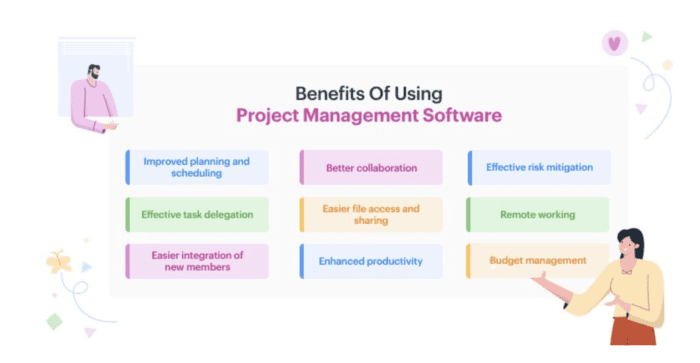
Whether you’re building an app on your own or hiring a team of ten developers, project management software is a must-have. It’s the only way to stay organized, track progress, and keep everyone on the same page.
Your development method will ultimately impact the type of software you should be using here. For example, if you’re using a no-code app builder, you can use a solution like Trello or Asana. But if you’re coding the app from scratch with a development team, you’d be better off with a solution like Jira Software.
In addition to the team collaboration features within a project management solution, you may decide to use a tool like Slack for communication as well.
Once you have these preliminary things in order, you can move forward with actionable steps.
How to Build an App — Getting Started in 5 Days
Everyone has different app ideas. Whether you’re launching free apps on the Apple App Store, paid apps on the Google Play Store, or planning to build the next killer app that’s downloaded by tens of millions of app users worldwide, everyone starts from the same place.
Below you’ll find a five-day sequence of steps to follow. This will help you build momentum, and you can use it as a preliminary app development checklist.
Most apps fail in the early stages because the project owner doesn’t have a concrete plan of action. But with this sequence below, your first week is completely outlined for you:
Day One Steps
Anytime you create an app (or any type of software development for that matter), it means you’re starting a business. So you need to treat your app business the same way you would any other type of new startup.
With that in mind, these are the actionable steps you need to take on day one:
- Define the target audience and potential customers for your mobile app business.
- Create a value proposition or unique selling point to show how your app will benefit the target users.
- Decide what platforms your app will be available on (iOS platform, Android, web app, etc.).
- Come up with a monetization strategy. How will your app make money? (will you offer in-app purchases, have a paid app and a free version, generate app sales through a product or service, etc.)
- Identify the key resources you need for your app to work properly after it launches. For example, do you need push notification servers or authentication servers?
- Identify necessary integrations that your app needs (third-party GPS apps, databases, etc.).
- Assess the costs involved with your mobile app business.
Everyone will have different answers to these questions. But it’s important for you to take the time and understand the best course of action for your specific app.
Using an app maker like BuildFire will really make your life easier when it comes to the steps above. That’s because our platform has everything you need to create, launch, and maintain your app are built-in on the backend.

You won’t have to worry about servers running on the backend or struggling to write custom code for third-party integrations. BuildFire has all of those capabilities out-of-the-box.
Plus, our cost structure is much more affordable compared to traditional development.
Additional Resources:
Day Two Steps
Next, you can start to focus a bit more on the development process itself. Here are the actionable steps you need to take for your new app on day two:
- Look at similar apps on the market and compare your app idea to these other apps.
- Research prototyping tools that you’ll need to map out your app design and architecture.
- Look back at the core features you defined during the preparation stage and use that to think about your minimum viable product.
- Outline your fastest past to launch, with the fewest barriers to entry. Focus on what’s important, and all the features that aren’t in this category can be added in later.
- If you’re coding a native app from scratch, decide what programming languages you’re going to use.
The most important part of this day is getting a rough outline of what your MVP will look like. Focus on your core features here, and think about how your core features should look in the user interfaces.
Rather than starting from zero, you should consider using an app builder as an alternative to traditional development. Platforms like BuildFire have everything you need to design, develop, and launch your app.
| Aspect | Traditional Development | Using BuildFire |
|---|---|---|
| Development Timeline | Longer | Drastically Reduced |
| Development Costs | Higher | Lower |
| Need to Hire a Developer | Yes | No |
This drastically reduces your development timeline, lowers your development costs, and eliminates your need to hire a developer. The vast majority of the steps explained in this guide can be handled directly within the BuildFire platform.
For those of you who are seeking a bit more assistance and want custom development done for you, BuildFire Plus might be a better option for you to consider. This is our all-inclusive development service that includes planning, design, wireframing, competitive analysis, strategy sessions, and so much more. Request a free consultation to get started.
Frequently Asked Questions
Where do I start if I’ve never built an app?
Start with preparation, not code. Most people with a great idea get stuck on the same questions — whether to hire a developer or a company, and when to begin market research — and this guide works through them across a five-day plan.
Can I really make progress on an app in five days?
The guide breaks getting started into day-by-day steps precisely so the process feels manageable rather than intimidating — the goal of the first days is preparation and direction, not a finished app.
Should I hire a developer or an app development company?
It depends on your budget and how much support you need. The guide walks through both options so you can decide before committing, rather than defaulting to whichever you found first.
What’s the biggest mistake first-time app builders make?
Not knowing where to start and stalling. Turning an idea into reality is intimidating for people who’ve never done it, so having a clear day-one plan is what gets projects off the ground.