

Push Notifications
One of the most significant advantages of a mobile commerce app is the ability to stay in contact with your customers. Communication is limited on a Shopify web store on its own. Right now, you’re probably relying on email to reach shoppers. But lots of factors need to go your way in order for an email campaign to be successful. First, you need to turn website visitors into email subscribers. That’s easier said than done. It usually requires a visitor to take at least a couple of steps to complete the process. If someone buys a product from your Shopify store, you might give them an option to automatically opt-in to emails, but some customers won’t go for that. Once someone joins your email list, communication still isn’t promised. Your emails need to be delivered and opened by the recipients. Considering the average person receives 121 emails per day, there is no guarantee that this will happen. That’s where push notifications come into play. To communicate with customers via push notifications, all they need to do is download your app from the app store. In terms of engagement, push notifications beat emails in every category.)
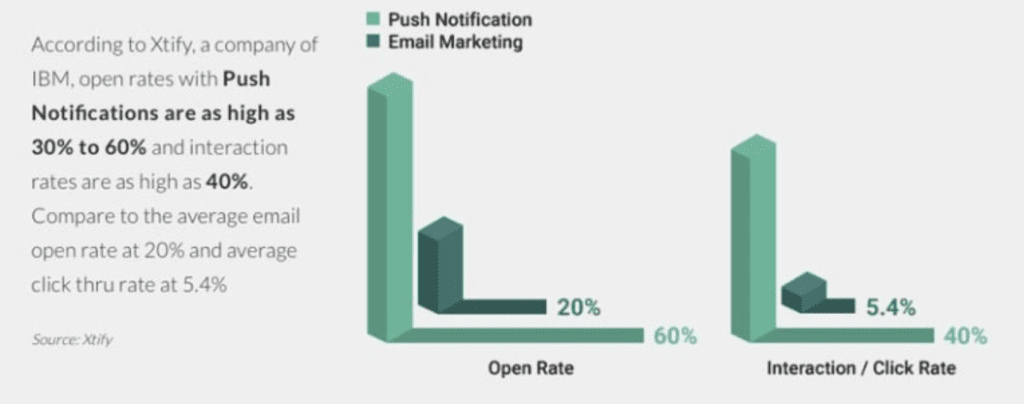 That’s because push notifications appear on a user’s mobile device similar to a text message. The chances of them reading it and opening the message are much higher than a promotional email buried in someone’s inbox.
While you should definitely be using push notifications to drive Shopify sales, just make sure you do so with caution. Sending too many messages can be annoying, and it’s one of the reasons why users mute push notifications.
As a Shopify store owner, you should only send push notifications that add real value to app users.
That’s because push notifications appear on a user’s mobile device similar to a text message. The chances of them reading it and opening the message are much higher than a promotional email buried in someone’s inbox.
While you should definitely be using push notifications to drive Shopify sales, just make sure you do so with caution. Sending too many messages can be annoying, and it’s one of the reasons why users mute push notifications.
As a Shopify store owner, you should only send push notifications that add real value to app users.
- Flash sales
- Discount codes
- Delivery notifications
Loyalty Programs
Loyalty programs are one of the best ways to retain your customers. A loyalty program gives people an incentive to spend more money and increase their shopping frequency. Both of these metrics will boost sales of your Shopify store. Can you have a customer loyalty program without a mobile app? Absolutely. But an app will really take your program to the next level. Here’s why. For starters, it’s unlikely that your customers will visit your website on a daily basis. Even your best customers may only online buy from your Shopify store once or twice per month. They probably aren’t eager to check their loyalty status if they need to land on your website, log in, and navigate to their customer profile. So the program almost becomes an afterthought. However, your customers use their phones every day. Your app is just a click away at any given moment. This makes it easy for them to track their status and gives them an incentive to reach the next level. Take a look at some of the top reasons why people continue to participate in loyalty programs.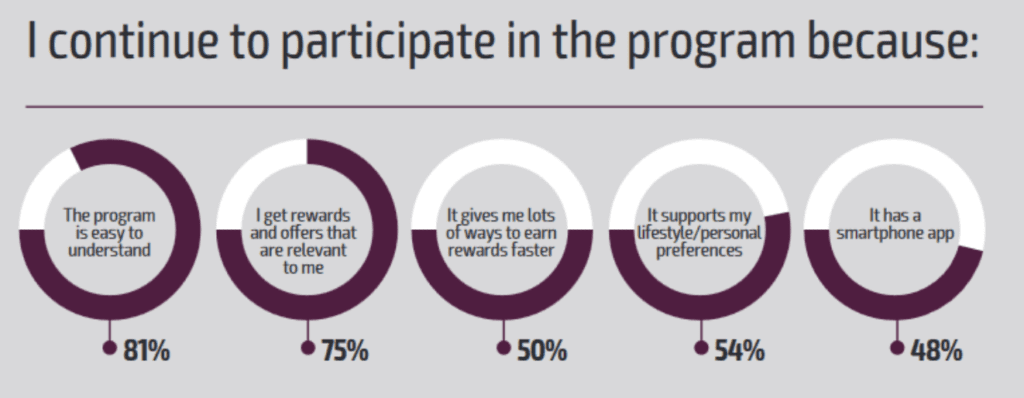 Nearly 50% of people said that they participate because the program is accessible through a mobile app.
If you look at all of the top mobile commerce apps on the market today, they all have customer loyalty programs. A simple mobile app builder, like BuildFire, has plugins that provide customer loyalty functionality for native mobile apps. This will be an easy way for you to drive customer engagement.
I recently wrote an article about Sephora’s app and customer loyalty program. They took an old loyalty program and revamped it to drive sales and conversions on their app. You can follow their lead and take the same approach for your eCommerce app. Alternatively, you can create a loyalty program with full customization.
Nearly 50% of people said that they participate because the program is accessible through a mobile app.
If you look at all of the top mobile commerce apps on the market today, they all have customer loyalty programs. A simple mobile app builder, like BuildFire, has plugins that provide customer loyalty functionality for native mobile apps. This will be an easy way for you to drive customer engagement.
I recently wrote an article about Sephora’s app and customer loyalty program. They took an old loyalty program and revamped it to drive sales and conversions on their app. You can follow their lead and take the same approach for your eCommerce app. Alternatively, you can create a loyalty program with full customization.
Flexible Payment Options
With a mobile app, you can give your customers more choices when it comes time to collect payments. Don’t assume that everyone buying from your Shopify store has Visa or Mastercard. You need to offer as many different payment options as possible. This will improve your conversion rates at checkout. More than half of all checkouts on Shopify come from a mobile device.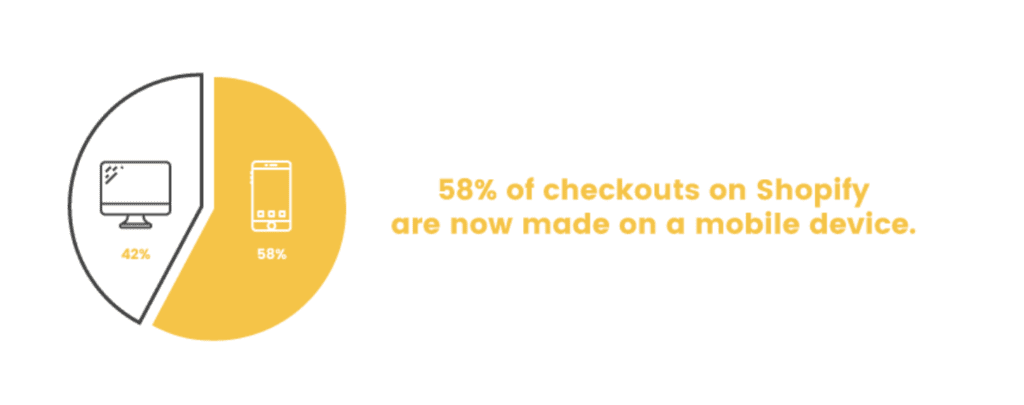 But 30% of mobile shoppers won’t complete the purchase process if the experience isn’t optimized for their device. An app is by far the best way to optimize mobile checkouts.
If you create an app for your Shopify store, it’s much easier for you to add different payment options to accommodate the preferences of mobile shoppers.
But 30% of mobile shoppers won’t complete the purchase process if the experience isn’t optimized for their device. An app is by far the best way to optimize mobile checkouts.
If you create an app for your Shopify store, it’s much easier for you to add different payment options to accommodate the preferences of mobile shoppers.
- All major credit cards
- All debit cards
- Gift cards
- PayPal
- Venmo
- Apple Pay
- Google Pay
One-Click Purchasing
This piggybacks off my last point in terms of speed and optimization in the checkout process. Mobile apps have changed the way people shop with one-click purchasing. Think about your current checkout process. What steps does a customer need to take if they want to buy something? I’m guessing the process looks something like this:- Find product
- Add product to cart
- Navigate to cart
- Enter name
- Provider contact information (email, phone number)
- Enter email address
- Provide billing information
- Enter shipping information
- Finalize checkout
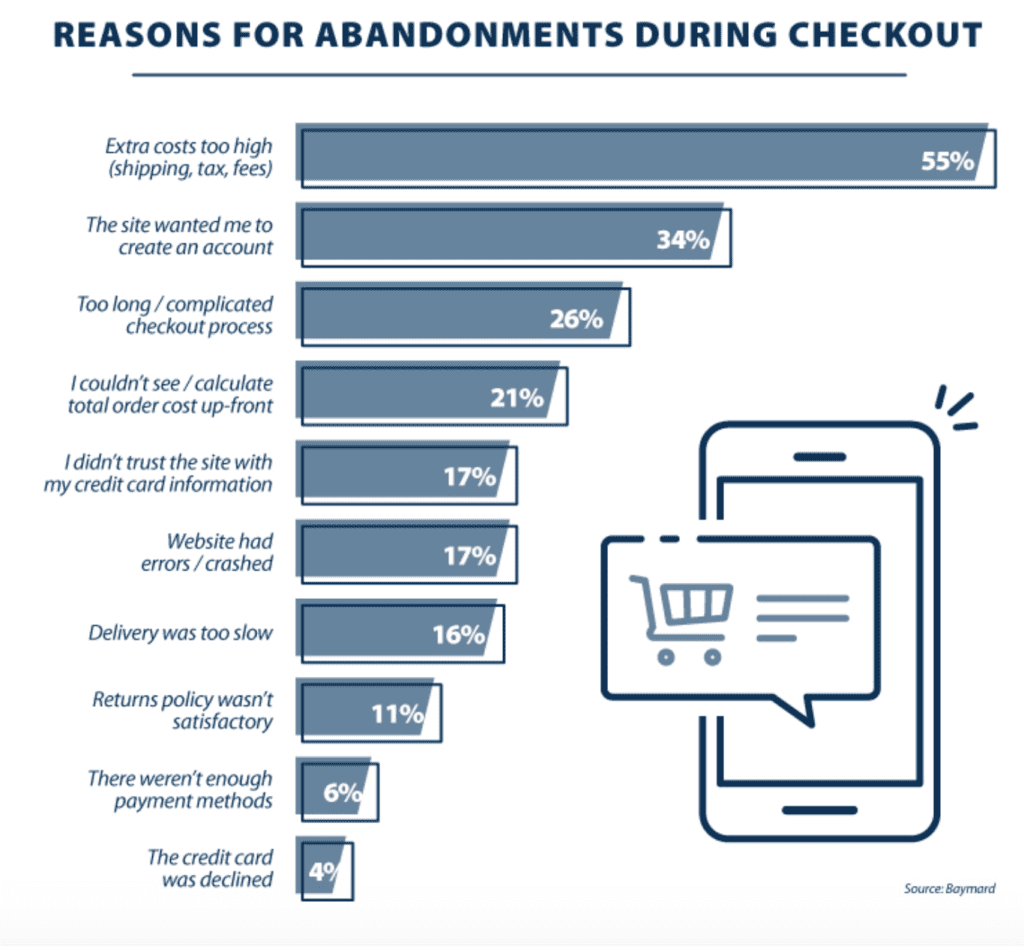 Aside from the cost, the two most common pain-points were related to speed and optimization.
34% of customers abandon their purchase because the site forces them to create an account. So while you may be able to eliminate some of those steps in the future by having your customers create an account today, one-third of them still won’t convert.
26% of shoppers don’t buy because the checkout process is too long and complicated.
Imagine that. Someone wants to buy what you’re selling. They add it to their cart but decide that it’s too much of a hassle for them to buy it.
The solution is simple—one-click purchasing with a mobile app.
Amazon was the pioneer behind this trend. But it’s now widely used by eCommerce retailers worldwide. All you need to do is put some form of a “Buy Now” button directly on your product pages.
This skips the complicated checkout and need for customers to enter tons of information into form fields, which is a hassle from mobile devices. Users will already have their name, contact info, shipping details, and payment method saved on their customer profile within the app.
Checkouts can be completed in a matter of seconds, which will increase your conversion rates and decrease abandonment rates. You could even use this technology to experiment with your pricing strategy.
Aside from the cost, the two most common pain-points were related to speed and optimization.
34% of customers abandon their purchase because the site forces them to create an account. So while you may be able to eliminate some of those steps in the future by having your customers create an account today, one-third of them still won’t convert.
26% of shoppers don’t buy because the checkout process is too long and complicated.
Imagine that. Someone wants to buy what you’re selling. They add it to their cart but decide that it’s too much of a hassle for them to buy it.
The solution is simple—one-click purchasing with a mobile app.
Amazon was the pioneer behind this trend. But it’s now widely used by eCommerce retailers worldwide. All you need to do is put some form of a “Buy Now” button directly on your product pages.
This skips the complicated checkout and need for customers to enter tons of information into form fields, which is a hassle from mobile devices. Users will already have their name, contact info, shipping details, and payment method saved on their customer profile within the app.
Checkouts can be completed in a matter of seconds, which will increase your conversion rates and decrease abandonment rates. You could even use this technology to experiment with your pricing strategy.
Referrals
Lots of eCommerce businesses have some type of referral program. But not all of those programs are successful. The best way to implement a customer referral program is with a mobile app. Here’s why. First, you need to offer an incentive for your customers to recommend your brand to other people. Monetary benefits will likely be the most successful. Something along the lines of a “give $20, get $20” campaign usually does the trick. Obviously, you can customize this to fit with your brand image. Once the promotion is determined, you need to figure out how customers are going to share the offer with their friends. Without an app, this is complicated. From a website, users will be forced to manually enter the names, phone numbers, or email addresses of people who they want to refer to. That’s not very practical, and most people will probably skip it. Here’s the thing. The majority of customers are willing to give referrals, but only a fraction of them actually do it.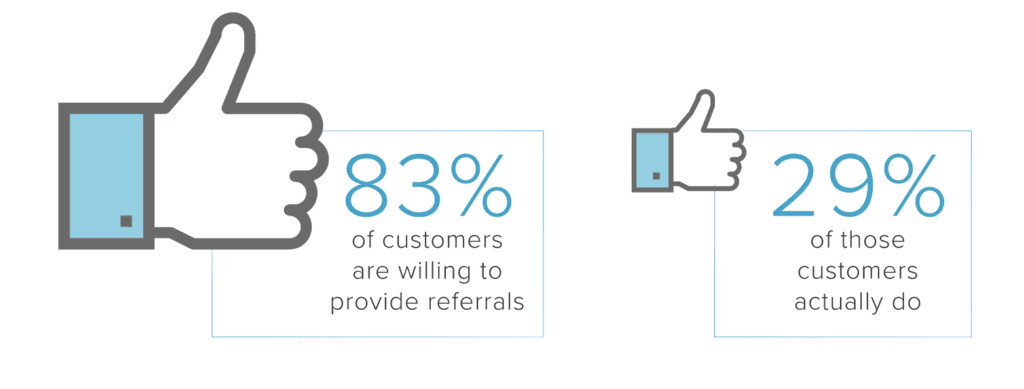 Mobile apps make it much easier for users to give referrals because an app can integrate with a user’s contact list. All they have to do is select the names of people that they want to refer.
App development ultimately increases the chances that customers will send out mass referrals.
Mobile apps also integrate with social media platforms, so your customers can share promo codes directly on their profiles as well.
At the end of the day, optimizing your referral program can drive a considerable boost in your sales. 92% of consumers trust recommendations from someone they know. So if a friend tells them about your brand, there is a good chance they will at least check you out.
That’s not all. A customer who has been referred to your brand is up to five times more likely to refer new customers. So you’re also boosting customer retention.
This will create a constant cycle of new referrals, which keeps your customer acquisition costs low and ROI high.
Mobile apps make it much easier for users to give referrals because an app can integrate with a user’s contact list. All they have to do is select the names of people that they want to refer.
App development ultimately increases the chances that customers will send out mass referrals.
Mobile apps also integrate with social media platforms, so your customers can share promo codes directly on their profiles as well.
At the end of the day, optimizing your referral program can drive a considerable boost in your sales. 92% of consumers trust recommendations from someone they know. So if a friend tells them about your brand, there is a good chance they will at least check you out.
That’s not all. A customer who has been referred to your brand is up to five times more likely to refer new customers. So you’re also boosting customer retention.
This will create a constant cycle of new referrals, which keeps your customer acquisition costs low and ROI high.
Location-Based Promotions
The most successful promotions are relevant. You might be offering a great deal or discount, but if it’s not closely connected or appropriate for your customers, then it’s useless. Earlier we discussed push notifications as a way to send offers to mobile app users. This is a benefit that you won’t get with a website alone. You can use your Shopify mobile app to leverage geofencing technology to deliver relevant promotions. Let me explain how this works. You can set up your app to integrate with the GPS on iOS and Android devices. So when a user enters a predetermined barrier within a location, you can automatically send them a push notification with a relevant offer. Let’s say one of your customers enters the lobby of a ski resort. You can instantly send a notification to their iphone about cold-weather gear. If a user walks by the beach, send them an offer for discounted sunscreen, sunglasses, or bathing suits. You get the idea. In addition to push notifications, you can also use a customer’s location to personalize the content they see when browsing on your Shopify app. For example, let’s say a customer with your app is located in Miami. It doesn’t make sense for snow boots to appear on their homepage. Using location-based services can improve the user experience and deliver relevant promotions in real-time. This increases the chances that mobile users will buy from your Shopify store app.Improve Customer Convenience
Every decision you make to improve your Shopify store needs to be based on the customer. Even if something is a bit more challenging or strenuous on your end, you can always make it work if it’s what the customer prefers. At the end of the day, customers prefer mobile apps over mobile websites.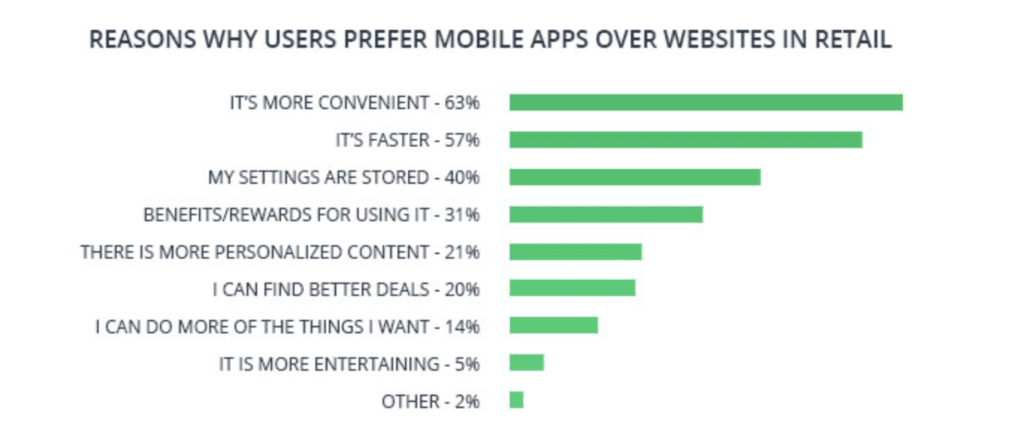 The number one reason why customers like apps better than websites for retail purchases is convenience. Beyond that, the other top benefits on the graph above are related to:
- Speed
- Stored settings
- Benefits and rewards
- Personalized content
- Better deals
Enhanced Customer Service
Let’s continue talking about how the app benefits your customers. In addition to making things more convenient for people, a mobile commerce app allows you to provide better customer service. Customers can track the status of an order directly in the app once they complete the purchase process. They’ll see updates on when the order has shipped, and have access to the tracking information as well. You can even send them a notification when the shipment has been delivered. Without an app, tracking a delivery can be a pain. You’re forced to send a separate email with the third-party tracking number. Customers must open that email, copy the number, open a new tab for the carrier’s website, paste the number, and then search for it. This isn’t practical. But from an app, they can view the status of an order and shipment in just seconds with a couple of clicks. Beyond that, you can also offer enhanced customer support directly in the app. If a customer has a question, your app can facilitate live chat with a customer service representative. Customers can submit inquiries or start support tickets within the app as well. Obviously, you don’t want to encourage customer returns. But with that said, returns are just part of being in the eCommerce business. So you might as well make them as easy as possible for your customers. Follow the example of successful retail giants in the eCommerce space. Amazon uses its app to facilitate simple returns by generating a QR code. Customers just have to bring the item to a shipment center or UPS store and get the code scanned directly from the app.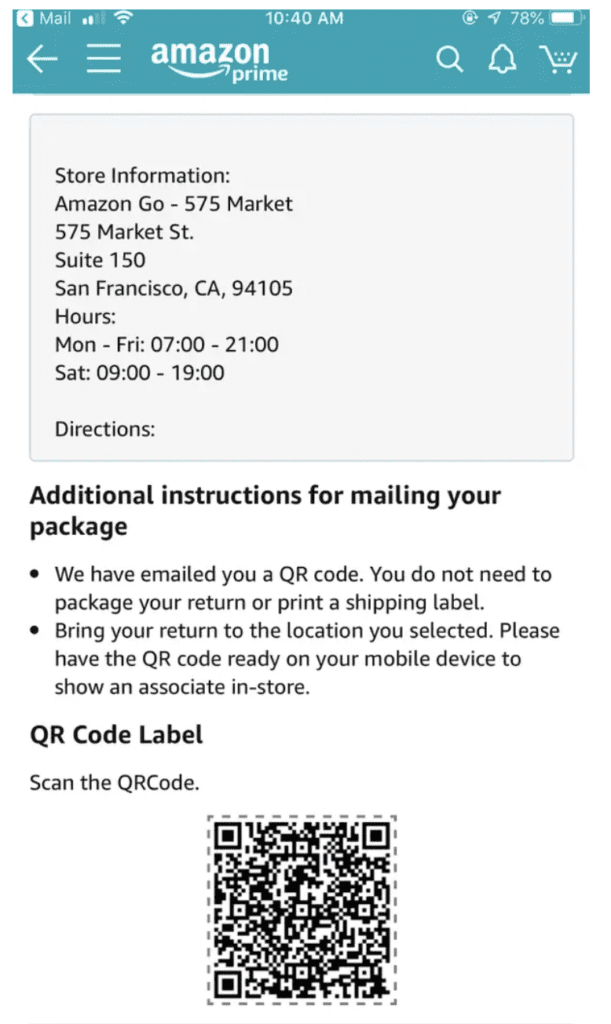 The customer doesn’t have to worry about printing labels or packaging anything. They just bring the item and smartphone to a shipping center. Returns don’t get much easier than that.
If your return process causes headaches for your customers, then they probably won’t buy from you again. But if you make this process simple, people will still be willing to buy from your Shopify store in the future, even if they weren’t satisfied with their initial purchase.
The customer doesn’t have to worry about printing labels or packaging anything. They just bring the item and smartphone to a shipping center. Returns don’t get much easier than that.
If your return process causes headaches for your customers, then they probably won’t buy from you again. But if you make this process simple, people will still be willing to buy from your Shopify store in the future, even if they weren’t satisfied with their initial purchase.
Personalization
We briefly talked about this earlier when discussing payment methods and location-based promotions. But personalization is worth mentioning again on its own. 63% of customers want personalized recommendations from retailers. App development is the best way to give people exactly what they need. Apps make it easy to leverage AI technology. This type of technology will monitor the actions of users as they interact with your app. Based on their browsing behavior and purchase history, your app can automatically recommend relevant products to each unique customer. When a customer sees a relevant product suggestion, it increases the chances that they’ll buy it. Personalized recommendations are a great way to upsell and cross-sell mobile app users. Either way, the end result will be an increase in your total sales.Augmented Reality
Augmented reality is another top trend in the technology world. This may not be for everyone, but some of you can definitely benefit from using AR to drive sales on your mobile app. Here’s how AR works. The app uses the device’s camera to project potential purchases in real-world scenarios on the screen. IKEA uses this feature to help its app users determine how furniture will look in their actual homes. So if you’re selling anything that belongs in someone’s home, such as lamps, paintings, or wall hanging items, you could use this technology.
There are other ways to get creative with AR as well.
Let’s say your Shopify store sells custom clothing. You can use a mobile app to help create a specialized, tailored fit for your customers. AR can get a person’s measurements without needing to see an actual tailor.
The technology behind these features is a bit complex, but the opportunity is still there.
So if you’re selling anything that belongs in someone’s home, such as lamps, paintings, or wall hanging items, you could use this technology.
There are other ways to get creative with AR as well.
Let’s say your Shopify store sells custom clothing. You can use a mobile app to help create a specialized, tailored fit for your customers. AR can get a person’s measurements without needing to see an actual tailor.
The technology behind these features is a bit complex, but the opportunity is still there.
Conclusion
Even if your Shopify store is doing well right now, it hasn’t reached its full potential if you don’t have a mobile app. The majority of Shopify sales come from mobile devices. So if you can’t adapt to this trend now, it could create big problems for your eCommerce business in the future. A mobile app gives you more opportunities to drive sales than a website ever could. You’ll be able to communicate with your customers using push notifications and location-based promotions. Loyalty programs and referrals are easier to implement on an app as well. Apps optimize the checkout process and make it easy for customers to buy using their preferred payment method. You’ve already made the right choice by using Shopify to power your eCommerce platform. Now it’s time to take that strategy to the next level by building a mobile commerce app. If you want to increase Shopify sales, use BuildFire’s app development solution for your eCommerce store.Frequently Asked Questions
What are the benefits of having a mobile app for my Shopify store?
A mobile app can improve customer experience, increase conversion rates, and offer more payment options.
How does a mobile app optimize the checkout process?
An app streamlines the checkout process, reducing steps and making it easier for customers to complete purchases.
Can I track orders through a mobile app?
Yes, customers can track their orders directly in the app, receiving updates and notifications.
Does a mobile app support customer service?
Yes, apps can facilitate live chat and other customer support features directly within the app.
What payment options can be integrated into a mobile app?
Mobile apps can support various payment methods, including credit cards, digital wallets, and more.