

The short answer: Match Maker is a Buildfire plugin that matches two different groups inside your app — for example, tutors and students, headhunters and talent, or pet owners and adopters, but really any two sides that need to find each other. You define both sides and their profile fields yourself, and your users swipe left and right, Tinder style, until they get a match.
Match Maker is the newest addition to the Buildfire plugin family, and it’s available in the marketplace today.
At its core, the plugin matches two different groups inside your app — tutors and students, headhunters and talent, pet owners and adopters — any two sides that need to find each other. And you define both sides entirely yourself.
How it works
Every profile is built dynamically by you, the app owner. The plugin ships with a reusable Field Library where you create profile fields on the fly — nine field types, from complex ones like Numbers and Selection to simple ones like Date and Text.
Once your fields are built, you assign them to sides. Match Maker ships with two sides by default — asymmetric matching requires two sides at all times — and each side gets its own fields and customizations.
For your users, the experience is instantly familiar: they set up their profile and start swiping left and right — Tinder style — until they get a match. And the moment a match happens, a match screen pops up and the other member gets a push notification — connect Buildfire’s Chat plugin, and the two can take it straight into a one-on-one conversation.
Match Maker was designed from day one to fit a wide range of business requirements. It can be the anchor of your app — the core feature everything else supports — or one piece of a bigger product.
So what can you actually build with it? Here are the seven trendiest app ideas you can start building right now.
1. Tutors and students
Students these days can be picky. They might prefer a tutor with a certain background or specific characteristics. Personally, when I want to learn a foreign language, I prefer native speakers to teach me. My perfect match is a tutor who is a native speaker of the language I’m learning and speaks my mother tongue — that’s when learning a new language feels truly comfortable.
Match Maker was built to filter on exactly these criteria. Tutors go on one side (side A), students on the other (side B). Categories can list the languages a tutor teaches or a student wants to learn — or, for a broader app, the topics a tutor specializes in: Marketing, Data Science, Teaching & Academics, and so on.
Fields then layer in the finer preferences. Add a Selection field on the tutor side for the languages they speak. A student can now filter the swipe deck by the language they want to learn (category) and, if they’d rather be tutored in their mother tongue, by the languages the tutor speaks (Selection field).
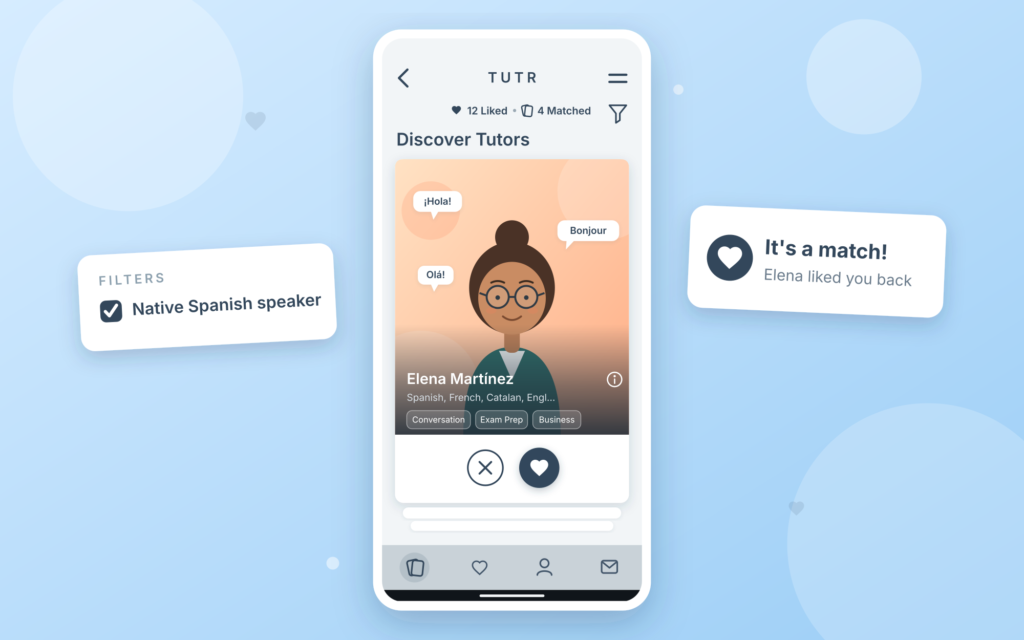
Monetization tip: enable in-app purchases so users pay before accessing Match Maker — and in some cases, it’s wise to charge only one side. That’s easy to set up: mark one side’s tag (say, “app-students”) to bypass the purchase, and everyone else pays. In this example, students already pay tutors after connecting (outside the plugin), so tutors are the natural revenue source — a fixed monthly subscription for access, while students swipe for free.
2. Talent and headhunters
What’s better than a fun way to get hired — or to hire?
Most of the ideas in this list aren’t things I’ve seen elsewhere, and this one might sound strange at first. But think about it: a headhunter browses talent, opens a card, gets a CV-like preview in one click, and swipes right to signal interest — instead of writing a long email or yet another LinkedIn message. Isn’t that better? The same goes for the talent side, where candidates browse the companies they’d love to work for without any hassle.
Filtering plays a critical role in this type of app, and to your advantage, Match Maker’s filter is built dynamically too. Four field types can be added to the filter with one click: Date, Number, Selection, and Categories.
For example: add a Number field for expected salary — ranges are supported — assign it to the talent side, mark it as required and filterable, and you’re done. A candidate enters their target range, say 60k–70k, and a headhunter uses the filter to find talent within the budget they’re offering. Amazing, isn’t it?
3. Travel buddies
A few apps already exist in this space — but none of them deliver the fun of swiping to get matched.
Many people would appreciate some company when traveling. Travel is a true joy, and the experience shifts entirely when you share it with a buddy you like — someone who wants the same things from the trip that you do.
Fair question, though: Match Maker requires two asymmetric sides, and swiping always shows you the opposite side — yet here, users are looking for people in the same group. How does this work? Two working workarounds:
A. Find the hidden asymmetry (recommended)
Many “same group” ideas conceal a natural two-role split, and the product is usually better when you surface it. Travelers become Trip hosts and Joiners: one side posts a planned trip — destination categories, dates, budget — and the other browses trips to join. This uses the plugin exactly as designed: genuinely different forms per side, meaningful filters in both directions, and natural self-selection at registration. The built-in limit — two hosts can’t match — is usually correct product behavior, not a loss. The same pattern applies elsewhere: ride-sharing splits into offering and seeking, sports into teams-seeking-players and players-seeking-teams.
B. Mirrored halves (pure peer matching, no roles)
Configure both sides identically: the same side name (“Travelers” on both — the header simply reads “Discover Travelers” for everyone), the same intro, the same fields from the shared library, the same categories block, and the same Required / Show-on-card / Filterable toggles. Then split your user base into two balanced halves via tags, using any arbitrary binary: birth month odd/even, surname A–M/N–Z, a Questionnaire answer, or assignment through user management or import. Since the widget never exposes sides beyond their names, identical naming makes the split completely invisible to end users — filters, the match screen, shortlist, chat, and push notifications are all side-agnostic and just work. One trade-off to know: with an arbitrary split, two users who land in the same half will never see each other, so roughly half of all possible pairings are off the table.
4. Volunteers and communities
Personally, I prefer volunteering in specific fields — helping street animals, or teaching my craft without expecting anything in return — and I prefer doing it on a non-working day like Saturday. On the other side, community members who need assistance might prefer volunteers with certain backgrounds or skills, within a certain age range, or in specific areas. Match Maker is the way — and the setup is straightforward.
5. Recreation clubs: tennis, golf, and climbing partners
Has it ever happened that you’re looking for a golf caddie in your area to help with certain duties? Or a partner for a Padel game? Pairing club members seeking tennis, golf, or climbing partners is exactly the kind of product where Match Maker shines.
6. Pet adoption
I love this one. Owners who put a pet up for adoption are usually sensitive about who takes them in. And chances are the adopter is looking for something specific too — maybe they like dogs more; what about breed, or age? Every one of these requirements can be configured by you, and users lean on the plugin’s filter to find the perfect pet — or the perfect new owner.
7. E-sports and gaming partners
Console or PC, millions of players are online — and every game gets more fun when you play with buddies. But sometimes your friends list is empty and there’s no one to play with. An app that matches you with players of the same games you play would be great — and now it’s a straightforward build.
A note on member privacy
Profile fields exist to be seen. Everything a member enters into their Match Maker profile is visible to other app users who browse them — on the swipe card, on the full profile, and through filters. Unlike your app’s registration form, where you control the privacy of each field, profile fields in the plugin cannot be made private. Be thoughtful about what you ask members to share: avoid sensitive information such as government IDs, financial details, or home addresses, and stick to details members would be comfortable showing publicly.
Start building
Match Maker is live in the Buildfire marketplace. Install it, open the Field Library, define your two sides — and let your users start swiping.