
Coming up with new ways to generate money for your mobile app can be tricky.
Before you started to develop your app, I’m sure you came up with a plan for your company to make money.
Well, not everything always goes according to plan.
Some of you may be in a position where you need to find another income stream outside of your in-app purchases or advertisements.
Key Takeaways
- Revenue Diversification: Auto renewable subscriptions offer a new income stream beyond in-app purchases and ads.
- Subscription Appeal: Automatic billing is convenient for users and beneficial for app operators.
- Apple’s Challenges: Setting up subscriptions on iOS can be complex due to Apple’s guidelines.
- Successful Models: Streaming services like Spotify and Hulu demonstrate the effectiveness of this model.
- Implementation Steps: Use iTunes Connect to set up and manage your app’s auto renewable subscriptions.
Even if you’re currently running a successful app that’s profitable, you should be ambitious and try to squeeze every dollar you can out of your business.
Auto renewable subscriptions are a great way to generate revenue, regardless of your current situation.
This could even be a strategy for those of you who are still in the pre-launch stages of development and you’re brainstorming monetization strategies before your app goes live.
But if you’ve never done this before, it may seem intimidating.
You’ve heard of auto renewable subscriptions and have a basic understanding of how they work, however, you’re not quite sure where to get started.
Well, you’re in luck.
I can provide you with the resources and advice to help you implement this strategy to your mobile app on the iOS platform.
Let’s start with the basics.
Think of an auto renewable subscription like a membership.
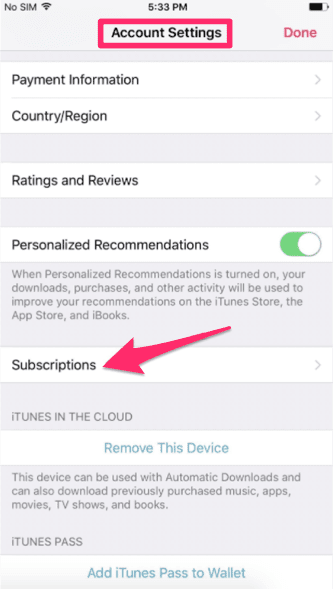
Apple users can review their subscriptions in the “Account Settings” on their devices.
Do you go to the gym? If so, you’re probably paying a monthly fee that’s automatically charged to your credit card.
The same concept applies here.
Rather than the customer having to complete a transaction every month, quarter, year (or whenever timeline you’re on), they get billed automatically.
That’s why this is so appealing to mobile app operators.
Really, you only have to get someone to sign up once.
After that, you collect money until the customer cancels their subscription, which hopefully doesn’t happen.
As long as your app is running efficiently and you prioritize the user experience, your customers shouldn’t cancel.
With that said, Apple makes it hard for businesses to run subscriptions on their platform, whether they are auto renewable or otherwise.
Here’s what you need to know before you dive in.
What Apple considers products
Apple has guidelines for in-app purchases.
They group these purchases into four different categories.
- Consumable
- Non consumable
- Auto renewable subscription
- Non renewing subscription
Consumable purchases are simple to understand.
If there’s an app that allows users to create a farm, users could purchase something like fertilizer to make their crops grow faster.
A non consumable product is a little bit different. It won’t expire or deplete after it gets used.
For example, let’s say you have a motorcycle racing game.
New race tracks or racing venues available for purchase would be considered a non consumable product.
Auto renewable subscriptions let the user buy content for a set period of time. The order gets renewed automatically until the user cancels it.
If a user buys a service that has a limited duration, it’s considered a non renewing subscription.
So for example, you may buy access to a certain radio station for a year, but after those 12 months, you would have to buy your subscription again.
What types of apps can use auto renew
Apps that provide streaming services are a great example of auto renewable subscriptions.
For example, let’s review an app like Spotify.
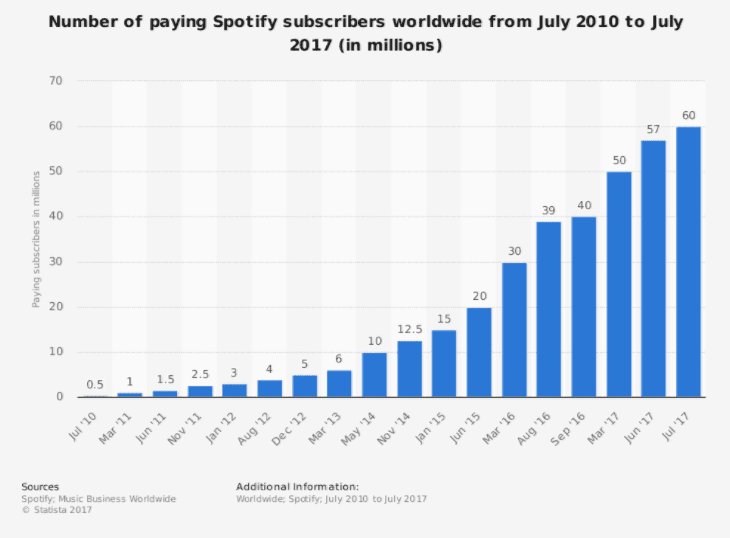
Take a look at how this company has grown in the last seven years.
This business model works.
As you can see from the data above, they’ve had an increase in users every year.
That’s amazing.
For those of you who aren’t familiar with Spotify, it’s a music app.
Users have access to songs, artists, playlists, albums and more.
They’ve got a free subscription that allows users to listen to songs on shuffle.
But they won’t be able to do things like:
- listen to music when they are offline
- have an advertisement free experience
- get high quality audio
- skip songs
- play any song
But for $9.99 per month, they’ll have access to all of these premium features.
Spotify even entices prospective customers to try their premium service at a discounted rate.
They offer the first three months at only $0.99 per month before switching it $9.99.
Do the math. As of July 2017, they have 60 million users paying $10 per month.
Other streaming services like the Hulu app offer auto renewable subscriptions as well.
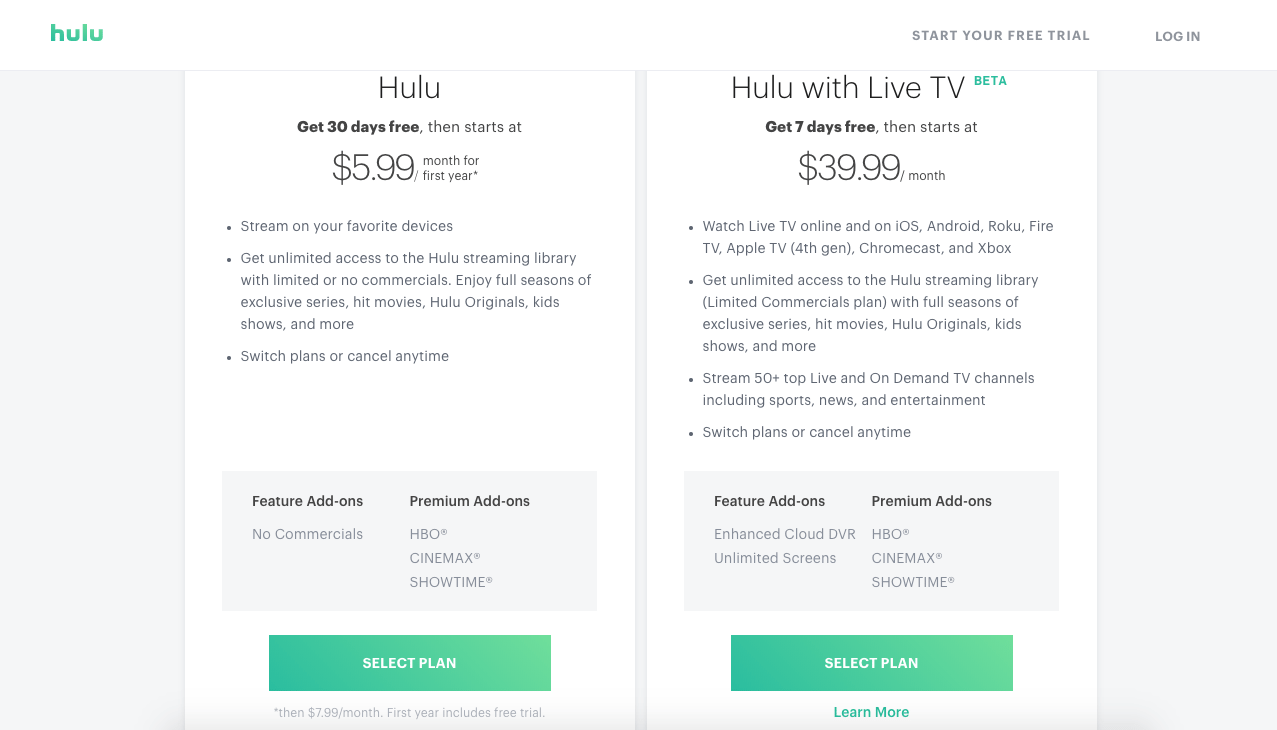
Their business model is similar to Spotify’s, except Hulu offers TV and video instead of just music.
They have different subscription options based on how much content you want access to.
Apple even offers their own auto subscription service with Apple Music.
You can try it out free for three months before paying $9.99 per month.
They also have a $4.99 per month and a $14.99 per month plan available for students and families, respectively.
But streaming services aren’t the only types of apps that have auto renewable capabilities.
Dating apps like Bumble and Tinder also have auto renew subscriptions.
People can use the apps for free but have the option to pay a monthly rate to get access to premium features.
Users can get things like unlimited matches, location changes, and the ability to use the app without being interrupted by advertisements.
Magazines and newspapers such as The Wall Street Journal have mobile applications that automatically charge users to read their content.
As you can see, there are definitely ways you can integrate this strategy into your app.
Just come up with some premium features and upgrades that users would be willing to pay for to enhance their experience.
How to set up an auto renew
To set up an auto renew for your app, you’ve got to sync up with iTunes Connect.
From here, administrators or app managers can sign in to make any changes.
If you’re running multiple apps on the iOS platform, all of them will appear on the homepage.
Click on the app that you want to alter.
Now you’ll need to go to “In-App Purchases” under the “Features” tab of this navigation.
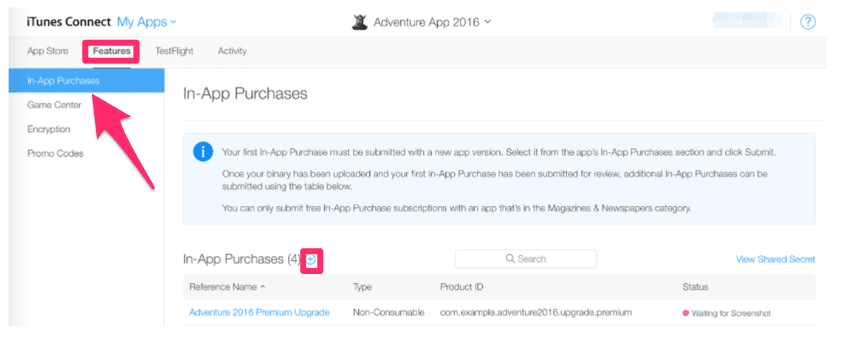
Click the “+” button, as I’ve highlighted above.
Now you’ll need to select which type of in-app purchase that you want to set up.
For our purposes, we’re selecting auto renewable subscriptions.
This will fall under a “New Subscription Group” after you click on the “Create” button.
You’ll also need to determine when you want the
Will you charge iOS users for a monthly or annual rate for their auto renewable subscriptions?
Frequently Asked Questions
How do auto renewable subscriptions increase app revenue?
Auto renewable subscriptions provide a steady income stream by automatically billing users at regular intervals.
What is the role of iTunes Connect in managing subscriptions?
iTunes Connect is essential for setting up and managing auto renewable subscriptions on iOS. It allows app managers to configure subscription options and monitor performance.
How can I ensure users don’t cancel their subscriptions?
To minimize cancellations, focus on delivering a high-quality user experience and continuously offer value through your app’s premium features.