

Push notifications are an essential marketing tool for anyone with a mobile app. It’s the best way to connect with your users, delivering important and time-sensitive messages directly to their mobile devices.
You can use push notifications to drive engagement, increase app usage, influence conversions, and so much more. The possibilities are truly endless.
But there’s definitely a right and wrong way to use push notifications, which is why I created this guide. Continue below to learn more about how push notifications work, why you should use them, when to use push notifications, and how to leverage them effectively.
Key Takeaways
- Effective Communication: Push notifications deliver messages directly to users’ mobile devices, ensuring high visibility.
- User Engagement: They are a powerful tool to drive app engagement and increase usage.
- Strategic Use: There is a right and wrong way to use push notifications, making strategy crucial.
- Comparison with Emails: Push notifications often outperform email marketing in terms of user action.
- Targeted Messaging: Automation allows for personalized messages based on user behavior and preferences.
What is a Push Notification?
Let’s start with the basics and definitions before we move into the high-level strategies of push notifications.
Elements of a Push Notification
A push notification is a message that’s delivered directly to the home screen of a mobile device.
Push notifications are superior to email and other customer communication methods because of the delivery. Similar to an SMS text message, pushes go straight to the smartphone user. This almost guarantees that they’ll see it the next time they check their phone or tablet.
When users download an app, they’ll usually opt-in to these messages by default. But the user ultimately has more control over how each notification gets delivered.
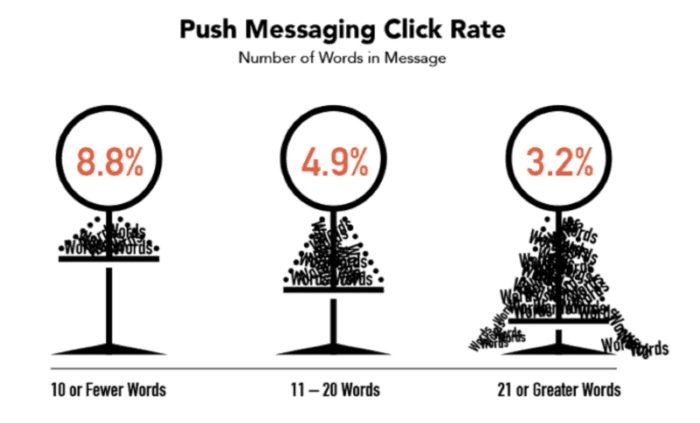
While push messages are similar to texts, there are also some significant differences you should be aware of. When users open a push message, they’re brought straight to the app. They don’t land on a screen where they can read the rest of the message. This means that the message must be short, ensuring the users can read everything in its entirety directly from the lock screen.
That’s one of the reasons why push messages with fewer words have a higher click rate:
Unlike emails and texts, push notifications can be sent without the user sharing any contact information. Assuming the user has notifications enabled on their device, app publishers can send them at any time.
Push Notification Functionality: How it Works
There are lots of moving parts behind the scenes for a message to pop up on a user’s notification center.
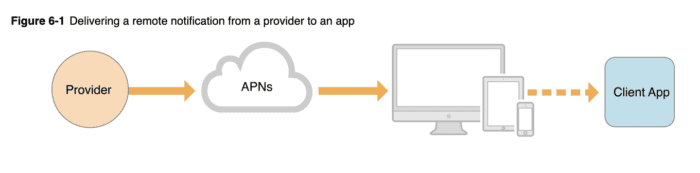
A push notification service specific to each operating system is the first requirement. Then the app publisher needs to enable the app with each service. The push services ultimately give the publisher an API (application programming interface) as a communication method with each service. From here, the publisher must add an SDK to their app, which is a code library for each operating system.
Apple Push Notification service (APNs) is one example of an OS-specific service. Here’s a visual representation of how it works:
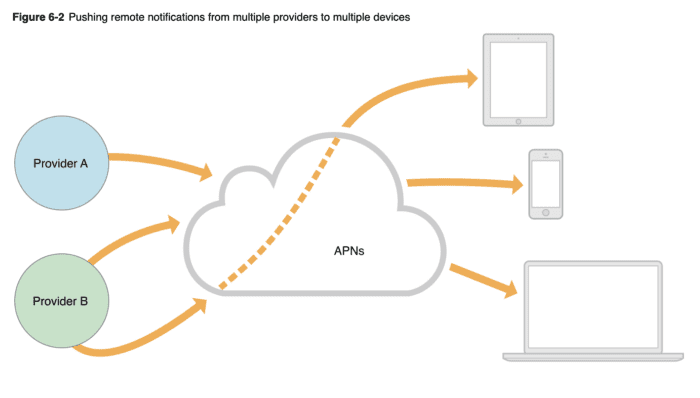
The process looks a bit different if you’re using APNs to send messages from multiple providers to multiple devices (like smartphones, tablets, and computers).
Beyond Apple, Google Firebase Cloud Messaging (FCM) is an example of a notification service for Android devices.
Once an app gets installed on a user’s device, incoming messages can finally get received.
Technical stuff aside, the basic concepts behind how this works from the publisher’s end is pretty straightforward. After you’ve been set up with a sending platform, it’s just a matter of drafting a new message, selecting the target audience, and sending the notification.
Why Do Apps Use Push Notifications?
There are countless benefits of push notifications. They increase open rates, keep users engaged, drive user retention, and ultimately enhance the user experience.
Think about the overwhelming amount of messages the average person sees on a daily basis. We’re constantly bombarded with TV ads, radio ads, billboards, social media ads, email ads—it’s never-ending. Most of those messages are of little interest to us.
But push messages are different. Users have already expressed interest by downloading a mobile application. This interest makes push notifications highly actionable.
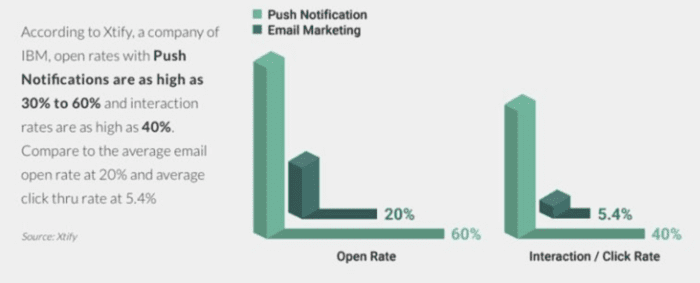
That’s one of the reasons why push notifications perform better than email marketing.
I’d like to quickly clear one misconception. Push notifications are not for user acquisition. Remember, the user has already downloaded the app. So campaigns surrounding acquisition wouldn’t relate to push notifications. Read this guide if you’re trying to get more people to download your app.
The great part about push notifications is the ability to target different users based on interests and intent. You can leverage automation to send targeted messages to the right people at exactly the right time.
For example, a user who just downloaded your app shouldn’t get the same message as an existing user who hasn’t used your app in a month. The former needs a welcome message, and the latter needs a nudge to come back.
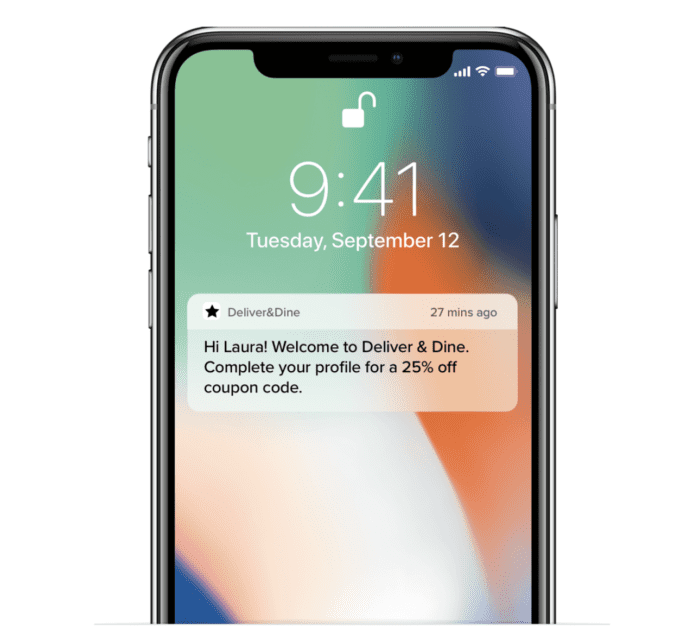
Here are some common types of push notifications for different apps:
- Promotional codes for discounts off next purchase
- Sports score updates
- Abandoned cart messages
- Send an alert for rideshare driver on the way
- Send an automated alert for food delivery arrival
- Triggered messages based on a location or action
- Reminder messages
- Breaking news updates
- Onboard a new user
As you can see, push notifications are really versatile. As an app owner, you’ll also have the ability to see data for your push messages. You can use that information to improve your campaigns moving forward. Tracking page visits to the promoted page, conversions, opens, and other KPIs will tell you which campaigns are working and which ones need improvement.
How Can Push Notification Campaigns Support My Business?
Now let’s dive into the nitty-gritty. Here’s where you’ll find the most important tips for high-converting push notifications.
Whether you’re targeting existing customers who are highly engaged or want to focus on users who are about to churn, the following strategies will help you nail every push notification campaign.
Provide Valuable & Relevant Content
If only two words cross your mind each time you craft a new message, make them “value” and “relevance.”
Is this message valuable? Is this m
You need to keep the user’s device and operating system in mind when you’re crafting push messages. There are differences between Android devices and Apple iPhones. There’s even a difference in the way Android users behave compared to iOS users.
| Aspect | iOS | Android |
|---|---|---|
| Text Limit | 170 characters | 65-character title and 240-character description |
| Notification Persistence | Disappears once the device is unlocked | Remains in the notification center until an action is taken |
Aside from Android messages being longer, they also appear differently on the screen:
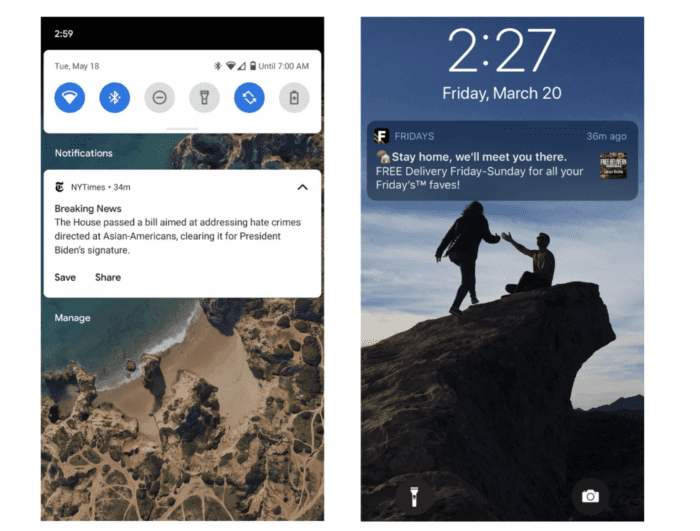
Even on the same OS, you’ll see subtle differences in push notifications between different software versions. The iOS 10.0 push notifications look different than the iOS 15.0 push notifications, even if they’re being sent to the exact same iPhone model.
Beyond the initial send, you need to be aware of differences between devices and OS for what happens after delivery.
With iOS notifications, the message disappears once the device is unlocked. But Android notifications remain in the notification center until an action is taken. Web push notifications in Chrome disappear when users leave that screen.
Understanding these subtleties between devices and OS is crucial for success. A message might not be performing well just because it’s too long for the device. It could have nothing to do with the intent of the campaign.
One way to combat this challenge is to segment users by device and OS. So your Android users will have different messages than iPhone users.
Ready to start sending push notifications to your app users? As previously mentioned, you need to set yourself up with a push notification service.
But if you’re using Buildfire to create your app, you can send and manage push messages directly from your admin dashboard.
As an app publisher, this will make your life ten times easier than going through a third-party.
| Feature | Buildfire | Third-Party Service |
|---|---|---|
| Message Management | Directly from admin dashboard | Requires integration |
| Automatic Push Sequences | Enabled | Depends on service |
| Location-Based Messages | Supported with geofencing | Varies by provider |
| Access to Analytics | Full access | May require additional setup |
In addition to crafting your messages directly from a simple dashboard, you can also enable automatic push sequences for different scenarios. Buildfire supports location-based messages with geofencing, and you’ll have full access to the message history and analytics.
Use Buildfire for activity-based notifications, drip notifications, messages for specific users, and custom user segments—the list goes on and on.
Buildfire is the easiest way to manage push notifications at every step of the user journey. Here are some helpful how-to articles from our knowledge base to get you started:
- Standard Push Notifications Tutorial
- On The Go Push Feature Tutorial
- Automatic Push Notifications Tutorial
- How to Send Push Notifications With Zapier
Frequently Asked Questions
- What are push notifications?
- Push notifications are messages sent by an app to a user’s device to engage them with timely information.
- How do I manage push notifications on Buildfire?
- You can manage push notifications directly from the Buildfire admin dashboard, allowing for easy message management and analytics access.
- What is the character limit for push notifications on iOS and Android?
- iOS allows up to 170 characters, while Android supports a 65-character title and a 240-character description.
- Can I send location-based push notifications?
- Yes, Buildfire supports location-based messages with geofencing capabilities.
- Why are my push notifications not performing well?
- Performance issues may arise from message length or device compatibility. Segmenting users by device and OS can help optimize delivery.
Frequently Asked Questions
How do push notifications increase app engagement?
Push notifications increase app engagement by delivering timely and relevant messages directly to users, prompting them to open and interact with the app.
What are the best practices for crafting push notification messages?
Effective push notification messages are concise, personalized, and actionable. They should provide value to the user and encourage interaction.
Can push notifications be used for user retention?
Yes, push notifications are excellent for user retention. By sending personalized messages based on user behavior, apps can re-engage users who have become inactive.
How do push notifications differ from SMS messages?
Push notifications differ from SMS messages in that they do not require the user to share contact information and are delivered directly through the app, often leading users back into the app for further engagement.
What role does user consent play in push notifications?
User consent is crucial for push notifications, as users must opt-in to receive them. This ensures that the messages are sent to an interested audience, enhancing their effectiveness.