
Enhancing Mobile App Accessibility for Broader Reach and Success
For your mobile app to be successful, you need to make sure that it can reach the widest possible audience. When more people have access to your app, it will boost your download rates and ultimately increase your total profits. But in order for your app to reach everyone, it has to be accessible. So what exactly is mobile accessibility? According to the Web Accessibility Initiative (WAI), it means that you’re making your mobile app more accessible to users with disabilities. This concept refers to more than just smartphones and tablets. Other devices need to be accessible, such as:- smart TVs
- smart watches and other wearables
- car dashboards
- airplane seat back monitors
- household appliances
Key Takeaways
- Accessibility Importance: Ensuring app accessibility can significantly increase your audience reach and profitability.
- WAI Definition: Mobile accessibility extends beyond smartphones to include various smart devices.
- Engagement Boost: Simple features like captions can enhance user engagement by over 500%.
- Demographic Shift: Aging populations increase the demand for accessible apps.
- Proactive Development: Developers should prioritize accessibility to stay ahead of potential legal requirements.
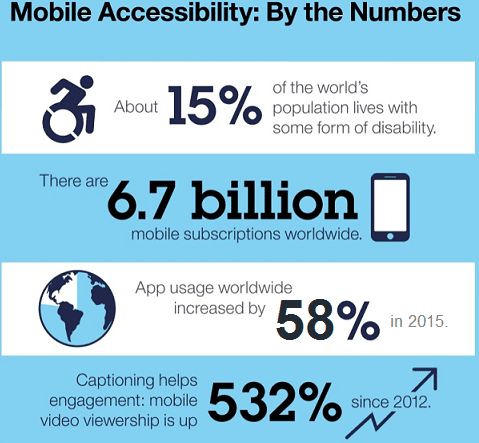 Captioning increased video engagement by over 500% over the last 6 years.
Technology is amazing. One of the best things about the advances in mobile applications and smartphone technology is that enables people with disabilities to access the mobile world.
Plus, as more Americans grow older, there will be an increasing market for apps that take advantage of these types of assistive technology. Even basic smartphones come with these features.
The developers who are smart will get ahead of the game now and make their apps as accessible as possible for most people before they are forced to by the law.
Captioning increased video engagement by over 500% over the last 6 years.
Technology is amazing. One of the best things about the advances in mobile applications and smartphone technology is that enables people with disabilities to access the mobile world.
Plus, as more Americans grow older, there will be an increasing market for apps that take advantage of these types of assistive technology. Even basic smartphones come with these features.
The developers who are smart will get ahead of the game now and make their apps as accessible as possible for most people before they are forced to by the law.
Who needs an accessible mobile app?
As I previously stated, accessible mobile applications are for people who have disabilities. Here are some more common categories of disabilities that can impact someone’s mobile app experience:- Lack of ability to move dexterously or tap with a purpose
- Inability to process external stimuli such as sound and sights
- Cognitive impairments that prevent following too many different screens or themes
What you need to meet the WCAG standards
The Web Content Accessibility Guidelines (WCAG) sets the standards for making web content more accessible based on the needs of different people. They have a detailed explanation of what should be done to accommodate those needs.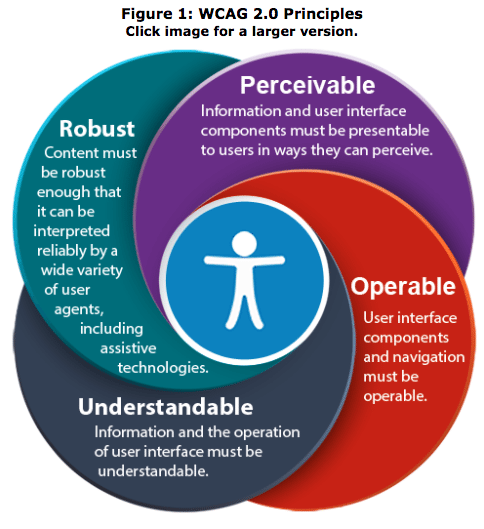 I’ve condensed their content and summarized it into a checklist. You can use this to ensure that your app meets the WCAG best practices and standards for online interactions.
Here are some of the most relevant ones for your mobile app.
I’ve condensed their content and summarized it into a checklist. You can use this to ensure that your app meets the WCAG best practices and standards for online interactions.
Here are some of the most relevant ones for your mobile app.
| WCAG Standard | Description |
|---|---|
| No time-based video or audio | Ensure captions are synced with audio and video content to allow users to follow along. |
| Text to speech compatibility | Accommodate visually impaired users by supporting voice technology. |
| Information continuity | Ensure seamless content viewing between portrait and landscape modes. |
| Colorblind accessibility | Provide clear separation between foreground and background for readability. |
| No seizure-inducing flashes | Avoid flashing lights and provide settings to disable them. |
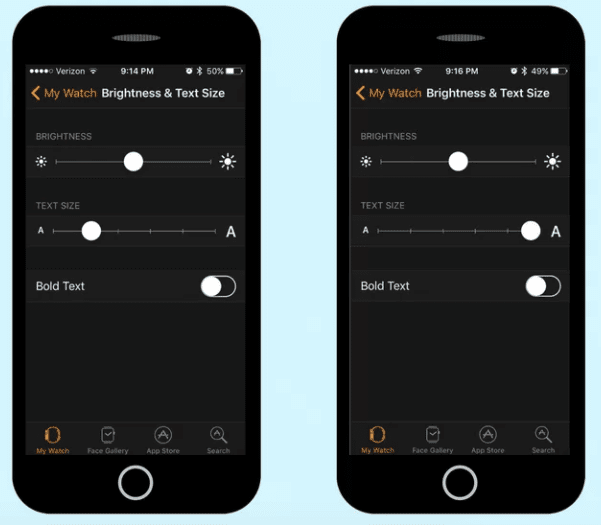 This is a great example of how easy this can be for you to implement.
Simply include a slider bar or something similar where the user can adjust the settings to their liking. Not everyone will be able to read your content on the default text size.
You’ve also got to make sure that your content gets formatted properly once the new sizes are applied.
Future proof assistive technology compatibility
You should always look to the future when you’re creating a mobile app. Think about technologies that are new or currently in progress. Focus on assistive technologies.
Is your app compatible with these?
You need to make sure that your app can accommodate existing assistive technology as well as
future assistive technology.
This is a great example of how easy this can be for you to implement.
Simply include a slider bar or something similar where the user can adjust the settings to their liking. Not everyone will be able to read your content on the default text size.
You’ve also got to make sure that your content gets formatted properly once the new sizes are applied.
Future proof assistive technology compatibility
You should always look to the future when you’re creating a mobile app. Think about technologies that are new or currently in progress. Focus on assistive technologies.
Is your app compatible with these?
You need to make sure that your app can accommodate existing assistive technology as well as
future assistive technology.
Conclusion
I realize that incorporating all of these accessibility features into your app can be a challenge. But with that said, it’s really worth it in the long run. First of all, trying your best to accommodate people with disabilities is just the right thing to do. However, by doing so, you’re also broadening your scope and opening up your app to a whole new audience.| Before Accessibility Features | After Accessibility Features |
|---|---|
| Certain people may have initially been discouraged from downloading or using your mobile app. | Once you implement these accessibility features you’ll end up making more money from new users. |
Frequently Asked Questions
How can I make my mobile app accessible to users with disabilities?
To make your mobile app accessible, follow the WCAG standards, which include features like text-to-speech compatibility and adjustable text sizes.
What are some common accessibility features for mobile apps?
Common accessibility features include voice control, screen readers, and adjustable text sizes.
Why is mobile app accessibility important for businesses?
Mobile app accessibility is crucial as it expands your audience reach and can significantly boost engagement and profitability.
Are there legal requirements for mobile app accessibility?
Currently, there are no specific laws mandating mobile app accessibility, but following guidelines like WCAG is recommended to avoid potential legal issues and to show inclusivity.
How does accessibility impact app engagement?
Accessibility features like captions can increase user engagement significantly, as they make content more accessible to a wider audience, including those with disabilities.