

Do you remember how you found the last app you downloaded on your tablet or smartphone? If you’re like most people, you probably searched for it in the App Store or Google Play. As it turns out, the battle for app discovery is being won (or lost) in app store search results, according to research by TUNE, an ad analytics company. Take a look at these interesting charts:
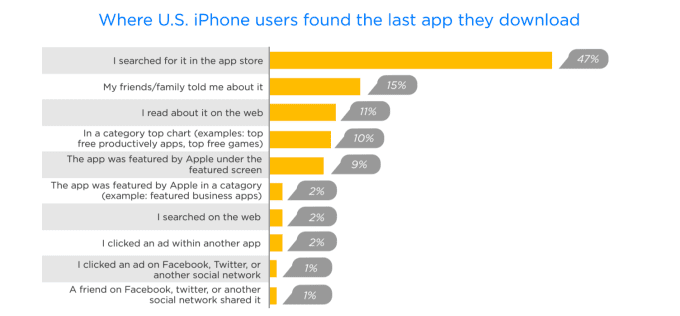
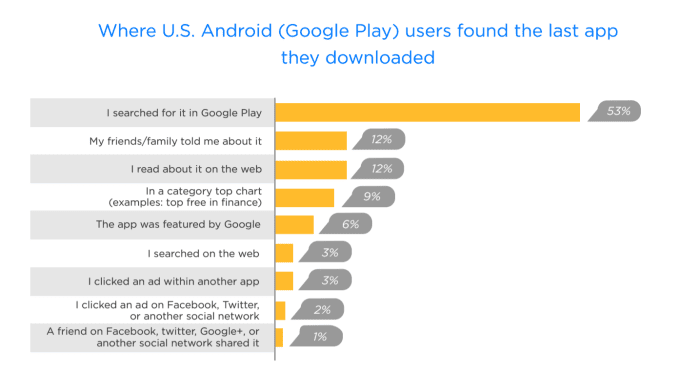
charts courtesy of Tech Crunch
This study shows pretty clearly that app developers need to focus on app store optimization (ASO), as opposed to other mobile app marketing channels, if they want their app to be discovered. If you’re about to release your new app, or want to get better organic download numbers from an existing mobile app, here are the basics of ASO to help you the best results.
Key Takeaways
- App Discovery: Most users find apps through app store searches, highlighting the importance of ASO.
- ASO vs. SEO: While similar in strategy, ASO requires different tactics than traditional SEO.
- Keyword Importance: Keywords are crucial for ASO, especially in Apple’s App Store.
- Visuals Matter: While not affecting rankings, visuals significantly impact user engagement and downloads.
- Localization Benefits: Localizing keywords can dramatically increase app downloads.
What Is App Store Optimization (ASO) Exactly?
Simply put, app store optimization are the steps you take as a mobile app marketer to help your app rank higher in app store search results. ASO functions as a tool to drive traffic to your app in the app marketplace and prompt more users to download your app. You can liken it to SEO for your mobile website, because the general idea and overall strategy is the same, but the tactics are somewhat different.
ASO requires a good understanding of your buyer persona; it will shape your keyword strategy. You need to know what keywords your target customers are using to search for apps so you can choose yours wisely. Because keywords matter just as much for ASO as they do for SEO, perhaps even more so, since you’re working with smaller, more tightly focused fields.
Basically, app store optimization is one of the most crucial components of your overall mobile app marketing plan. So…let’s get started.
The 8 Basic Parts of App Store Optimization
While there are a few variations between optimizing for Google Play versus Apple’s App Store, the process for both rests on eight basic elements. For simplicity’s sake, you can break them out into three main categories:
Optimizing Keywords
➤choosing the right title
➤writing an optimized description
➤including localized keywords where appropriate
App Store Visuals
➤your app icon
➤the screenshots you use
➤the promotional or preview video
Offset Factors that Affect ASO
➤number of downloads (and uninstalls)
➤number and quality of your app ratings and reviews
We’ll look at each of these elements in more detail and break out the differences between optimizing for the App Store and Google Play. An app store publishing service can set the listing up for you.
Choosing Keywords for App Store Optimization
You probably already know how important identifying the right keywords are for ASO, but you may not know which factors are most important when it comes to choosing them. Don’t make the very common rookie mistake of looking for keywords with the highest search volume—your top priorities should be choosing the most relevant keywords and the ones you have the best chance of achieving a higher rank. After all, it isn’t going to do you a bit of good to choose a keyword that gets 500,000 searches a month if your app ranks 699th for that term.
If you need help with keyword search, try tools such as Sensor Tower, TUNE (formerly MobileDevHQ) and App Annie. You’ll find a wealth of useful app analytics to shape your marketing efforts.
Of note: Keywords are more important for Apple’s App Store ASO than for Google Play, but you should still choose wisely.
Title Keywords for App Stores
Simple rule: Use a keyword in your title. Period. The graph below gives you ample reason to do so:
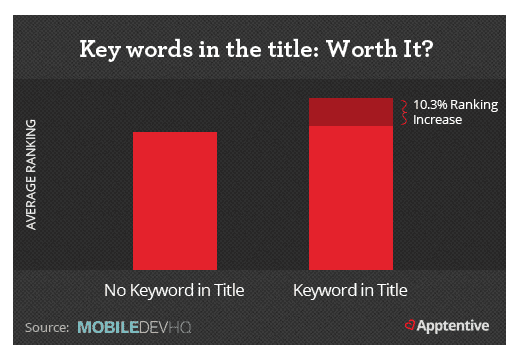
Image courtesy of MobileDevHQ via Kissmetrics blog
As a matter of mechanics, the App Store displays 25 characters in the title, while you can use 30 characters for Google Play. Don’t use special characters ($,%,&, etc.) in your app title; keep them all URL friendly. And don’t use category words (free, game, puzzle, etc.) in your app name, because you already select those when you list your app.
The App Store also gives you 100 characters to list your keywords; here are some tips:
➼Separate words by a comma, but don’t use a space after the comma. Use your 100 characters wisely.
➼Don’t repeat keywords.
➼Use numerals, don’t write out numbers.
➼Skip stop words like “the,” “at,” etc.
➼Don’t repeat the app name in this section.
Optimizing Your App Description
This is the space where you sell your app by offering compelling copy about all the features and benefits they user can expect if they download your app. Since the recommendations for optimizing the app description are quite different for the App Store and Google Play, we’ll break them down here by marketplace.
|
The App Store |
Google Play |
| First three lines visible; make them count | Focus on first 167 characters for web search |
| Prioritize compelling copy over keywords | Watch keyword density; don’t keyword stuff |
| Include social proof (awards, reviews) | Don’t use testimonials |
| Highlight features/benefits list | If possible, get backlinks |
| Include press releases and updates in the “what’s new” section | Use long-tail keywords and take advantage of all 4,000 characters |
| Don’t overuse keywords, it will lower your rankings | Use main keywords a maximum of 5 times each |
One other important note about optimizing your app description: This is a good place to do A/B testing and find the copy, keywords, and features or benefits that do best with your target customers. You can also A/B test your icon, screenshots, or any other part of your app page. Google has added improvements to Google Play so that you can A/B test your app page elements right from the Google Play Developer Console.
Localizing Your Keywords
Depending on your app and your target audience, it may well be worth your while to localize your keywords. What does it mean to “localize” your keywords? It just means to translate your title, the first sentence or two of your description (including a call to action), and even your screenshots. Is it worth it? Check out these charts based on one developer’s experience with keyword localization and the “Harlem Shake Yourself” app:
Before localization, approximately 3,000 downloads
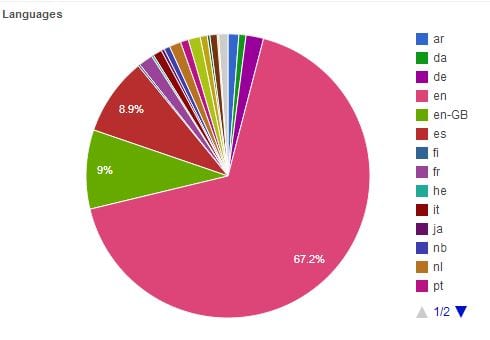
After localization, approximately 23,000 downloads (760% increase)
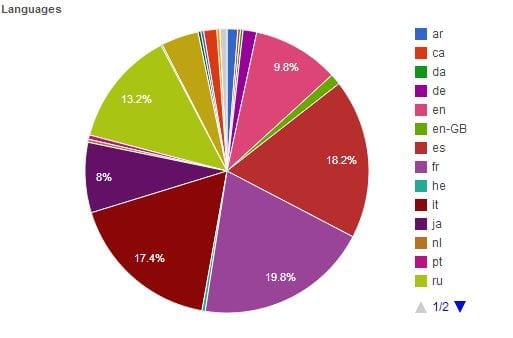
Of course, your results may vary, but if you are marketing an app that targets customers in more than one country, you should definitely do keyword localization.
Getting the Visuals Right for ASO
Technically, your visuals aren’t going to really impact the ranking algorithms, but they are going to make a huge difference in how your app is perceived by potential users and how many of them will be interested enough to click through and ultimately download your app. So yes, you do need to get them right for ASO. Let’s look at the three main visual elements in detail.
The App Icon
This is the first (and sometimes only) visual impression you will give potential customers, so it needs to be powerful, yet simple, and consistent with the rest of the app design. This is also a <a href="https://build
The Promo Video
You can add a preview or promotional video to your app page in both stores; there are separate guidelines for the App Store previews and for Google Play promo videos. While these aren’t mandatory, they can be extremely compelling and give you a leg up on branding and promoting your app. Some tips:
?Write a script and stick tightly to your video plan.
?Get to the “magic moment” right at the beginning; this is especially important with the App Store, since you only have 30 seconds to make your point.
| Feature | App Store | Google Play |
|---|---|---|
| Video Localization | One video for all countries | Separate video for each language translation |
Off-Site ASO Factors
These are the most difficult ASO factors for mobile app marketers because they have a relatively high impact on rankings—and they are pretty much completely out of your direct control.
Both app store algorithms factor in the following offsite stats:
?average rating and total number of reviews
?number of downloads and uninstalls
?user engagement (how many times they open the app, session length)
?growth trend line
Moz did some research into just how important each of these factors were in each of the two app marketplaces; one of the key takeaways was that ratings and reviews matter much more to the Google Play algorithm, and there are almost 16 times more rankings on Google Play apps than iOS apps (3.1 million versus just 196,000).