

By definition, a deskless worker is any employee who is not seated behind a desk when they’re working. While this definition is quite broad, it’s highly relevant to the majority of businesses so who is a deskless employee?
Some examples of deskless positions include on-site technicians, field sales representatives, delivery drivers, blue-collar workers, and home healthcare providers. Even insurance adjusters need to be on the go to meet clients and contractors on-site at a claim.
The list goes on and on, but the deskless workforce seems to be penetrating companies of all sizes in nearly every industry.
Key Takeaways
- Deskless Workforce Growth: The deskless workforce is expanding across various industries and company sizes.
- Mobile App Necessity: A mobile app is crucial for engaging and managing deskless employees effectively.
- Communication Challenges: Traditional communication methods fall short for deskless workers, necessitating real-time solutions.
- Technology Adaptation: Embracing mobile technology helps close operational gaps and futureproofs business processes.
- Efficiency Improvement: Mobile apps streamline workflows, allowing deskless staff to access information and complete tasks efficiently.
There are countless employees out there who don’t have the option to work in an office. If you consider the amount of field employees who are on the move or work at multiple locations, you’ll see the deskless workforce rate is rising quickly.
Workforce mobile apps are designed to accommodate the needs of blue-collar workers and field employees. This is the best way to get them engaged with your company.
)
According to a recent study published by Forbes, 80% of the workforce is considered deskless.
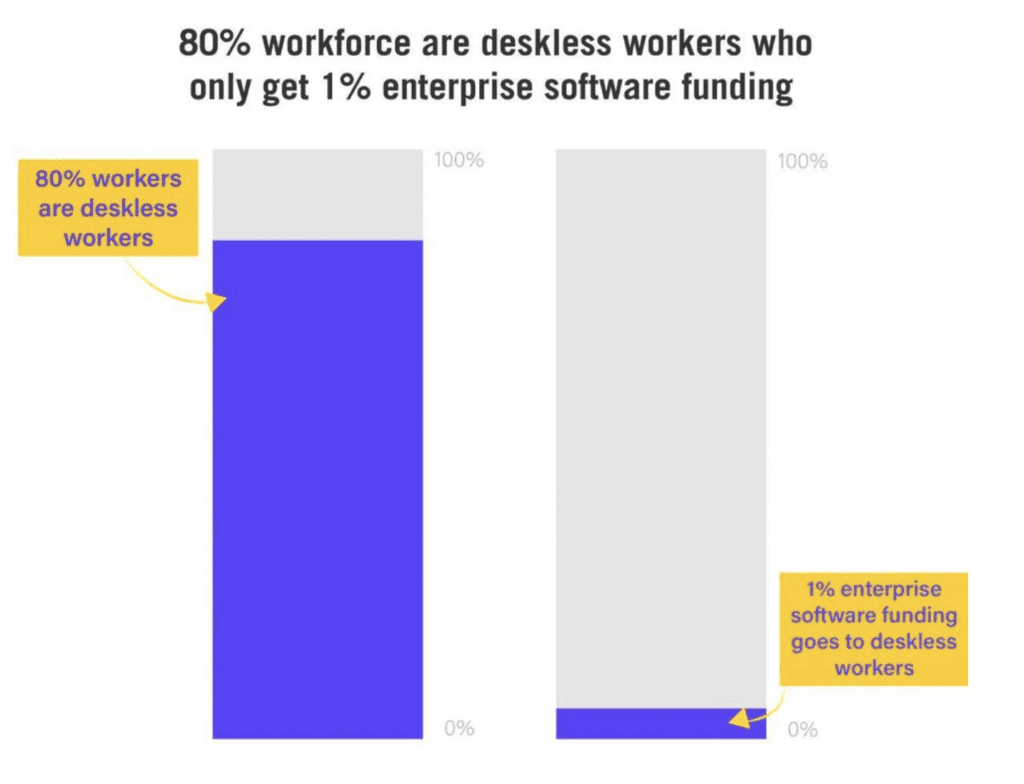
Yet, just 1% of software funding is allocated to these employees. There are obviously some serious flaws with those numbers.
So if your company has deskless employees, you’ll need to change the way that you manage them. This will require you to leverage the appropriate technology.
Your deskless workforce needs a mobile app.
Simply put, you can’t treat remote or field workers the same way as your in-house employees. Plus, even your traditional in-house staff might be deskless a handful of times per month. So a mobile app will ultimately benefit your entire workforce.
For those of you who are interested or on the fence about a mobile app for your remote staff, I’ll explain why this is a must-have technology for nearly every business.
Improve Communication
Deskless employees are different. While this may seem like an obvious statement, a surprisingly high amount of businesses haven’t seemed to recognize and adapt to this quite yet.
Communication is the key to success at any place of business.
However, 79% of workers in the United States say that they are more likely to hear about something through word of mouth in the office as opposed to official communication from management.
Nearly 50% of all workers are not happy with how management communicates with them.
According to a recent study by the Harvard Business Review, these are the biggest communication issues in the workplace.
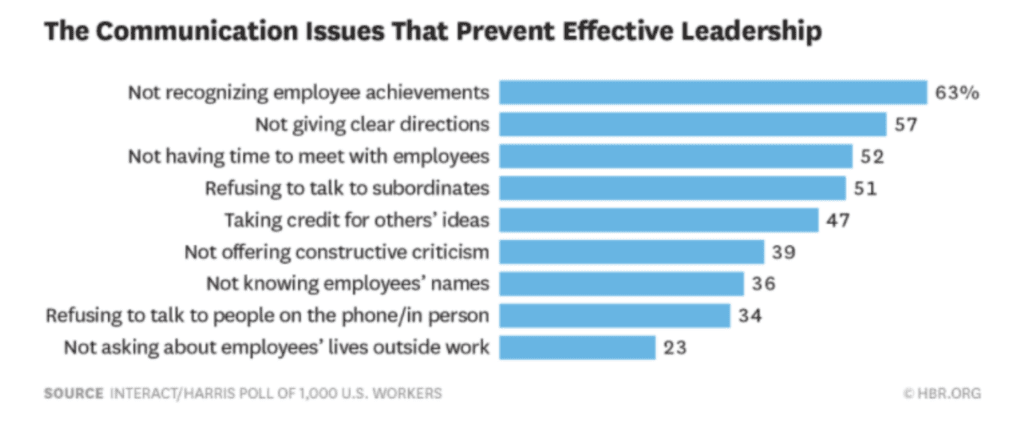
As you can see, not giving clear instructions and not having time to meet with employees both rank high on this list.
If your business is having so trouble communicating with your staff while everyone is under the same roof, how can you possibly communicate with your deskless employees who are constantly on the go?
With a deskless worker, you can’t just spontaneously stop by their desk or office to give them instructions. You can’t expect them to be at all meetings either.
So what’s your current process for keeping these people up to date or in the loop?
All too often I consult with business owners who don’t really have a system for this. Maybe someone from the meeting sends a follow-up email. But that’s not always helpful or accurate.
Picking up the phone to call a deskless employee can turn into a game of phone tag, which is not an efficient use of anyone’s time.
A mobile app eliminates friction in the communication process. Your deskless staff can be informed in real-time with push notifications and announcements within the app.
This will make them feel like they are still part of the team, even though they aren’t always around or available. It also ensures that they’ll always have access to a clear set of instructions, as opposed to taking notes by hand over the phone during a call with a manager.
Futureproofing Closes Gaps
Your business can’t afford to fall behind the latest technology trends. Failure to adapt now could lead to big problems down the road.
Learning how to leverage technology will help close any gaps or inefficiencies in the workplace.
Once you learn how to futureproof your system, managing deskless employees will become easier than ever before.
If you’re still relying on fax machines, landline phones, and face-to-face communication to manage your workforce, then your process has room for improvement.
You need to take advantage of the technology that your staff is already using on a daily basis. BYOD, short for bringing your own device, has become the new normal in the workplace.
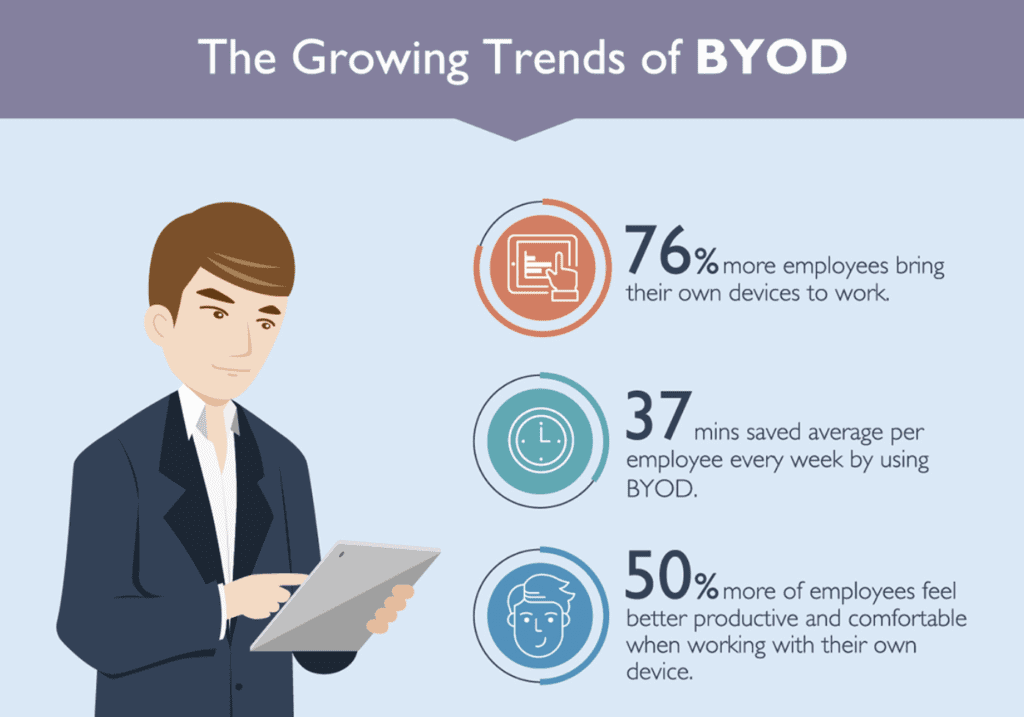
96% of Americans own a smartphone.
The vast majority of employees bring these devices to work, and they feel more productive when using their own devices. So why not take advantage of this?
Your staff is already using their phones at work. So it only makes sense for communication to go through these devices with an app.
An app makes it easier for your deskless workforce to solve problems. They’ll have access to useful resources, guides, customer information, and much more in the palms of their hands.
Your business mobile app can also be used for communicating with team members, keeping track of workflow progress, and updating schedules.
| Without Mobile App | With Mobile App |
|---|---|
| Staff must come into the office for assignments. | Staff can receive assignments directly on their mobile devices. |
| Physical folders with customer information are used. | All customer information is accessible within the app. |
| Notes are manually updated in customer folders. | Tasks and notes can be updated in real-time within the app. |
| Staff returns to the office to drop off notes and files. | All updates are made digitally, eliminating the need to return to the office. |
An app will improve your efficiencies and allow your staff to get more done in a day’s work. It also enhances your record-keeping proce
Easy Integration
We’ve already discussed how technology can bridge the workforce gaps between deskless employees and their employers. But with that said, sometimes employees can feel overburdened with too much technology across multiple platforms.
| Aspect | Deskless Employees | In-Office Workers |
|---|---|---|
| Platform Navigation | More complex due to multiple interfaces | Easier solution for similar tasks |
That’s why a mobile app is the ideal solution for everyone.
Your internal business app can easily integrate and potentially replace other software that you’re currently using. Both your in-house and deskless workforce will have access to the same information, in real-time, on the same platform.
Training your staff on how to use one mobile app is much easier than teaching them how to use five or six different software solutions.
By consolidating the technology, your deskless workforce won’t need to jump from platform to platform to get work done, which will ultimately increase their productivity.
A mobile app creates a single source of information for things like customer history and job notes. You won’t have to worry about mistakes being made when employees are forced to manually update information across multiple platforms.
Since all data will be coming from one system, it will be much easier for you to analyze everything so you can make informed business decisions. All of the data in the app can also be used to improve the workflow process for deskless employees.
Enhance Security
Security needs to be a top priority for all businesses. It’s your job to protect any information related to your company, employees, and customers.
Analyze your current process for cracks, leaks, or vulnerabilities in your security systems.
How are you communicating and transmitting sensitive information to your deskless workforce?
This information can be anything from a customer’s home address to an employee’s social security number. Emails, web-based employee portals, and physical documents are not always secure. But a mobile app serves as an added layer of protection for sharing files.
55% of small businesses experienced a cyber attack in the past year and 50% had a data breach. These are the most common types of attacks on businesses.
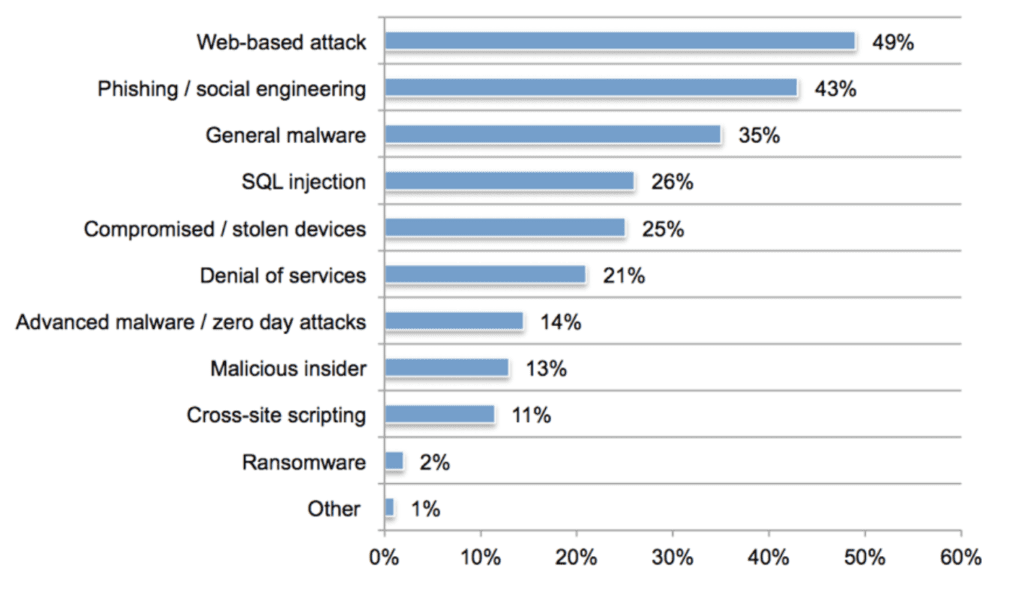
Mobile app technology can prevent these types of breaches.
| Security Method | Traditional Approach | Mobile App Approach |
|---|---|---|
| Access Control | Emails, web-based portals, physical documents | Facial recognition, fingerprints, biometrics |
| Data Breach Risk | Higher risk due to physical file loss | Lower risk with app and phone security |
| Employee Error | 48% of breaches due to negligence | Additional security layers reduce impact |
Smartphones can use facial recognition, fingerprints, other biometrics to access sensitive information. Your employees will need to verify their identity before viewing something like a paystub.
48% of data breaches were caused by a negligent employee. A mobile app will help add security layers, even when an employee makes a mistake.
For example, if your staff loses a physical file, it could end up the wrong hands. But to access that information on a mobile phone, someone would have to hack both the phone and app. This becomes nearly impossible if a fingerprint scan is required for each.
Improve Accessibility
Not everyone works a traditional 9-5 job.
People work odd hours, especially deskless employees. Some may start early, others may work late nights or weekends. Depending on the nature of the position, some deskless workers may need to be on-call at a moment’s notice.
A mobile app gives them on the go access to everything they need from virtually anywhere. This includes access to real-time information related to the workflow process.
For example, let’s say you have ten employees out on the road performing work on-site at different customer homes. By the nature of your business, the work is ongoing, and you’ll need to be back at each home more than once.
With a mobile app, your staff will have real-time access to scheduling appointments.
This is much more effective than having to follow-up and call your customers while sitting in front of a schedule in the office.
What happens if a customer asks a question that your deskless employee doesn’t know the answer to? No problem. Instead of calling into the office, they can access handbooks and other resourceful guides at their fingertips directly within a mobile app.
Conclusion
You can’t afford to neglect your deskless workforce.
Times are changing, and you need to leverage technology to improve your workflow processes and systems for managing employees.
A mobile app will make it easier for you to communicate with remote workers while simultaneously futureproofing your operation. An app appeals to the majority of your staff, which will increase employee satisfaction and engagement.
It’s easy to integrate a mobile app into your process. This investment will boost your security and lower your costs for the long term by improving employee productivity.
An app gives everyone, including your in-house staff easier access to critical information.
If you’re ready to build a mobile app for your deskless workforce, you can do it using BuildFire’s platform. We have experience building apps to improve communication for field employees.
You can build the app yourself using our system or have our team of experts build it for you.