

Key Takeaways
- App Store Optimization: Critical for improving your app’s discoverability and ranking.
- Title Strategy: Use a clever, searchable title to enhance visibility.
- Description Guidelines: Avoid keyword spamming and restricted content to maintain compliance.
- Visual Appeal: High-quality graphics and screenshots can boost download rates.
- Audience Expansion: Overcome language barriers to reach a diverse audience.
How to Rank App in Play Store – App Ranking Factors
Android users and iOS users behave differently. So if you’ve previously had an app ranked on the Apple App Store, you can’t necessarily apply the same formula here. Sure, there are definitely some similarities between the two ranking systems. But if you want a high rank on the Google Play Store, you’ll need to follow the guide I’ve developed for you. Here’s what you need to know.Comprehensive App Store Listing: Google Play Store Optimization
Google says that your comprehensive store listing is critical in relation to your app’s discoverability. It consists of these main components:- App Title
- App Description
- Promo text
- Relevant Keywords
 They named the app Fly Delta, as opposed to just Delta.
That way the title is more searchable.
If someone’s looking to book a flight, what are some words that they’re going to search for?
“Fly” is definitely a viable option.
So while you don’t need to completely change your app’s name from the name of your company, you can make subtle alterations.
Refer back to the main components of your comprehensive store listing.
Keywords play a factor.
We’ll continue to discuss the importance of keywords throughout this guide, but that’s a perfect example of a keyword used in the title.
Here are some other tips to consider when selecting a title for the Google Play Store.
They named the app Fly Delta, as opposed to just Delta.
That way the title is more searchable.
If someone’s looking to book a flight, what are some words that they’re going to search for?
“Fly” is definitely a viable option.
So while you don’t need to completely change your app’s name from the name of your company, you can make subtle alterations.
Refer back to the main components of your comprehensive store listing.
Keywords play a factor.
We’ll continue to discuss the importance of keywords throughout this guide, but that’s a perfect example of a keyword used in the title.
Here are some other tips to consider when selecting a title for the Google Play Store.
- Try to make it as unique as possible.
- Do not use common terms or phrases.
- Reference and reinforce what your app does.
- Keep it short.
- Do not intentionally misspell common words.
 Their app allows Android users to control the jukebox for different locations across the country directly from their phones.
But take a look at the title.
It hits the mark for everything on our list above.
It’s unique without using any common terms.
The name is also short and concise, but you can tell that it has to do with music.
TouchTunes also didn’t use any incorrectly spelled words.
For example, here’s what would happen if they named it something like “TouchToones” in an attempt to be creative or unique.
The Android user searching for something on the Google Play Store would likely see their device autocorrect the spelling in the search bar.
So the app wouldn’t be a top hit in the search results.
This would definitely have a negative impact on the ranking.
Now that your title is all set, it’s time to focus on the description.
Here’s your chance to explain what users will get out of your app.
The Google Play Store will allow you to put in some keywords that help with search optimization in your description.
However, if you try to go overboard they will consider it “keyword spamming” and potentially remove the app.
Your description also can’t include anything that Google considers restricted content.
Examples restricted content on the Google App Store include:
Their app allows Android users to control the jukebox for different locations across the country directly from their phones.
But take a look at the title.
It hits the mark for everything on our list above.
It’s unique without using any common terms.
The name is also short and concise, but you can tell that it has to do with music.
TouchTunes also didn’t use any incorrectly spelled words.
For example, here’s what would happen if they named it something like “TouchToones” in an attempt to be creative or unique.
The Android user searching for something on the Google Play Store would likely see their device autocorrect the spelling in the search bar.
So the app wouldn’t be a top hit in the search results.
This would definitely have a negative impact on the ranking.
Now that your title is all set, it’s time to focus on the description.
Here’s your chance to explain what users will get out of your app.
The Google Play Store will allow you to put in some keywords that help with search optimization in your description.
However, if you try to go overboard they will consider it “keyword spamming” and potentially remove the app.
Your description also can’t include anything that Google considers restricted content.
Examples restricted content on the Google App Store include:
- Violence
- Gambling
- Hate Speech
- Harassment or Bullying
- Sexual Content
- Illegal Activity
 Your description can’t impersonate another app, brand, or business.
You’re also not allowed to use anyone else’s intellectual property when writing a description.
The Google Play Store has you create promo text.
It’s a quick description that’s only one line long.
This only appears in older versions of Android software.
Your description can’t impersonate another app, brand, or business.
You’re also not allowed to use anyone else’s intellectual property when writing a description.
The Google Play Store has you create promo text.
It’s a quick description that’s only one line long.
This only appears in older versions of Android software.
Look and Feel Graphics of Your Google Play Store App
You’ll need some high quality graphics to boost your ranking on the Google Play Store as well. These graphics include your:- App Icon
- Images
- Screenshots
 You also need to include screenshots so prospective downloader can get a feel for how your app looks.
The screenshots should highlight your top features and key benefits.
Here’s a great opportunity for you to show off your differentiation strategy.
What makes your app unique?
How does it make life easier for the user?
Venmo does a great job with this.
You also need to include screenshots so prospective downloader can get a feel for how your app looks.
The screenshots should highlight your top features and key benefits.
Here’s a great opportunity for you to show off your differentiation strategy.
What makes your app unique?
How does it make life easier for the user?
Venmo does a great job with this.
 They show multiple screenshots that depict the user experience.
Just from these few pictures we can see that the app lets you:
They show multiple screenshots that depict the user experience.
Just from these few pictures we can see that the app lets you:
- Pay with both debit or credit cards
- Pay using a Venmo balance
- Request payments
- Split costs with several people at the same time
Expand Your Audience
To get high search rankings, app developers must have diverse target audience. However, you might encounter a problem with language barriers. Google automatically has machine translations of all the listings in the PlUser Experience
Lots of the topics that we’ve covered so far focus on the user experience. Your mobile app needs to perform at a high level, or nobody’s going to want to use it or download it. The download rate impacts the app store search results in the Google Play Store. Releasing your mobile app on the Google Play Store was a smart move.| Platform | Downloads |
|---|---|
| Google Play Store | 135% more downloads |
| Apple’s iOS App Store | Fewer downloads |
 The majority of time spent using mobile applications is only between three apps.
People won’t be able to leave a review if they’re not using it.
That’s why your app needs to satisfy the user.
If it’s not adding any value to their life or providing any entertainment, they have no reason to use it.
One of the best ways to get more reviews and ratings is by encouraging feedback and interaction with the users.
After they’ve had the app for a week or two, send them a notification asking for a review.
Otherwise, they might not go out of their way to rate it.
It’s all about providing excellent customer service as well.
If your app users have comments, complaints, or suggestions for the app’s performance, take those into consideration.
Come up with new versions of the app that fix any bugs or glitches.
People will only give you so much leeway before they decide to stop using your app.
You don’t want to be the app that someone downloads but never uses.
The majority of time spent using mobile applications is only between three apps.
People won’t be able to leave a review if they’re not using it.
That’s why your app needs to satisfy the user.
If it’s not adding any value to their life or providing any entertainment, they have no reason to use it.
One of the best ways to get more reviews and ratings is by encouraging feedback and interaction with the users.
After they’ve had the app for a week or two, send them a notification asking for a review.
Otherwise, they might not go out of their way to rate it.
It’s all about providing excellent customer service as well.
If your app users have comments, complaints, or suggestions for the app’s performance, take those into consideration.
Come up with new versions of the app that fix any bugs or glitches.
People will only give you so much leeway before they decide to stop using your app.
You don’t want to be the app that someone downloads but never uses.
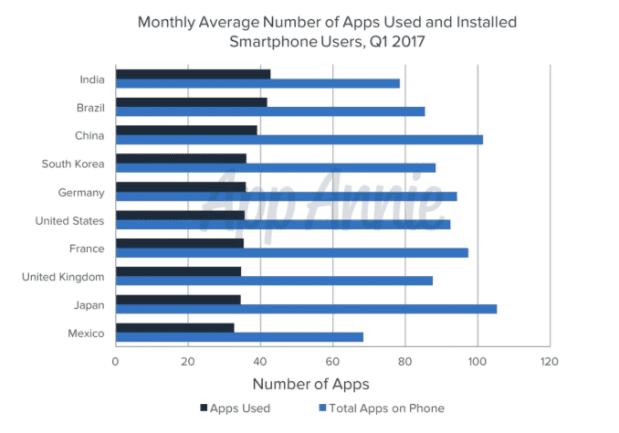 Look how staggering the results are on this graph.
If you can’t focus on improving the customer experience, your download rate, reviews, and ratings will all suffer.
But if you can master these components, it will boost your Google Play Store ranking.
Look how staggering the results are on this graph.
If you can’t focus on improving the customer experience, your download rate, reviews, and ratings will all suffer.
But if you can master these components, it will boost your Google Play Store ranking.
Conclusion
The lifecycle of your app isn’t complete once you finish building it. To be successful, you’ve got to get users to download it from the Google Play Store. It’s easier for Android users to find your app if it’s ranked high on the Play Store. To do this, you need to understand how the Google algorithm works and take the necessary actions to ensure your app hits all of the requirements. Start with a strong title. It should be short, memorable, and speak to the functionality of your app. The app’s description is the best place for you to include keywords to boost its search optimization. Just make sure that you stay within all of the guidelines set in place by Google. Focus on images as well. Include some screenshots that display exactly how your app works. It will give a prospective downloader a chance to preview the app before they actually download it. Come up with a colorful and creative app icon. Doing all of these things will help improve your download rate. The more downloads you get, the more ratings and reviews you’ll receive from users. Cumulatively, this is a recipe for success to shoot your app to toward the top of the Google Play Store rankings. What keywords will you include in your app’s description to improve its discoverability and app store SEO?Frequently Asked Questions
How can I improve my app’s visibility on the Google Play Store?
Improving your app’s visibility involves optimizing your app store listing with relevant keywords, high-quality graphics, and a compelling description.
How important are app icons and screenshots for ranking?
App icons and screenshots are crucial as they attract users and encourage downloads, which in turn can improve your app’s ranking.
Can keyword spamming affect my app’s ranking?
Yes, keyword spamming can lead to your app being penalized or removed from the store. It’s important to use keywords naturally and in moderation.
How does user behavior differ between Android and iOS users?
Android and iOS users have different behaviors and preferences, which can affect how your app is ranked on each platform. Understanding these differences is key to optimizing your app for each store.