
Understanding Progressive Web Apps: The Future of App Development
App development can be a maddening process.
If you’re going to develop an app, you’re faced with a tidal wave of tough choices.
Should you design an iOS app, Android app, or both? Which one first? How often will you make updates? How will you prevent your app from becoming obsolete as technology changes?
Today’s app development environment is full of these kinds of difficult decisions.
Key Takeaways
- Cross-Platform Solution: PWAs work seamlessly on both iOS and Android, eliminating the need for separate apps.
- Easy Updates: Updates can be rolled out quickly and efficiently, ensuring your app remains current.
- Increased Engagement: PWAs are linked to higher user engagement and conversion rates.
- Broader Reach: PWAs cater to users who prefer not to download apps, expanding your audience.
- Future-Proof: PWAs are designed to adapt to technological changes, securing their place in the future of app development.
But thankfully, there’s a new solution that’s quickly emerging as an alternative.
With it, you can develop an app that works for iOS and Android, update quickly and easily, and guarantee it will keep working as technology continues to change.
That miracle of technology is known as a Progressive Web App, or PWA. And it’s taking the world of app development by storm.
If you’ve wanted your app to work on every device, everywhere, every time, PWAs need to be your top priority.
In this article, you’ll learn what PWAs are, how they can solve your app development issues, and how to get started building one today.
Let’s jump in!
What are Progressive Web Apps?
On the surface, the term Progressive Web App might just come off as tech jargon (originally coined by Alex Russell and Frances Berriman), but PWAs are actually the next step in user-friendly app experiences that every app developer should carefully explore.
Many users are permanently stuck on apps and rely on them for all their functions, while others prefer to make use of traditional websites. PWAs are a seamless bridge between those two needs.
PWAs combine the look and feel of an app with the ease of programming of a website. These cutting edge apps make it easy for your users to access your content (essentially on a full-screen web page), providing a higher quality experience and happier users.
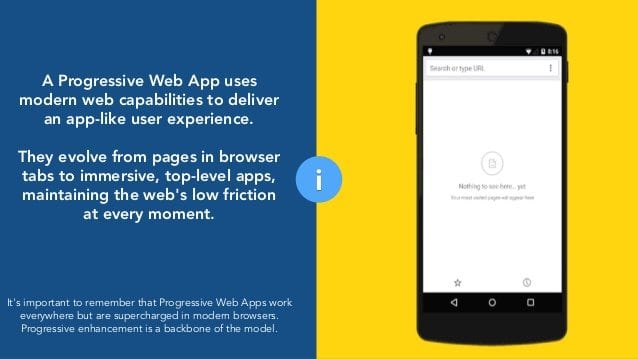
What’s in it for you? Well, happy users are engaged users, and engaged users increase your revenue. Even better, PWAs have a direct link to increased engagement and conversions, as we’ll see later.
Plus, you’ll get a broader reach to your target audience. Not every web user is interested in downloading an app. At the same time, they might still be interested in taking advantage of the features of your app.
By offering your app as a PWA, you can ensure that you are still available to this group of people.
At its heart, a PWA is a website that makes use of new technology to act like a traditional mobile app.
This allows PWAs to work across all different types of devices and all different types of browsers. That means you can design one app that works beautifully for Apple, Android, and Windows devices.
The huge portability and accessibility between devices makes PWAs the future of mobile apps. While we of course can’t know for certain what the future of app development holds, it’s a likely bet that PWAs will start to dominate the market.
Some developers are even predicting that the native app is doomed to die, with PWAs completely taking over the app development world in the coming years.
While we’re on the topic, let’s take a closer look at exactly how PWAs differ from native apps.
How Are PWAs Different Than Native Apps?
First, let’s start off with a simple explanation of the difference.
| Aspect | Native Apps | Progressive Web Apps (PWAs) |
|---|---|---|
| Platform Dependency | Platform-specific (iOS, Android) | Cross-platform, works on any browser |
| Installation | Installed via app stores | Accessed via web browsers, can be added to home screen |
| Connectivity | Can work offline | Can work offline using service workers |
| Updates | Manual updates via app stores | Automatic updates through the web |
A native app is a self-contained program that lives on a smartphone. It works like a program you run on your computer, like Microsoft Word or a media playing app.
A PWA is essentially websites that display like mobile apps. They’re more like Google Docs or Netflix, because they can perform the same functions as native programs, but through the internet browser.
But PWAs are different than most websites and native apps. There are a few key differences you need to understand to differentiate between them.
1. Progressive
The biggest selling point of PWAs is that they don’t have the restrictions of traditional apps, namely the restricted ability to only work with one platform. This means that PWAs must be as progressive as possible and work on as many platforms as possible.
They should be able to work with any browser that is owned by the user. A PWA can’t really be called a PWA if it is unable to function with some browsers or operating systems.
Progressive enhancement is one of the key factors that set PWAs apart from traditional apps and before you offer your app in that format, you should ensure that it truly can work with every browser type available on the market. Check to see if the API is compatible.
2. Responsive
It’s a well-known fact that internet users access the internet from mobile phones, tablets, desktops, laptops, and a variety of other devices.
As a PWA is offered to the public, all these must be taken into consideration. It is foolhardy to assume that everyone that uses your PWA will be doing so from a desktop.
In other words, your PWA must be able to function on mobile, tablets and so on as well as on a full-scale desktop. This type of design–where a website’s design adjusts to meet the requirements of the device being used–is known as responsive design.
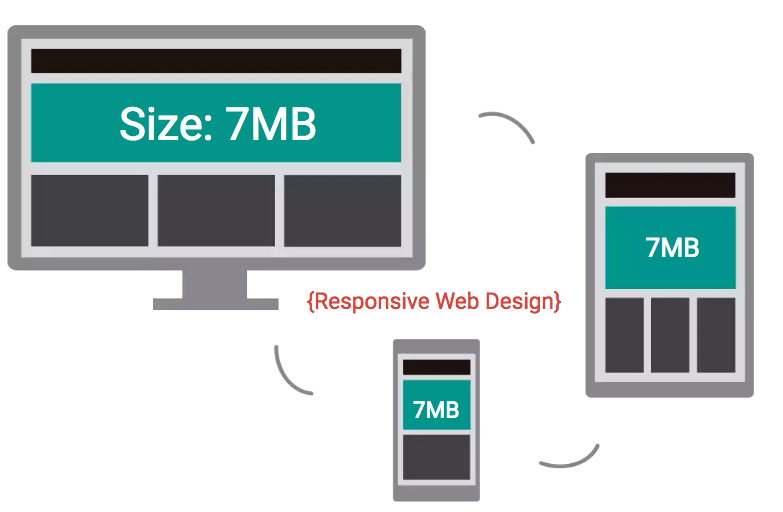
Responsive design like this is critical to making PWAs progressive and accessible on a variety of devices.
A situation where the user tries to make use of your PWA on mobile and find themselves unable to will be not only frustrating but discouraging as well.
3. Connectivity independent
It’s common knowledge that you can’t visit a website if the internet is down. But most native apps allow you to use them despite limited or no connectivity.
A PWA, while running on an internet browser (leveraging an API), allows users to interact with the app independent of the connection.
This is done by caching the app data ahead of time. This caching is made possible by the use of what’s known as a service worker. The service worker offers a programmatic way to cache resources.
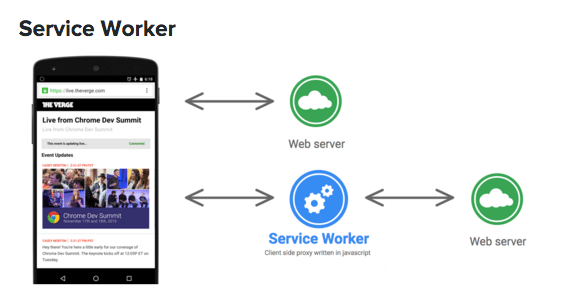
Not every user is blessed with a spectacular internet connection and even if they are, the internet connection won’t always be as strong.
If you are offering a PWA to the public, then it’s imperative that it has the sort of functionality that can operate even when connectivity is low.
Beyond this, your PWA should also be able to work offline. In the past, it would have been an amazing feature for a website to work without a connection, but today, it is no longer a bonus. It’s a requirement.
4. App-Like
As much as a PWA goes beyond the limits of a traditional app, it is important to note that they must still maintain an app-like structure.
This is one of the biggest differences between a PWA and a website. Many websites have a few simple pages that contain static pages like contact info, blog articles, and sales pages.
To be considered a PWA, a website needs to include interactive features that engage the user. This page can the
n be added to the homescreen of a device and users can interact with the app as though it were a native app.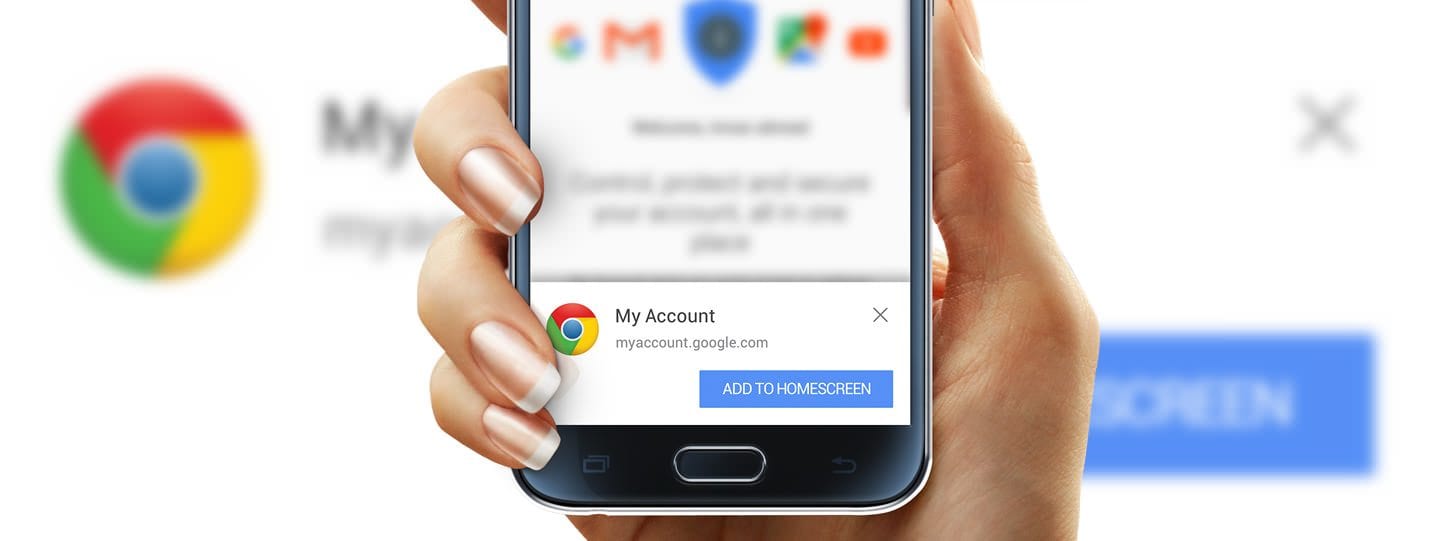
This means that they must still give the functionality of an app. Notification and features should run seamlessly in the background until they are needed by the user.
The functions must be easily accessible for the user and if it is a function that is continuously in use (say, a font-changing app), it should run without any interference.
The functionality of a PWA is central to its value.
Future-proof Technology
No matter what happens in mobile app technology, PWAs will always be the cutting edge. As the web and apps converge, the only safe place to be is with a PWA.
The history of this convergence is easy to find. When mobile devices were introduced, they were completely separate from desktop and laptops.
Gradually, however, these two “different” technologies have grown closer and blended together.
With tablets that double as laptops, smartphones the screen sizes of tablets, and design standards that allow developers to create websites that fit any size screen, the future will be one of blurry lines between technology.
The same applies to the world of native apps. In the battle between n
Advantages of Progressive Web Apps
If you’re considering developing a PWA, you need to understand the benefits behind doing so. There are a lot of ways in which a PWA is better than a native application. Here are a few ways in which you can use a PWA for areas in which a native app simply can’t compete.Access Anywhere
Since PWAs are based on HTML leverage web technologies, they rapidly load on any operating system, and on any device. Aside from the easy access and fast page loads, These apps do come with some drawbacks. The often need to be regularly upgraded, might be too large to install, or might not be compatible with certain devices. There’s also the question of whether the app is available for certain devices below a certain range. Needless to say, apps can have a number of factors that make them difficult to install and use, This is where the benefits of PWAs are very obvious.| Feature | PWA | Native App |
|---|---|---|
| Installation | No download required, accessible via browser | Requires download from app store |
| Compatibility | Works on any device with a modern browser | May not be compatible with all devices |
| Updates | Automatic updates via the web | User must approve and download updates |
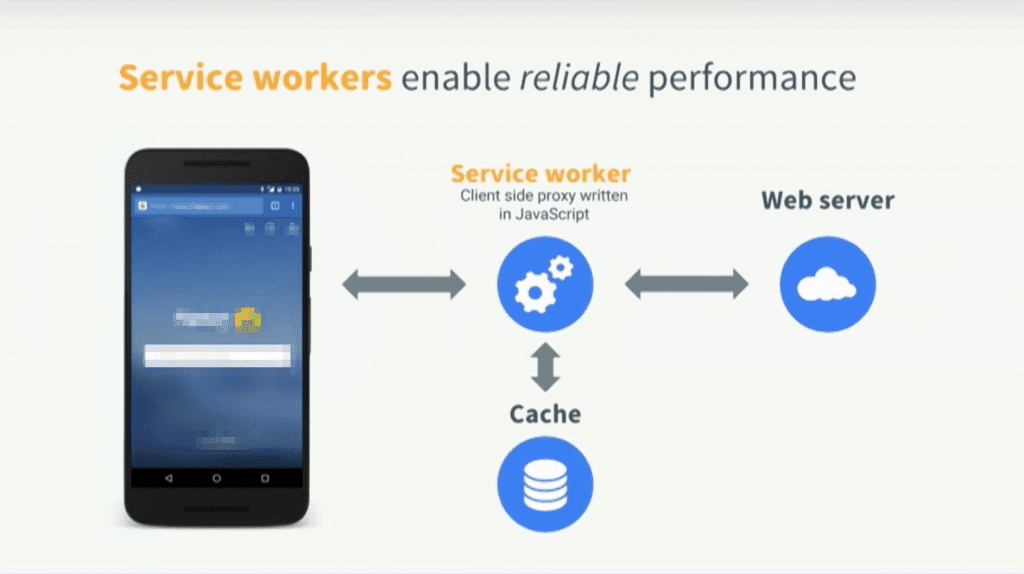 There is also the option of displaying offline messages for users. Either way, there needs to be proper provision made for offline use of the PWA.
Promotion with SEO
Search engine optimization best practices promote PWAs, making it easier for users to find them through Google or other search engines. Many internet users are probably searching for the type of features that your PWA offers and the most common way that they search for these is by way of search engines. That is why it is important for search engines to recognize your URL as an application. This is thanks to W3C manifests and service worker registration scopes. These allow search engines to recognize your URL as an application and list is as such. When potential users are then searching for features similar to your own, your PWA will be more visible and thus more discoverable to them. Of the most effective ways to get your web app (or any other thing on the internet) seen is to have it well-listed on Google search results. PWAs are recognized as applications by Google and are thus very search engine friendly. Having your web application offered as PWA puts you at the forefront and makes you more likely to be seen by those looking for the functions you offer. There’s an added benefit that can help your search engine rankings as well. The only thing modern internet users love more than making use of various apps with various exciting features is sharing these discoveries with others. In the case of apps, if a user wanted to share it with another person, they would need to share a link to an app store where the new user would have to go through the process of downloading and installing. This opens another can of worms entirely. The new user might not have enough memory space on their device or the app might be incompatible with their device altogether. With PWAs, sharing is as easy as sending a URL to a potential new user. There is no installation or downloading involved. With that said, some PWAs are installable on a user’s home screen (more on this shortly).Easy Updates
Skip the middleman of needing approval by multiple operating systems and push new versions of your app directly to your users. App updates are a fact of Internet use. New features are developed every day and bugs and glitches are removed with easy release. App updates are also one of the most hated aspects of app use. It’s a running joke that most internet users will put off updating their apps until the app can no longer function. Following in the pattern of taking any stress of use of the app user, PWAs have the added benefit of pushing updates by the developers themselves and not the users. Because the PWA isn’t downloaded per se, all new updates and features can be added remotely by the development team. Users will only notice new and improved features but don’t have to approve updates themselves.Direct Deployment
For traditional apps, a user will need to take a number of steps to download the app. First he or she will need to find it in the app store, authorize the installation, wait for it to download, login or set up the app, and finally begin using it. For each of these steps, app developers can expect 20% of users to lose interest and stop the process. PWAs load directly onto a smartphone user screen without needing an app store download. Since it’s loaded in the browser, there is no searching or installing required. This makes for a dramatic increase in the total number of app installs when using PWAs. Depending on the type of features that your PWA offers, users might want to continuously make use of it. If that’s the case, PWAs can be added to users’ home screen and accessed without any hassle. Apps typically have to be installed from an app store, which is often tedious and stressful. PWAs can be added to a homepage at the push of a button (example: “add to home screen”) and from then on become a part of the user’s frequent internet use.
This means no visiting a site every time its features are needed or downloading from an app store. PWAs are very easily accessible for the their users as this is one of their biggest benefits.
Apps typically have to be installed from an app store, which is often tedious and stressful. PWAs can be added to a homepage at the push of a button (example: “add to home screen”) and from then on become a part of the user’s frequent internet use.
This means no visiting a site every time its features are needed or downloading from an app store. PWAs are very easily accessible for the their users as this is one of their biggest benefits.
Safe and Secure
PWAs provide the familiar app experience user’s demand without sacrificing performance or security. There are even ecommerce sites using PWAs. One of the biggest and most important topics for internet users today is safety, particularly when it comes to content being stolen, shared, or hacked. PWAs by their very nature are able to combat this problem. PWAs are offered via HTTPS, which provides major benefits for both users and developers. Unlike traditional native apps, which have access to the operating system of the device, a PWA is limited to the constraints of the browser. This restricts overall vulnerabilities and limits the chances of a scam app overriding a user’s security settings. A native app is also limited to updates when the user accepts them. In contrast, a PWA can be updated on the fly and immediately used by all users accessing the app. This allows vulnerabilities to be covered with patches quickly and efficiently, without lost time waiting for users to update the app on their device. It’s for these reasons that some experts have said that PWAs, when properly built, may be more secure than native apps themselves.| Aspect | PWA | Traditional App |
|---|---|---|
| Speed | Loads much faster due to light coding of a web browser | Slower due to software-wide, detailed languages |
| Data Usage | Uses less data | Higher data consumption |
| Download Process | Can be downloaded from the browser, eliminating friction | Requires app store download |
| Feature Updates | New features are updated by developers without user intervention | Users need to manually upgrade to access new features |
Frequently Asked Questions
How do Progressive Web Apps improve user engagement?
Progressive Web Apps (PWAs) enhance user engagement by offering a seamless, app-like experience directly through web browsers.
Can PWAs work offline like native apps?
Yes, PWAs can work offline by using service workers to cache data. This allows users to access the app even without an internet connection, similar to native apps.
What are the cost benefits of developing a PWA?
Developing a PWA can be more cost-effective than native apps because they are cross-platform and do not require separate versions for iOS and Android.
How do PWAs ensure they remain up-to-date?
PWAs automatically update through the web, ensuring users always have the latest version without manual updates.
Are PWAs suitable for all types of businesses?
PWAs are versatile and can be suitable for many types of businesses, especially those looking to reach a broader audience without the need for app store distribution.
What is a Progressive Web App (PWA)?
A Progressive Web App is a type of application software delivered through the web, built using common web technologies including HTML, CSS, and JavaScript.