

Key Takeaways
- Mobile Apps: Essential for daily business operations and employee recommendations.
- Productivity Boost: Apps can significantly enhance business productivity and success.
- Evernote Benefits: A versatile digital notebook for organizing business information.
- Square Register: Simplifies payment processes with mobile credit card reading.
- Wunderlist Features: Digital to-do lists with reminders and task management.
1. Evernote
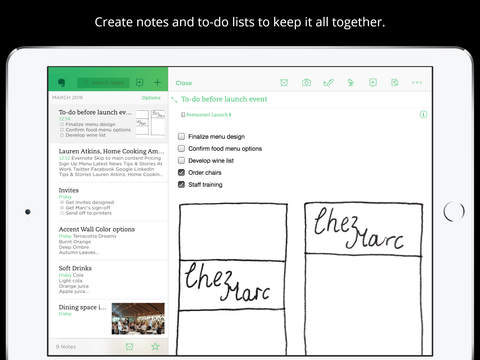 Have you ever felt frustrated after losing an important notebook or document? Or wished for a more effective way to take notes at meetings, organize your thoughts, and plan your content (like blog posts)?
If so, you should consider using Evernote.
Simply put, it’s a digital notebook you can use to quickly keep track of your ideas so you can revisit them later and avoid forgetting the important stuff.
But don’t dismiss Evernote if that benefit doesn’t make it sound useful – you can use it for so much more than jotting down random ideas. For example, you can use it to take notes on client calls, outline blog posts, and organize all of your business information.
Best of all, Evernote Business (the $12 per user per month version) allows you to easily collaborate with everyone on your team. You can invite co-workers to join specific notebooks and leave their own notes on what you’ve written.
And you don’t have to worry about not having access to your notebooks when there’s no WiFi nearby – you can access them any time. No internet connection necessary.
Have you ever felt frustrated after losing an important notebook or document? Or wished for a more effective way to take notes at meetings, organize your thoughts, and plan your content (like blog posts)?
If so, you should consider using Evernote.
Simply put, it’s a digital notebook you can use to quickly keep track of your ideas so you can revisit them later and avoid forgetting the important stuff.
But don’t dismiss Evernote if that benefit doesn’t make it sound useful – you can use it for so much more than jotting down random ideas. For example, you can use it to take notes on client calls, outline blog posts, and organize all of your business information.
Best of all, Evernote Business (the $12 per user per month version) allows you to easily collaborate with everyone on your team. You can invite co-workers to join specific notebooks and leave their own notes on what you’ve written.
And you don’t have to worry about not having access to your notebooks when there’s no WiFi nearby – you can access them any time. No internet connection necessary.
2. Square Register
 Imagine what your professional life might be like if you had to haul around a clunky cash register everywhere you went to accept payments. What if that was literally the only way you could accept customer payments when you’re out of the office?
It’d be ridiculously difficult – so much so that you’d probably avoid accepting payment altogether.
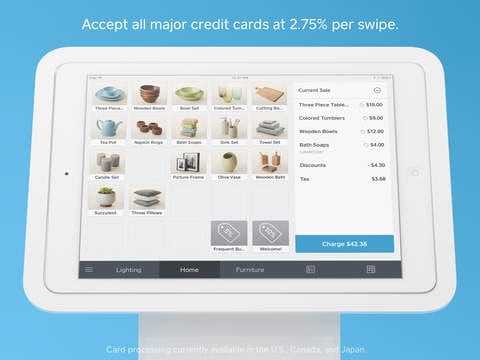
Fortunately, you can use the Square Register app to easily turn your phone into a credit card reader so you can accept payments without invoicing or using a physical register.
Want to offer a discount of accept a gift card? No problem – the app allows you to do both.
On top of that, Square Register app allows you to send digital receipts to customers, track your inventory and sales history, and download previous transaction information as an Excel file. You can even use the app to allow merchants and customers to give each other feedback if an issue arises with the product sold.
Imagine what your professional life might be like if you had to haul around a clunky cash register everywhere you went to accept payments. What if that was literally the only way you could accept customer payments when you’re out of the office?
It’d be ridiculously difficult – so much so that you’d probably avoid accepting payment altogether.
Fortunately, you can use the Square Register app to easily turn your phone into a credit card reader so you can accept payments without invoicing or using a physical register.
Want to offer a discount of accept a gift card? No problem – the app allows you to do both.
On top of that, Square Register app allows you to send digital receipts to customers, track your inventory and sales history, and download previous transaction information as an Excel file. You can even use the app to allow merchants and customers to give each other feedback if an issue arises with the product sold.
3. Wunderlist
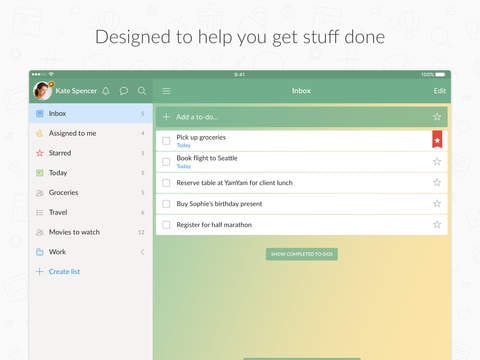 Paper to-do lists are a thing of the past. In today’s business world, it’s often better to go digital. That way, you can reduce paper clutter (and go green!), keep track of your lists more easily, and access your lists conveniently from anywhere.
Interested? If so, download the Wunderlist app.
Not only is it great for creating digital to-do lists – it allows you to share those lists, sends you reminders for tasks that need to be completed soon, and let you re-arrange your list items as your priorities change.
Worried that your many to-do lists will get lost and start to overwhelm you?
That won’t happen if you use the Wunderlist features to their full potential and filter your tasks by due date (or other specifications).
And guess what? The app is free to use. But if you want more functionality, you can download the premium version, which allows you to assign unlimited to-dos, upload large file sizes, and more.
Paper to-do lists are a thing of the past. In today’s business world, it’s often better to go digital. That way, you can reduce paper clutter (and go green!), keep track of your lists more easily, and access your lists conveniently from anywhere.
Interested? If so, download the Wunderlist app.
Not only is it great for creating digital to-do lists – it allows you to share those lists, sends you reminders for tasks that need to be completed soon, and let you re-arrange your list items as your priorities change.
Worried that your many to-do lists will get lost and start to overwhelm you?
That won’t happen if you use the Wunderlist features to their full potential and filter your tasks by due date (or other specifications).
And guess what? The app is free to use. But if you want more functionality, you can download the premium version, which allows you to assign unlimited to-dos, upload large file sizes, and more.
4. Slack
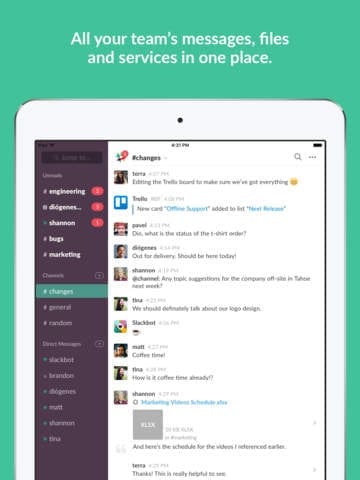 If you’re researched communication apps for your small business at all, you’ve probably encountered Slack. It has become wildly popular for its simple, intuitive interface and useful collaboration features.
But don’t think that you’ll be able to use Slack to its full potential right away – there’s a bit of a learning curve, so you and your team might need to devote a week or two to figuring out the best way to use the app based on your business operations and customize your Slack experience.
Don’t let that stop you from using the app though.
Once you and your team figure it out, there’s a good chance you’ll notice improved productivity due to the way the app streamlines the way you collaborate.
For example, instead of digging through your emails for a conversation/document, you can simply use the Slack search tool to find what you need. You can also create multiple groups for different departments, projects, etc.
You can get the Lite plan for free if you want to try Slack out. From there, you can always upgrade to the paid plan, which starts at $8 per month per user.
If you’re researched communication apps for your small business at all, you’ve probably encountered Slack. It has become wildly popular for its simple, intuitive interface and useful collaboration features.
But don’t think that you’ll be able to use Slack to its full potential right away – there’s a bit of a learning curve, so you and your team might need to devote a week or two to figuring out the best way to use the app based on your business operations and customize your Slack experience.
Don’t let that stop you from using the app though.
Once you and your team figure it out, there’s a good chance you’ll notice improved productivity due to the way the app streamlines the way you collaborate.
For example, instead of digging through your emails for a conversation/document, you can simply use the Slack search tool to find what you need. You can also create multiple groups for different departments, projects, etc.
You can get the Lite plan for free if you want to try Slack out. From there, you can always upgrade to the paid plan, which starts at $8 per month per user.
5. HipChat
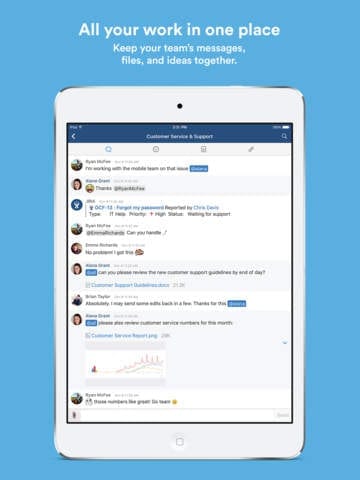 Similar to Slack, HipChat is an app that makes it easy for you and your team to collaborate using group messaging, instant messaging, and file sharing.
| Feature | Slack | HipChat |
|---|---|---|
| Free Plan | Lite plan available | More features in free plan |
| Paid Plan Cost | $8 per user/month | $2 per user/month |
| Collaboration Tools | Extensive | Comprehensive |
13. Pocket
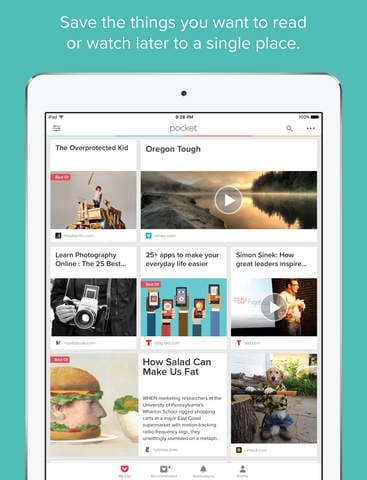 Have you ever come across a blog post or website you wanted to look at, only to get sidetracked by a more urgent business-related task?n problem for busy business owners. If you’ve ever experienced it, try Pocket.
This easy-to-use app allows you to save videos, articles, blog posts, and pretty much anything else you’ll find online so you can view it later.
And you don’t need an internet connection to view your saved items – all you have to do is open up the app, and it’ll be there waiting for you.
That means no more missing out on the things you’re most interested in that can help you power your business forward. It’ll all be stored in your digital Pocket.
Have you ever come across a blog post or website you wanted to look at, only to get sidetracked by a more urgent business-related task?n problem for busy business owners. If you’ve ever experienced it, try Pocket.
This easy-to-use app allows you to save videos, articles, blog posts, and pretty much anything else you’ll find online so you can view it later.
And you don’t need an internet connection to view your saved items – all you have to do is open up the app, and it’ll be there waiting for you.
That means no more missing out on the things you’re most interested in that can help you power your business forward. It’ll all be stored in your digital Pocket.
14. Swype
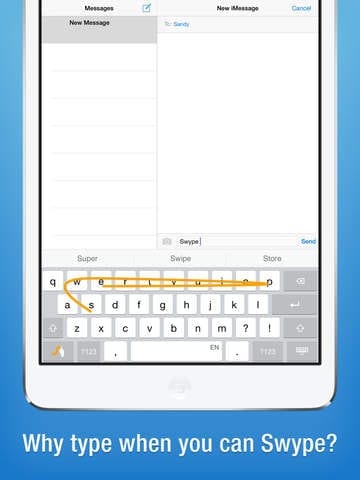 If you didn’t grow up using a smartphone, you might find typing on your phone tedious to the point where it significantly slows down your productivity.
With Swype, you can make typing on your smartphone easier than ever.
If you didn’t grow up using a smartphone, you might find typing on your phone tedious to the point where it significantly slows down your productivity.
With Swype, you can make typing on your smartphone easier than ever.
| Feature | Normal Keyboard | Swype |
|---|---|---|
| Input Method | Tapping individual letters | Gesture-based input |
| Typing Speed | Slower | Faster |
| Accuracy | Standard | Known for accuracy |
| Additional Features | None | Emoji keyboard, customizable layout |
Frequently Asked Questions
How can mobile apps enhance small business productivity?
Mobile apps can streamline operations, improve communication, and automate tasks, leading to increased productivity.
What are the benefits of using Evernote for business?
Evernote helps businesses organize information, collaborate with team members, and access notes offline. It’s a versatile tool for managing business data efficiently.
How does Square Register simplify payment processes?
Square Register turns your phone into a credit card reader, allowing you to accept payments without a physical register. This app simplifies transactions and is ideal for businesses on the go.
What makes Slack a popular choice for team communication?
Slack offers an intuitive interface and extensive collaboration features, making it easy for teams to communicate and share information.
Why choose HipChat over other communication apps?
HipChat provides comprehensive collaboration tools at a lower cost, making it a budget-friendly option for small businesses. Its free plan offers more features compared to competitors.