

The demand for no-code development platforms has skyrocketed in recent years.
These tools enable non-technical users to build mobile apps, websites, and web apps without hiring a developer. This lowers the barrier to entry of app development for business owners and entrepreneurs, and it also allows companies to build apps without relying on internal technical resources.
Not only are no-code development platforms easy to use, but they’re also really affordable. You can use no-code platforms to create an app for a fraction of the cost compared to traditional development—making it a no-brainer approach to development for nearly any use case.
With that said, using a no-code development platform doesn’t automatically guarantee success. You still need to have a plan and know how to get the most out of your tool, which is why we created this guide.
Key Takeaways
- Understanding Platforms: Choose a platform that aligns with your app’s specific needs and objectives.
- Cost Efficiency: No-code platforms offer a cost-effective solution compared to traditional development.
- Customization and Flexibility: Leverage templates and pre-built functionalities for a tailored app experience.
- User-Centric Design: Always prioritize the end-user experience for better engagement and satisfaction.
- Continuous Improvement: Use feedback and testing to refine and enhance your app over time.
Regardless of your use case or need for a no-code app development platform, you can use the proven tips and best practices below to improve your chances of success and a positive experience for your end users.
Find the Right No Code Development Platform
The first step to successful no-code mobile app development is finding the right platform.
There are tons of no-code development platforms on the market, each with its own strengths and weaknesses. To find the right platform for your needs, it’s important to understand the type of app you’re trying to build. Some platforms specialize in mobile app development, while others focus on web app development or website development.
Beyond the type of app you want to build, make sure you consider factors like the platform’s ease of use, feature availability, integrations, and the level of customization you can achieve. You should also assess the costs associated with using each platform and the level of support offered.
| Platform Feature | Importance | Considerations |
|---|---|---|
| Ease of Use | High | Ensures quick learning and efficient development. |
| Feature Availability | Medium | Check if the platform supports the features you need. |
| Customization | High | Allows for tailored app experiences. |
| Cost | Medium | Evaluate against your budget and expected ROI. |
| Support | Medium | Consider the level of customer support provided. |
One of the key benefits of no-code app development is the ability to create and launch an app quickly and cost-effectively.
However, this can only be achieved if you choose the right platform. A platform that is too complex or too limited in terms of features and customization may slow down the development process and prevent you from achieving your desired results. On the other hand, a platform that is well-suited to your needs will make the development process much smoother and more efficient.
Success with no code development starts here. So don’t rush through this process. Take the time to research and compare different platforms to find the one that best fits your needs and objectives. Check out our guide on the best app building software to help you identify the right tool for you and your specific needs.
Utilize Templates For Design
The best no-code platforms offer pre-built templates and design elements that can be customized to meet your specific needs. By using these templates, you can save time and effort on the design process, allowing you to focus on the core functionality of your app.
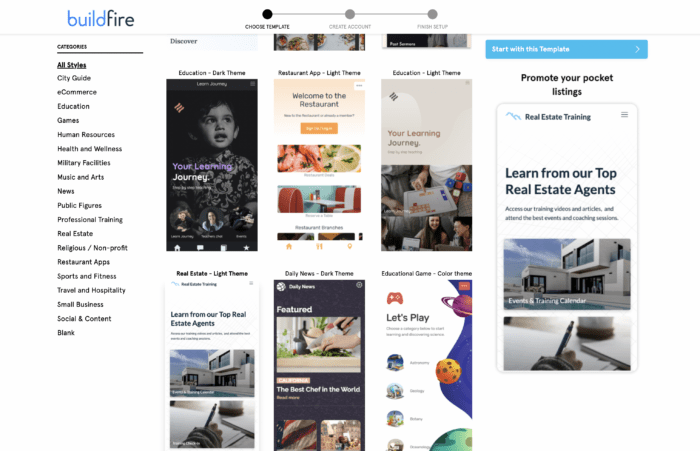
When using templates, it’s important to choose one that fits the overall look and feel of your app.
Make sure that the template you choose is mobile-friendly and visually appealing, as this will help improve the user experience and increase user engagement. Consider the available customization options and make sure that you can modify the template to meet your specific design requirements.
It’s also important to remember that templates are not set in stone. You can modify and tweak the templates as much as you need to achieve the desired results. For example, you can change the color scheme, add custom images, and rearrange elements to create a unique and personalized design.
In short, you don’t need to be a design expert or hire a designer to succeed here. Just choose a no-code platform with a wide range of templates for your specific type of app. This will save you a ton of time and money as you’re going through this process, and you can still create a visually-appealing app that’s user-friendly and stands out from the crowd.
Leverage Pre-Built Functionality
Pre-built functionality is powerful in the no-code app development world. That’s how no-code app builders work.
With the right platform, you’ll have access to a range of features that can help streamline the development process and bring your app to life. Whether you need user authentication, data storage, push notifications, or any other functionality, it’s likely that a pre-built solution exists that can be leveraged.
First, consider the available options. Different platforms offer different sets of pre-built features. So make sure to choose the one that offers the functionality you need.
You should also think about relevance, as not all pre-built features are created equal. Focus on the ones that are most relevant to your app and will be the most valuable to your users.
Just because a feature is pre-built doesn’t mean it’s set in stone. Most no-code platforms allow for customization and extension of their pre-built features, so don’t be afraid to make changes as needed to better fit your app’s needs.
Here at Buildfire, our app development platform has over 150+ pre-built functions that can be added to your app with a single click.
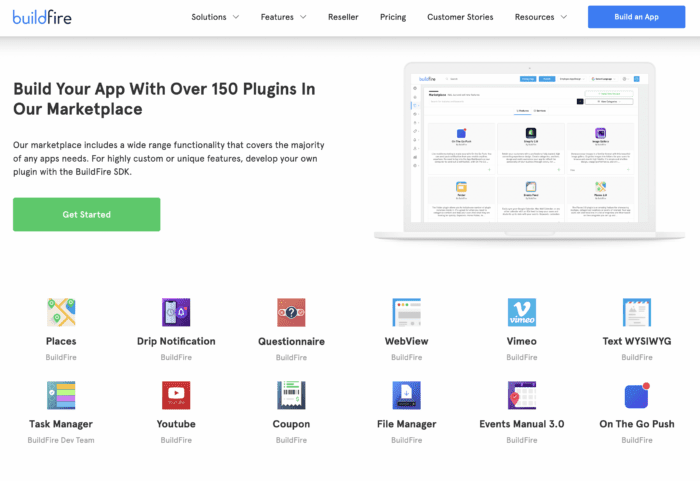
Let’s say you wanted to add videos to your mobile app. You could simply add the YouTube or Vimeo plugin. Or maybe you want to extend your ecommerce shop to get more mobile conversions. In this case, you can just install our Shopify plugin to add ecommerce functionality.
Pre-built functionality can be a game changer for your no-code app development process. So take the time to understand what’s available, and choose the right features for your app to succeed.
Define Your App’s Core Features and Objectives
By focusing on the core features and objectives, you can prioritize development and get to market quickly. This is important because it allows you to validate your app idea, test your assumptions, and make data-driven decisions about future development.
Consider the following when defining core objectives:
- Identify Your Unique Value Proposition: What sets your app apart from others in the market? What problem does it solve or what need d
Speaking of support, you shouldn’t be afraid to reach out to our team for assistance. A good no-code platform should have a dedicated support team that is ready to help you with any questions or issues you may have.
Frequently Asked Questions
What are the benefits of using a no-code development platform?
No-code development platforms allow users to build apps without technical expertise, saving time and reducing costs.
How do I choose the right no-code platform for my app?
Consider the type of app you want to build, the platform’s ease of use, feature availability, and customization options.
What kind of support can I expect from a no-code platform?
Support varies by platform, but many offer customer service, tutorials, and community forums. It’s important to choose a platform that provides the level of support you need.
How can pre-built functionality enhance my app development process?
Pre-built functionality can significantly speed up development by providing ready-to-use features.