

The decision to build a mobile app starts with excitement and vision.
Even though you may already have a perception of how the app will look like, there is a crucial step early in the planning process that will make all the difference later – wireframing.
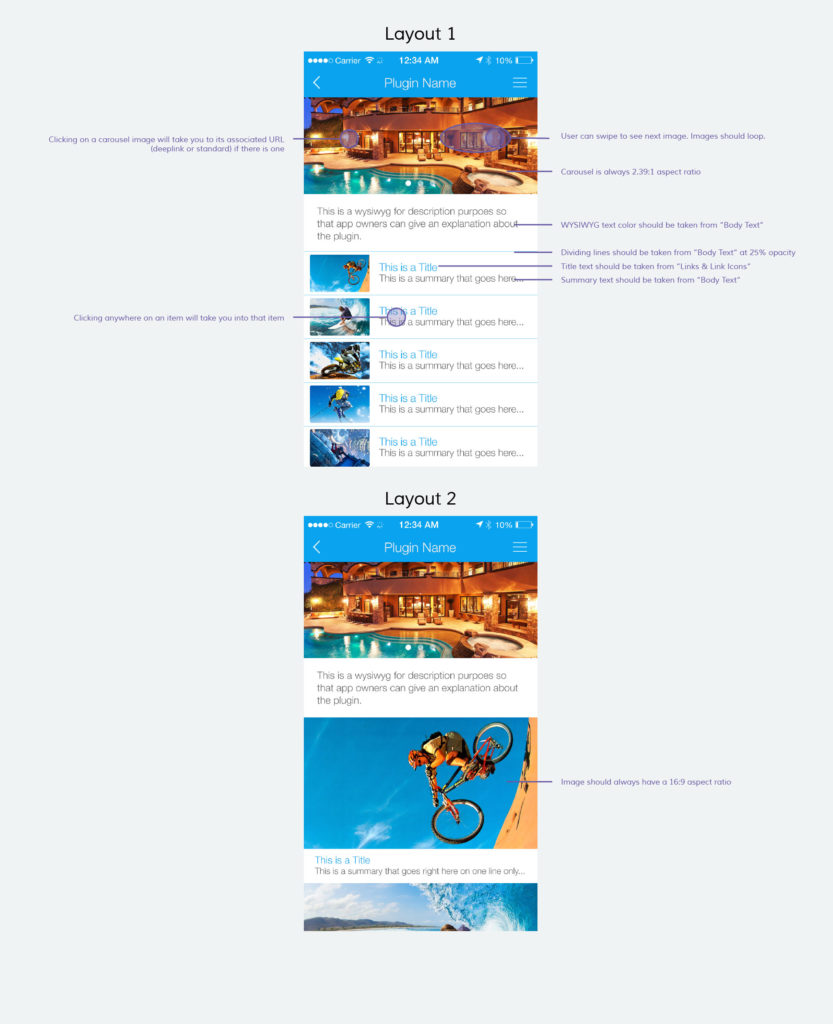
In mobile app development, wireframing is a schematic blueprint; a visual guide that represents the app layout, the flow between the screens and its functional representation informed by your business objective.
Key Takeaways
- Wireframing Importance: Wireframing is a crucial early step in app development that bridges initial ideas and the final product.
- Advantages of Wireframing: It saves development time, promotes discussion, and serves as a superb visual aid.
- Visualization Benefits: Wireframing allows for exploring app experiences without design distractions.
- Cost Efficiency: Skipping wireframing can lead to unanticipated obstacles and increased costs.
- Use Case Clarity: Wireframing helps define and clarify app use cases, guiding development and updates.
A mobile app wireframe lets you explore your thought process, navigation and utility of an app with the benefit of simplicity. It bridges the gap between your initial, raw thoughts and a final product before any coding begins.
There are many advantages to wireframing:
- You can pencil it on paper or use some of many available online tools like Fluid UI
- It is quick and easy to create and change, potentially saving you hundreds of development hours
- It is a superb visual aid
- It promotes discussion and analysis
Wireframing helps you visualize a full app experience without the distractions of visual design and graphic elements. This allows for a deeper exploration of multiple layout ideas, concepts, and workflows, leading to a process of building a fully functional, intuitive and user-friendly mobile app.
While you may want to skip wireframing and jump straight into development, don’t do it! Wireframing will help you avoid many unanticipated obstacles and perhaps save you thousands of dollars in engineering costs later.
Let’s dive in!
1) Deeply understand your use case(s).
First, you should clearly define the purpose of your app. This will be a small, specific task your users can achieve with it. It is the groundwork for success, and you should look at it as the number one reason your users will want to download and use the app, which should feed into all the work included in building it.
Your app shouldn’t simply please the eye – it must help the user solve a problem or achieve a goal. Otherwise, it will ultimately be forgotten, irrelevant, and deleted.
A foolproof way to define value and purpose for your app is by documenting its use cases.
A use case is a single list of actions that your user will take to achieve a goal from start to finish. Depending on the goal(s), the number of use cases can vary.
| App Type | Primary Goal |
|---|---|
| Weather App | Disclose weather conditions for a location |
| Taxi App | Book a taxi |
| HR App | Multiple goals: communication, reviews, training, etc. |
| Quora App | Ask questions, answer, upvote, comment, share, search |
Investing time and effort into wireframing feeds clarity into each step of the app planning and development process, allowing you to invest your resources into the most value-added elements and sharpen your vision.
The only true way to achieve this sharpness in this early stage is by having a crystal clear definition of your app’s use cases and using them to lead all future decisions, development, messaging, and updates.
Use cases and wireframing will help you answer these questions:
- How will your app solve an issue, or relieve a pain point?
- What is the goal (or multiple goals) that your app will help them achieve?
- What is the most likely core reason why someone will download your app in the first place, i.e. what is its unique selling point?
- Where there are several use cases, how do they relate to each other and how will they all work together in your overall messaging and purpose?

2) Walk in your user’s shoes.
This one may seem obvious, but it isn’t emphasized enough: it is crucial to understand the context behind the use case. This focuses on what your user will see when trying to complete the single task – the task you defined above – they had in mind when downloading the app in the first place.
Wireframing allows you to think about the context and the motivation behind your users’ actions and enables you to adjust to it.
Using a gaming app while sitting on the couch is very different from designing for a support technician in the field.
With wireframing, you’re working with a document that is easily modified. You have a unique opportunity to easily explore and define the most common conditions of the user.
For each of these contexts, analyze the process, the limitations, and the app’s utility and ability to fulfill the user’s needs with little or no friction points and extra steps.
Let’s take an example of a railway app that permits the user to access train schedules and book tickets. At first, you might imagine a home screen with large branding, fields for user log in and a menu available at the top right-hand corner where users can access the search fields and their personal settings.
If you think about context, your user is on the go, looking for a quick solution and likely in a hurry. Therefore, the more desirable flow here is a home screen that immediately offers searching for the desired train, stops and schedules; ideally suggesting the best options based on current location. Activities like logging in should be secondary, as the most likely goal of the user is to simply find the train timetable, so don’t make them navigate through multiple steps to reach their objective.
If your user isn’t able to get to their goal in the way they imagined – in this case, in the shortest time possible and with the least amount of screens and text fields – they will eventually give up and look for the solution that will live up to these expectations.
The user’s point of view and their immediate context are extremely important. Wireframing will help you clarify the user journey:
- For each of your use cases, what is the immediate context (or multiple contexts) that the user will find themselves in when accessing your app?
- How can this context, combined with that goal, be optimized for from a perspective of your app’s home screen and the immediate first actions?
- What is the ideal time it will take the user to achieve the goal based on context? Will success be indicated by longer or shorter in-app time?
3) Optimize the number and order of screens to reach the goal.
High page views, pages per session and low bounce rate have commonly been seen as success metrics across website analytics – and very logically so.
However, in a mobile app environment, the screen real estate is limited, and users often need information in a maMore importantly, you do all this before any development, design or coding has started. You will tackle screen flow, content and layout issues at the stage when it costs you virtually nothing to make drastic changes.
| Aspect | Reading App | Information Access App |
|---|---|---|
| User Experience | Reflected by long in-app time | Reflected by shorter in-app time |
With a wireframe, you will answer the following questions about the screen flow:
- What is the user’s ideal behavior in your app?
- Will a good user experience be reflected by long in-app time in case of a reading app or by shorter in-app time when it’s crucial to access information immediately?
- How many screens should your users view before achieving their goal?
- What is the best order and categorization of menu items and subitems to reduce unnecessary steps?
- How do we make navigation intuitive?
- Which items and can be completely removed compared to a desktop experience?
4) More efficient use of high-level design and mockup resources.
While wireframes include all key organizational elements of an app, such as menus, buttons, call-to-actions and main functionalities – they are still stripped from complex design elements, and simply focus on app’s skeleton.
This saves time across teams and stakeholders as no coding or design work needs to be done at this stage. Because wireframe defines how an app will work rather than what it will look like, it is much easier to move between its core elements as no design or code needs to be changed.
Once the basic wireframing is complete, you can engage more costly resources, such as developers, graphic designers, copywriters and any other teams involved to work on the app prototype.
Because of wireframing, your overall development time frame can allow for better resource distribution, or it can simply be quicker overall. It allows you to move fast and provide your teams with a clear early picture of what you’re trying to achieve with the app.
Frequently Asked Questions
- What is wireframing in app development?
Wireframing is the process of creating a blueprint for an app’s layout and functionality before any design or coding begins. - Why is wireframing important?
Wireframing helps identify potential issues in the app’s design and functionality early, saving time and resources. - How does wireframing improve user experience?
By optimizing screen flow and layout, wireframing ensures a more intuitive and efficient user experience. - What elements are included in a wireframe?
Wireframes typically include menus, buttons, call-to-actions, and main functionalities without complex design elements. - When should wireframing be done in the app development process?
Wireframing should be done before any development, design, or coding begins to address potential issues early.