

Key Takeaways
- Platform Decision: Choosing between Apple and Android depends on your target market and budget.
- Development Costs: Building for both platforms can be expensive; prioritize based on user behavior.
- User Behavior: Apple and Android users have different purchasing habits and engagement levels.
- Feature Restrictions: Apple’s closed ecosystem offers stability but limits flexibility, unlike Android’s open source.
- Monetization Strategies: Apple is better for paid apps, while Android suits ad-based revenue models.
Feature sets
| Aspect | Apple | Android |
|---|---|---|
| Ecosystem | Closed, more control and stability | Open source, encourages innovation |
| Development Restrictions | More restrictions, higher price point for devices | Fewer restrictions, more modifications |
| User Cost | Higher device cost | Lower device cost |
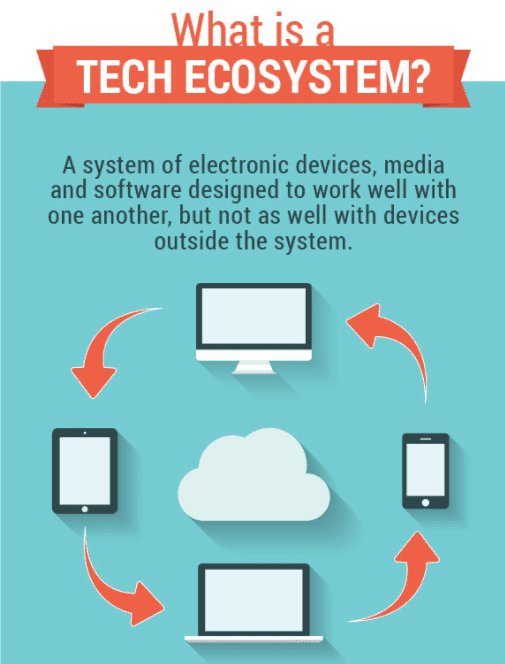 A closed ecosystem means that Apple regulates entrance to use their platform.
All of the content is restricted to specific devices that are supported by that ecosystem.
This means that as a developer you’ll have to use Apple’s features, but there are a lot of them.
The advantage to developing your app on a closed ecosystem like Apple’s means that there’s more control and stability.
But with that said, there will be more restrictions for the developer.
From the user perspective, purchasing a device that operates on a closed ecosystem means that it will have a higher price point.
So in general, Apple devices are more expensive than Android devices.
This gives you some more insight about the user, but we’ll get into that in greater detail shortly.
Android
Android operates on an open source ecosystem.
A closed ecosystem means that Apple regulates entrance to use their platform.
All of the content is restricted to specific devices that are supported by that ecosystem.
This means that as a developer you’ll have to use Apple’s features, but there are a lot of them.
The advantage to developing your app on a closed ecosystem like Apple’s means that there’s more control and stability.
But with that said, there will be more restrictions for the developer.
From the user perspective, purchasing a device that operates on a closed ecosystem means that it will have a higher price point.
So in general, Apple devices are more expensive than Android devices.
This gives you some more insight about the user, but we’ll get into that in greater detail shortly.
Android
Android operates on an open source ecosystem.
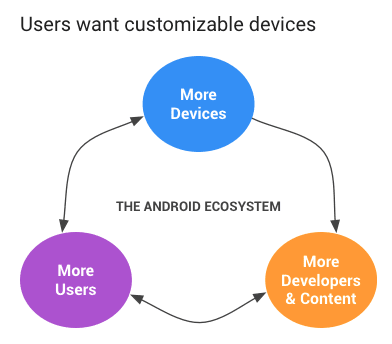 This allows for tons of modifications as well as lots of functionality.
Open source platforms are less secure.
So sometimes updates get blocked by mobile network operators.
Android has an open platform to encourage developer innovation.
You can get Android’s source code for free and port it to your app’s hardware.
This means you won’t have to jump through as many hoops to develop your app on the Android system because there are less restrictions.
This allows for tons of modifications as well as lots of functionality.
Open source platforms are less secure.
So sometimes updates get blocked by mobile network operators.
Android has an open platform to encourage developer innovation.
You can get Android’s source code for free and port it to your app’s hardware.
This means you won’t have to jump through as many hoops to develop your app on the Android system because there are less restrictions.
How to make money
The purpose of every mobile application is to make money, right? If that’s not your primary goal, you’ll probably need to reevaluate your decision to build an app in the first place. So how do you plan to make money? Here are a few of the most common business models.- Subscriptions
- In-app purchases
- Advertisements
- Pay per download
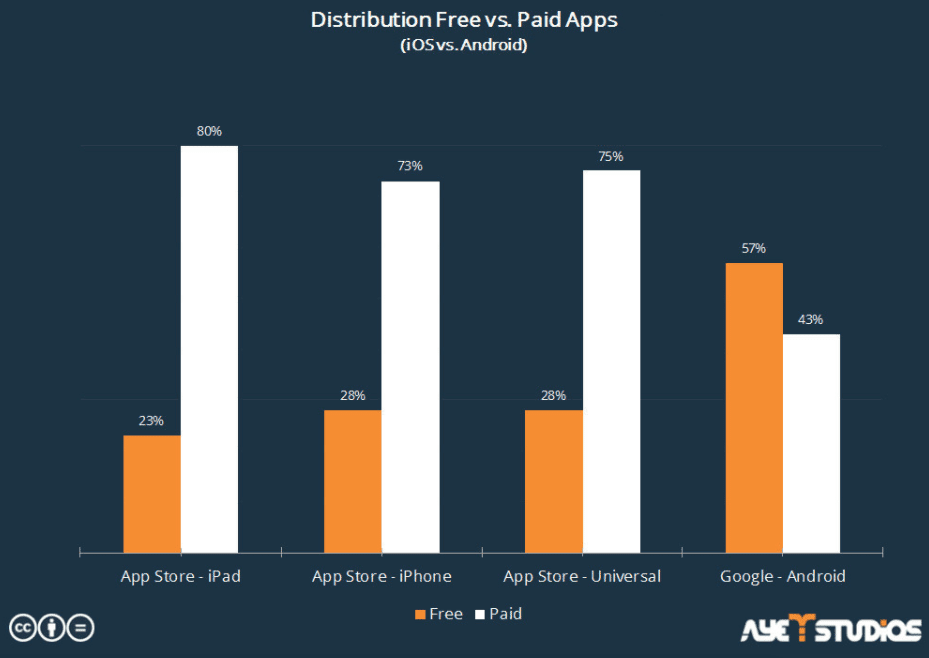 As you can see from the graph, there is a clear difference between the two platforms.
So if you’re going to charge for downloads, the Apple App Store is the place to do it.
That’s because those users are used to seeing more paid apps and less free apps when they’re searching for something to download.
Whereas Android users don’t see as many apps that require payment to download.
So if they see yours, they’ll probably consider just finding another one that has similar functions and is offered for free.
Just know that if you’re going to charge Apple users to download your app, it’s going to be an expensive strategy.
You’ll have a much higher customer acquisition cost than if you offered it for free.
But with that in mind, you’ll also make more money all at once.
Your users will be more engaged as well.
If they’re willing to pay for it, that means they probably won’t abandon it.
Android
If you’re going to make money off of advertisements and in-app purchases, then you should build on Android first.
Just don’t expect your in-app purchases to be too significant.
As you can see from the graph, there is a clear difference between the two platforms.
So if you’re going to charge for downloads, the Apple App Store is the place to do it.
That’s because those users are used to seeing more paid apps and less free apps when they’re searching for something to download.
Whereas Android users don’t see as many apps that require payment to download.
So if they see yours, they’ll probably consider just finding another one that has similar functions and is offered for free.
Just know that if you’re going to charge Apple users to download your app, it’s going to be an expensive strategy.
You’ll have a much higher customer acquisition cost than if you offered it for free.
But with that in mind, you’ll also make more money all at once.
Your users will be more engaged as well.
If they’re willing to pay for it, that means they probably won’t abandon it.
Android
If you’re going to make money off of advertisements and in-app purchases, then you should build on Android first.
Just don’t expect your in-app purchases to be too significant.
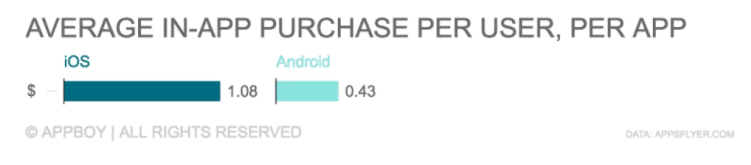 You’re going to get less money per purchase, but that’s spread over way more people.
Android users dominate the market share.
I’ll show you some more specific numbers when we talk about the different types of people using your app in a little bit.
The advantage of releasing your app for free on the Android platform is that you’ll be able to get more downloads.
But your users may not be as engaged since they’re not investing anything into the download.
So the key to this strategy is coming up with a way to get money from people who use the app the most.
Charge for app upgrades and premium services to enhance their experience.
You’re going to get less money per purchase, but that’s spread over way more people.
Android users dominate the market share.
I’ll show you some more specific numbers when we talk about the different types of people using your app in a little bit.
The advantage of releasing your app for free on the Android platform is that you’ll be able to get more downloads.
But your users may not be as engaged since they’re not investing anything into the download.
So the key to this strategy is coming up with a way to get money from people who use the app the most.
Charge for app upgrades and premium services to enhance their experience.
Release cycles
Here’s something that developers don’t always think about right away when they’re trying to figure out which platform is better for their business. You’ve got to consider which software version your users are using within their respective platforms. Obviously, your app needs to be written in code that’s compatible for with the most up to date software versions. But there’s a major difference between Apple and Android devices here. Apple The majority of Apple users are running their device on the most current version. In fact, 95% of Apple users have one of the two latest operating systems installed on their devices. This makes programming and development easier because you can estimate what your app is going to be able to do. You’ll just need to be prepared to come up with more updates to optimize the user experience based on the software they’re using. But for the most part, you won’t need to worry about software from a few years ago. Android Android users are not all up to date on the most current operating platform.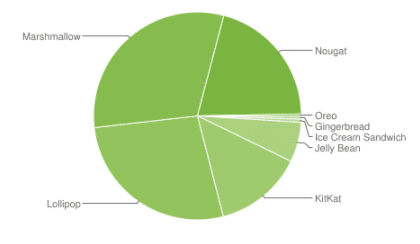 Since these users are all over the place, you might have to develop for older versions that are out of date.
Oreo and Nougat are the two most recent versions of the Android software.
Less than 20% of users are operating on these systems.
This makes your development process more complicated since you have to accommodate such a wide range of versions.
Since these users are all over the place, you might have to develop for older versions that are out of date.
Oreo and Nougat are the two most recent versions of the Android software.
Less than 20% of users are operating on these systems.
This makes your development process more complicated since you have to accommodate such a wide range of versions.
Who uses the devices
Now it’s time for you to consider who is going to be using your app. If you have an existing business and you’re planning to use this app as another source of income, turn to your current customers as a reference. What devices are they using? For those of you that are developing an app for a startup company, you’ll need to consider your target market. Some basic aspects to consider are:- Age
- Location
- Income
Enterprise adoption
Remember when Blackberry used to dominate the workplace market? It seemed like everyone wearing a suit and holding a briefcase had a Blackberry in their hand as well. But those days are over.| Apple | Android |
|---|---|
| Apple devices are known to be more secure. We discussed this earlier when we talked about their closed ecosystem. That’s why you’ll see major corporations like IBM partnering with Apple for their corporate devices. But with increased security comes fewer features. | Since Android is open source, it’s less secure. But with that said, there are way more devices and even more features. Apple users have to get an iPhone or iPad to access your mobile app. While there may be different versions of those devices, you can’t compare that to the number of devices that operate on the Android platform. That’s probably another reason why Android dominates the global market share. |
Why Apple first
So when should you build your app for Apple first? To sum it, it’s better to go with Apple when you’re first starting out. Developing for Apple is quicker and less expensive. Building your app for Android will cost you about 30% more money. Although you’ll have some more restrictions and regulations with Apple because it’s a closed ecosystem, it’s still the best way to make money quick if you’re targeting the right demographic. An example of this demographic would be users in the United States who make a high annual salary. If you’re planning to charge users to download your app, you should release it on Apple first.Frequently Asked Questions
Should I build my app for Apple or Android first?
It depends on your target market. The decision comes down to who uses each platform, the feature sets available, how you plan to make money, and each platform’s release cycles.
Does it matter which platform I launch on first?
Yes. iOS and Android users differ in demographics and spending behaviour, and the platforms differ in monetisation and release processes — so the right first choice depends on which audience matters most to your app.
How does monetization differ between Apple and Android?
The platforms differ in how apps make money and in enterprise adoption, so your revenue model can favour one over the other. Matching the platform to your monetisation plan is part of the decision.
Can I eventually build for both platforms?
Most apps do. The first-platform decision is about where to start given limited time and budget, not a permanent choice — you sequence them based on which audience delivers the most value first.