

You finally built your mobile application.
Congratulations. I know how long of a journey you’ve gone through because I’ve been in your shoes before. You should be proud of your accomplishment.
Now that you’ve figured out all of the design and coding elements of your mobile application, what’s the next step?
It’s time to determine how your app is going to connect to a server.
Key Takeaways
- API Connection: Most mobile apps require an internet connection to function properly, often facilitated by APIs.
- RESTful API Benefits: RESTful APIs enhance app scalability, reliability, and performance through stateless data handling and caching.
- Choosing API Types: Consider third-party APIs from providers like Amazon or Google, or develop your own with careful planning.
- Architectural Styles: Pragmatic REST is widely used for mobile apps, while event-driven architecture suits real-time applications.
- Server Utilization: Offloading tasks to a server can improve app performance and conserve device resources.
The majority of apps that are out there today need to connect to the Internet in order to operate properly. APIs are an option for backend communication.
But if you don’t have much experience building APIs or other web services, this may sound like an extremely daunting task. That’s why I created this guide.
I’ll explain everything you need to know about APIs. You’ll learn how to create one and understand some basic differences between the various types and options.
We’ll also go through the process of implementing a RESTful API to your mobile app.
I’ll show you which options are the best so you can make an informed decision.
What is a RESTful API?
Before we proceed, let’s cover all of the basics.
API stands for “application program interface.” In short, this allows developers to access the platform or application of another party.
A RESTful API has specific features that makes it different.
When it comes to the client server architecture, the client and server are both completely independent of one another. The front end component is the client and the back end of the service is the server.
RESTful APIs are also cacheable. This means that the client has the capability of storing all of the responses within a cache. As a result, the API has an improved performance.
When request transfers are being processed, no data gets stored on the server. Instead, the data is stateless, which means the session is saved on the client’s end.
RESTful APIs are commonly referred to as RESTful web services because they implement REST principles as well HTTP protocols.
Basically, it encompasses numerous resources with HTTP requests and then gets represented in a standard format, which is typically XML. As long as the hypertext is standard, it works for valid types of Internet media.
Here’s a visual representation of some examples.
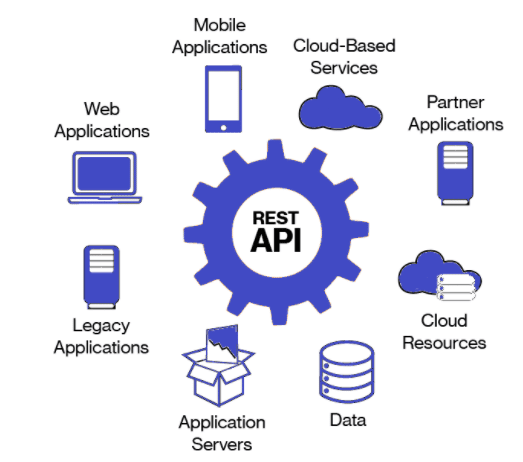
Some examples of RESTful API response formats include:
- JSON
- REST
- XML-RPC
- PHP
- SOAP
Furthermore, a few popular request formats for RESTful APIs are:
- XML-RPC
- REST
- SOAP
Overall, RESTful APIs enhance web apps and mobile apps that are distributed over the Internet. The mobile apps become more scalable and it’s easier to modify it as well.
Ultimately, your app will become more reliable, portable, visible, and simplified with a RESTful API.
API Mobile – Different types of APIs
Amazon, Google, and Facebook all provide APIs. It’s also possible to get an API from another third party.
Another option is to develop your API internally.
While this may seem like an appealing option, there could be problems with APIs that are built internally. Historically, the reason why internal APIs have issues is because people don’t plan them out properly.
Even mobile app developers who have experience working with multiple apps, it doesn’t mean that they have built APIs or other web services that were specifically designed for mobile applications.
It’s like anything else. If it’s your first time doing something, you’re going to experience some speed bumps along the way.
Educating yourself on different options will save you time, money, and headaches in the long run.
Another popular API interface is from LinkedIn. That’s because their platform is used by business professionals to network, it’s slightly different from the APIs used by Twitter and Facebook.
LinkedIn limits third party access to their API. It’s restricted to people who are officially partnered with them.
The LinkedIn developer page has a detailed explanation of how their RESTful API works and gives you a tutorial of how to do things, such as implementing your paging parameters.
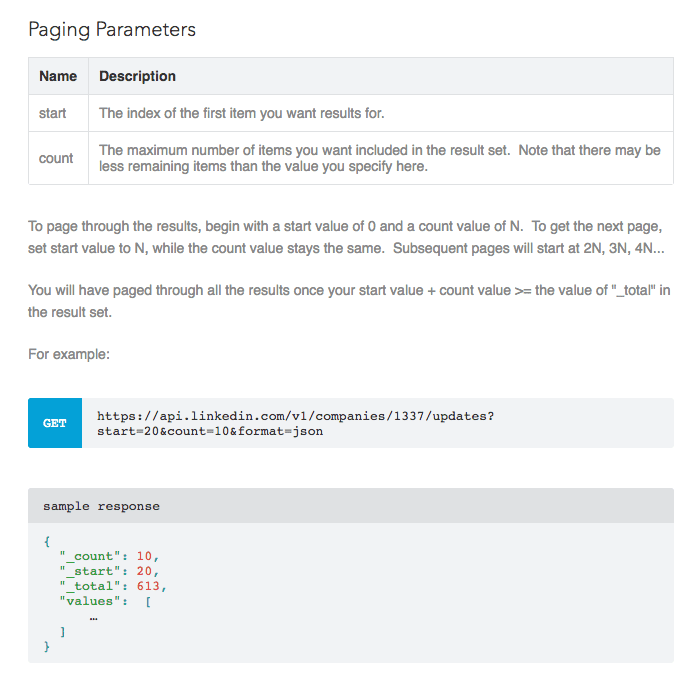
Most of today’s modern APIs are friendly for developers.
Companies treat their APIs the same way that they would treat a product as opposed to a code. That’s because they are intended to be consumed by specific target audiences, such as developers.
Different versions get written so that the user can manage their expectations and perform regular maintenance.
As APIs become more and more standardized, the security and monitoring improves dramatically. That’s why they perform better and they are easier to scale, as I mentioned earlier.
APIs have their own SDLC (software development life cycle) in terms of building, versioning, testing, designing, and managing.
Tips for building out your API
Before you start creating a RESTful API, I just wanted to give you some pointers to take into consideration.
First and foremost, I recommend using common architecture as your rest architecture. Experieced developers will be more familiar with it and as a result, things should run smoothly.
You don’t want to introduce your developers to a foreign architecture because they might struggle with it. In this case, your app and API will suffer.
Here are four different types of architectural styles to you might come across while researching for your API design:
- Hypermedia
- Pragmatic REST
- Web Service
- Event Driven
| Architectural Style | Suitability | Developer Familiarity |
|---|---|---|
| Hypermedia | Web applications | Low |
| Pragmatic REST | Mobile and web applications | High |
| Web Service | Not suitable for mobile apps | N/A |
| Event Driven | Instant messaging, multiplayer games, video chat | Varies |
Hypermedia is mostly used for web applications. It’s easy to scale and evolve these API architectures. However, most developers aren’t very familiar with this design.
Pragmatic REST is perfect for both mobile and web applications. The majority of developers will be familiar with this, but it could be difficult to adapt this architecture as time passes.
Web service is not suitable for mobile apps, so it’s not something you should be considering right now. I just wanted to bring it up in case you stumbled upon it while researching architectures.
Event driven architecture can give you an option that has low overhead. There are certain scenarios where it can provide sufficient service.
Apps for instant messages, games for multiple players, and video chat applications are all suitable for event driven architecture.
Layering
To maximize the effectiveness of your API, the architecture should have layered components. Here’s a graph to show you how these layers work with one another.
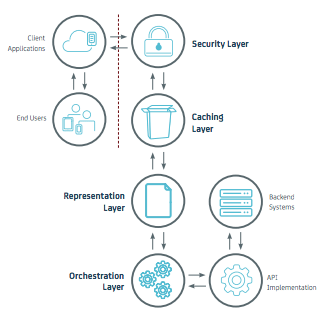
The security layer is extremely important. You want to make sure that your business isn’t susceptible to any security breaches or threats. The data stored in the backend of your systems shouldn’t be accessible to just anybody.
Your caching
layer best fits near the rim of your API’s architecture. That makes it easy to deliver any common requested for cached responses.
Making your representation layer as friendly for the developer to work with is essential. But you want to do this without hindering any of the backend performance.
Including an orchestration layer beside the interface can allow you to combine data from various APIs.
Server
Let your server do the majority of your work. Your server can help users keep costs low for their network data and also save the battery life on their devices.
Your mobile app will definitely benefit if you can store data remotely on a server or eliminate some difficult tasks to a remote device.
Connecting to a remote API will keep all of your data secure when it’s stored. As a result, the app can still run smoothly on the user’s end.
Storing data remotely with an API also makes it easy for users to access their information as it gets synced to all of their devices.
Allowing your server to do most of the work will ultimately benefit the developers as well. It will save them time and gives them an opportunity to consolidate some of the coding.
You should leverage the server because the hardware is better than whatever the mobile clients are using to crunch numbers.
Performance is key when it comes to choosing a server. Any problems with your server can absolutely
Tools to help with your RESTful API
As we just said, proper tools can help make your life much easier when you’re creating a RESTful API for your mobile application.
But if this process is new for you, it’s possible that you don’t know the first place to start looking for these tools.
Here are a few options to get you started in the right direction.
| Tool | Features |
|---|---|
| Slate |
To use Slate you’ll need:
|
| Apiary |
|
| Swagger |
|
Conclusion
After you finish building an iOS app you’ll need to figure out how your app is going to connect with the server.
Implementing a RESTful API is the solution.
There are different types of APIs. You could use an existing format or develop one internally. These APIs also come in different formats.
Security always needs to be a priority during this process. Always make sure that your data is protected and encrypted.
RESTful APIs can help make your mobile app more reliable, portable, simplified, and visible. Mobile APIs can enhance the core features of an app, like GPS data and databases. This will improve the experience on each mobile device of end users.
Finding the right tools can help you implement a RESTful API.
If it’s your first time creating a RESTful API, use this guide as a reference.
What type of RESTful API are you going to build for your mobile application?
FAQ
- What is a RESTful API? A RESTful API is an application programming interface that uses HTTP requests to GET, PUT, POST, and DELETE data.
- Why use a RESTful API for mobile apps? RESTful APIs help make mobile apps more reliable, portable, and simplified, enhancing core features like GPS data and databases.
- What tools can help in creating a RESTful API? Tools like Slate, Apiary, and Swagger can assist in designing and implementing RESTful APIs.
- How does a server benefit a mobile app? A server can store data remotely, saving network data costs and battery life, while ensuring data security and synchronization across devices.
- What should be prioritized when implementing a RESTful API? Security should always be a priority to ensure data protection and encryption.